
Conflict Checker Context:
What-
Why-
How-
When-
Link to this existing article: http://helpdesk.eventbooking.com/hc/en-us/articles/207473253-Calendar-Hierarchies-and-Conflict-Checking
-conflict overlap
- event level
-function level
Click event level (conflict overlap)
Copy and paste code
Open up notepad ++
Paste in code
Language tab ---> xml
XML Code: Conflict Checker Levels (3 options)
- Don't care (will book w/ no warning / conflict checker won't pop up)
- Alert only (conflict checker pops up / shows "do it anyway" button)
- Alert / prevent (will pop up alert and prevent booking (aka no "do it anyway" button)

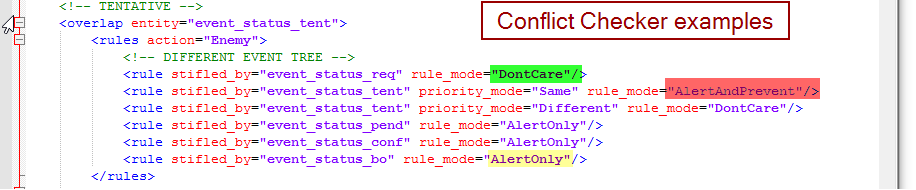
These can be customized
Granted hold 1
Granted hold 2
Granted hold 3
These have a priority setting
Needs to be able to
DEFAULT CODE - see screenshot in slack from Linda
For TENTATIVE status (in code)
Don't ever let it be "don't care"
Because we don't ever want to have 2
Pretty print xml only (with line breaks)
How to test if new code worked
-Name it "EB Test Event"
Settings tab
2 levels:
Event
Function (aka subevent)
Avails behavior - what avails report looks at
Entity - what conflict checker looks at
ENEMY - different event tree
FRIENDLY - same event tree
Comments
0 comments
Article is closed for comments.