
How to add combo calendar(s):
- Login to venue (via Root) username: kbest
- Search for venue
- Click "calendars"
- "add calendar to company"
- Calendar type: "combo"
- Save
- Control + F (search for combo calendar) click it
- Click "Members" tab ---> edit --> expand all
- Click spaces that should be included in combo calendar
- save
How to edit combo calendar(s):
2 Options:
- If the combo calendar is not being used, go ahead and change it.
- If the combo is being used, remove the existing combo, which will retain the current booked space, and create new combo instead.
Note: Removing a combo calendar removes the "combo" but doesn't "release" the space
How to check if combo calendars are being used:
Why? - if client asks to change a combo calendar (ticket #6596)
From <https://eventbooking1.zendesk.com/agent/tickets/6596>
- Login to venue (w/ EB user) username: eb______
- Search for venue
- Click calendars tab
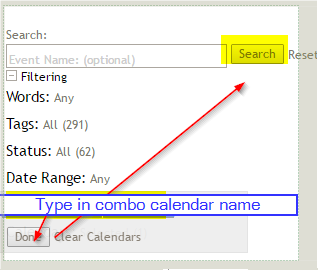
- Click "event search"
- Calendar: enter combo calendar --> Done --> Search
- List of events booked with combo calendar will appear
Comments
0 comments
Article is closed for comments.