
VenueCoalition Corporate View Additional Configuration
This document expands on the standard Classic corporate view set up to include the custom development that has been performed for VenueCoalition and as such is only applicable to this corporate entity. Please see these instructions for the standard setup procedure.
You can find the VenueCoalition spreadsheet with all of the venues and custom RSS feed links here -
Once the standard setup has been performed an additional custom API feed must be generated. This feed was custom developed and sends event data from Classic to a SalesForce integration that VenueCoalition has developed.
- Open the root page for the venue
- Click on the Web Links tab
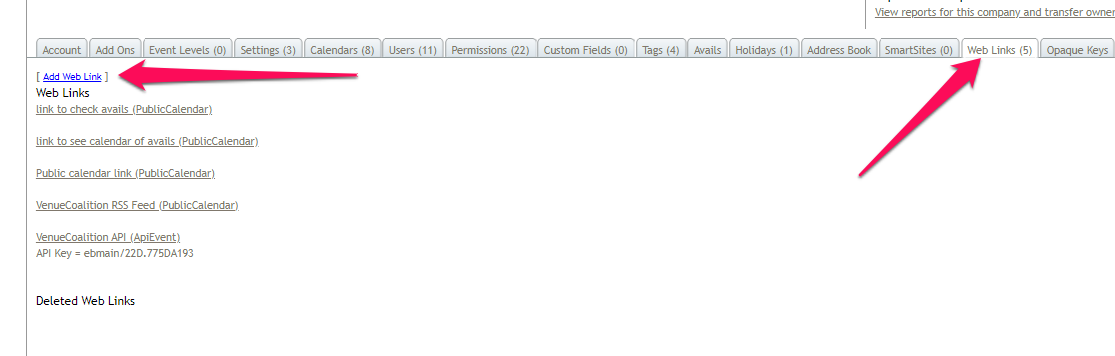
- Click the blue Add Web Link option
- Set the Link Name to - VenueCoalition API Key
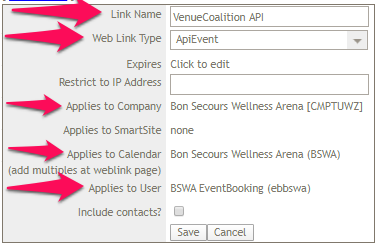
- Set the Web Link Type to APIEvent
- Select the company you are configuring this link for
- Select the primary space that the API will be tied to (same as the space(s) the vault is configured on)
- Set the applied user as the EB user for that company
- Click the Save button
- Refresh the page
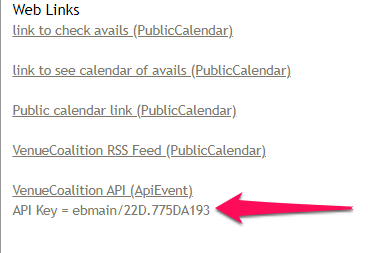
- Open the Web Links tab again
- Copy the API code that is displayed and send it to Rob over Slack
Once everything has been verified please go back to the spreadsheet (above) and make sure to update the status in column C from Refreshing to Verified.
Comments
0 comments
Article is closed for comments.