Need API endpoint for Add Event to OSB

Zendesk Ticket: https://ungerboeck.zendesk.com/agent/tickets/386948
Account: Ontario Teachers’ Pension Plan Board
Region: US
Articles used in your research:
https://supportcenter.ungerboeck.com/hc/en-us/articles/4419364117015-Make-Your-First-API-Call
https://supportcenter.ungerboeck.com/hc/en-us/articles/115010256147-API-Overview
General
Business impact if not resolved: The client is working to enhance their user experience by allowing users to create events in Outlook, integrate them into Momentus, and then complete their bookings through the OSB (My Events). Without a way to assign an OSB configuration via API, these events do not appear in OSB, disrupting the intended workflow and requiring manual intervention.
Description of the issue: Events created via the API do not include a field or parameter to assign an OSB Configuration at the event level. As a result, these events are not automatically available in OSB (My Events) for the associated contact.
What does the client want to do? Why do they want to do this? Their goal is to streamline the user experience by enabling a seamless flow where: A user creates an event in Outlook > The event is integrated into Momentus via API > The user can then log into OSB and complete bookings under My Events.
The Issue: The issue is that events created via API are not automatically assigned to their OSB Configuration and cannot be displayed in OSB under My Events.
What you've already tried or suggested: I confirmed that there is an action that allows to assign an OSB configuration in BackOffice (Tools > Assign to OSB configuration)
Why does this not work? It looks like this only works from BackOffice. I cannot find and available end point or a field (such as a configuration ID or similar parameter) that would allow assigning the OSB Configuration value when creating an event via the API.
What I've already tried or suggested:
-Confirmed that assigning an OSB Configuration can be done manually in BackOffice using: Tools > Assign to OSB Configuration
-Tested API functionality using the API Help page
-Reviewed available endpoints and available fields for event, but couldn't find a field to assign the event to OSB.
Why does this not work?
-The OSB Configuration assignment appears to be limited to BackOffice Tools functionality
-There is currently no available API endpoint or field (such as a configuration ID parameter) that allows assigning the OSB Configuration during event creation in the API Help page
-As a result, events created via API must be manually updated in BackOffice to appear in OSB
Macro Vertical: Corporate
Debug Environment:
Customer DB Location: Hosted
Database: Otpp_Test_0395503651_USI
Server: Debug-Canada,1433
Version: 26.1_2026051301
V30 Link: https://supportwebus.ungerboeck.com/Otpp_Test
User Login: usiadmin/ITRocks2014
Recreation Steps:
1. Log into: : https://supportwebus.ungerboeck.com/Otpp_Test >> User Login: usiadmin/ITRocks2014
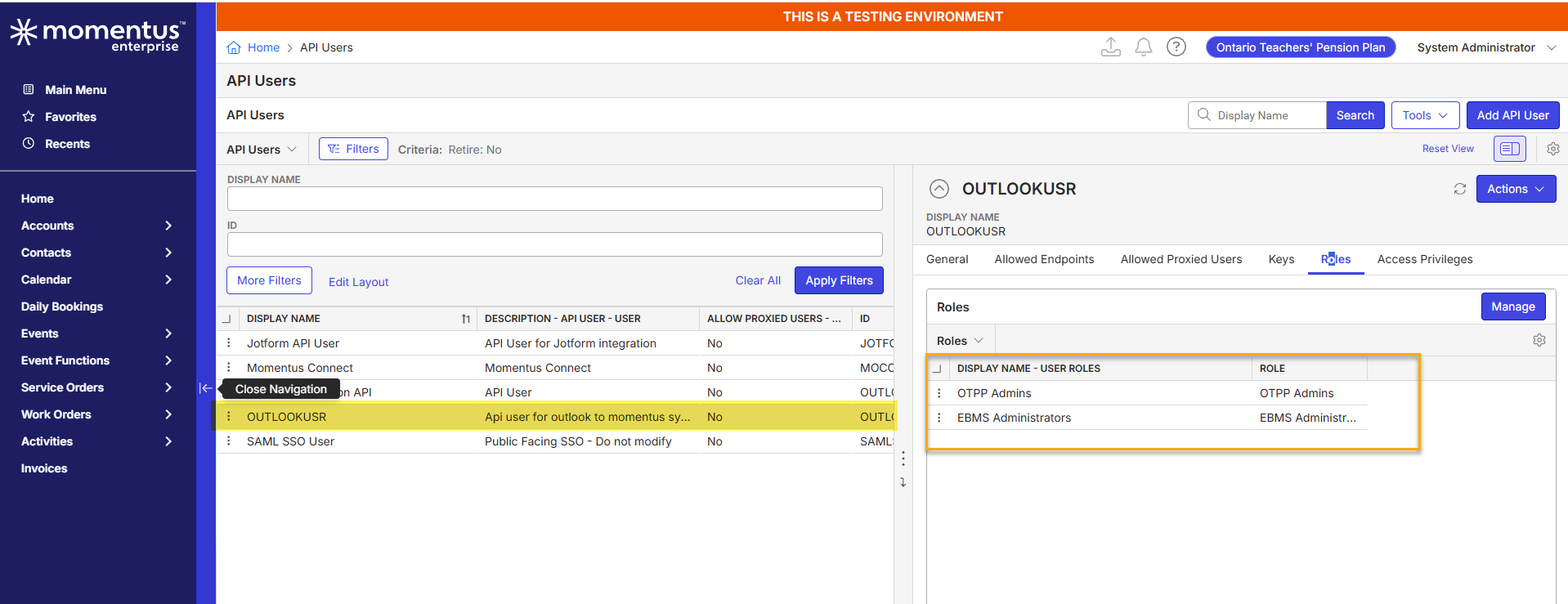
2. Navigate to Main Menu > API Users and locate the OUTLOOKUSR user. This user will be used for authentication in the API Help page.
3. Go to the API Help from the Main Menu. Authenticate using the OUTLOOKUSR API user credentials.
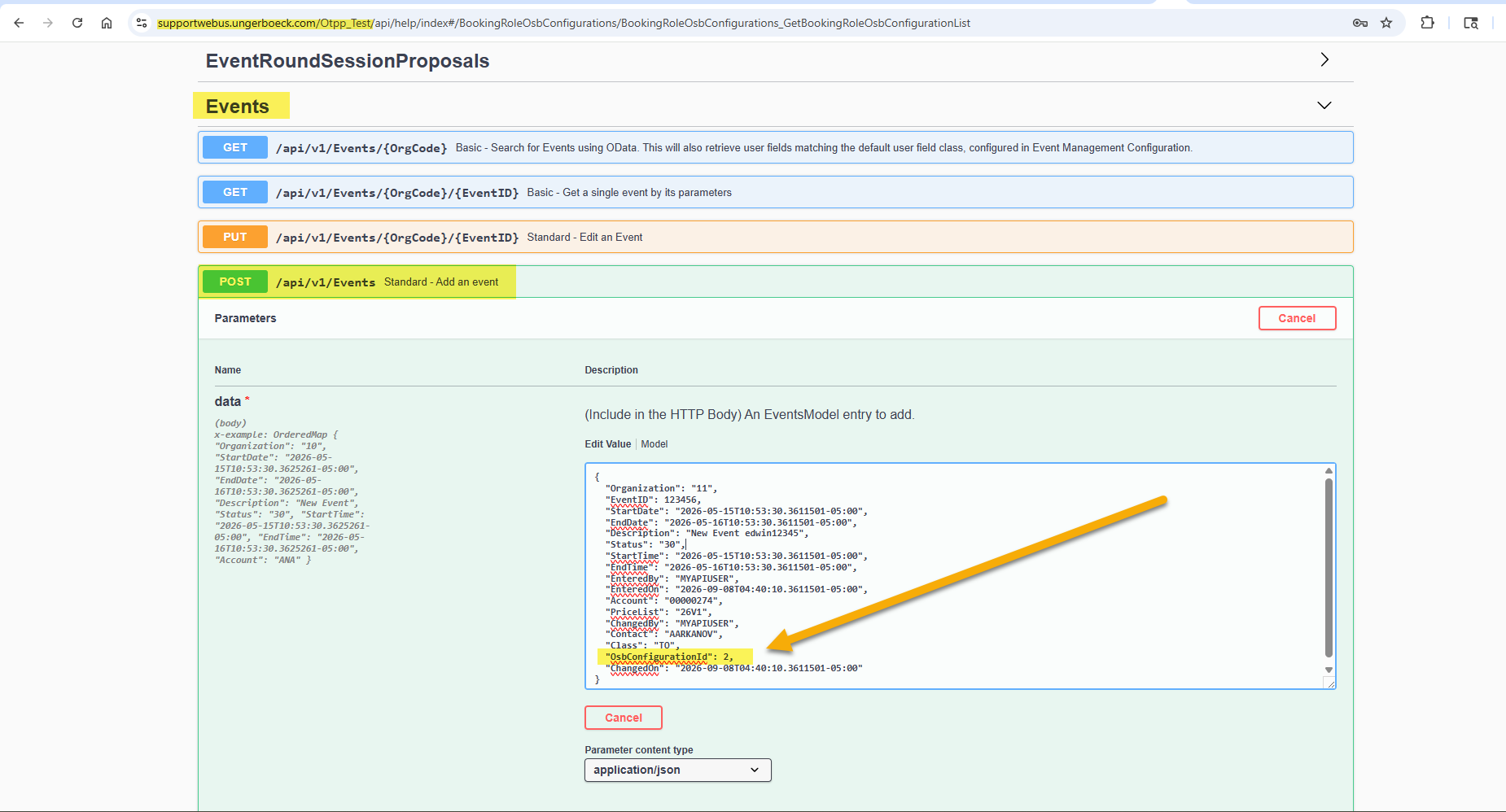
4. Navigate to the Events → POST endpoint
5. Execute the API call to create a new event using a payload (I am using the following):
{
"Organization": "11",
"EventID": 123456,
"StartDate": "2026-05-15T10:53:30.3611501-05:00",
"EndDate": "2026-05-16T10:53:30.3611501-05:00",
"Description": "New Event edwin12345",
"Status": "30",
"StartTime": "2026-05-15T10:53:30.3611501-05:00",
"EndTime": "2026-05-16T10:53:30.3611501-05:00",
"EnteredBy": "MYAPIUSER",
"EnteredOn": "2026-09-08T04:40:10.3611501-05:00",
"Account": "00000274",
"PriceList": "26V1",
"ChangedBy": "MYAPIUSER",
"Contact": "AARKANOV",
"Class": "TO",
"OsbConfigurationId": 2,
"ChangedOn": "2026-09-08T04:40:10.3611501-05:00"
}
6. Submit the request to create the event.
7. Locate the newly created event in BackOffice. Observe that the OSB Configuration field is not populated at the event level.
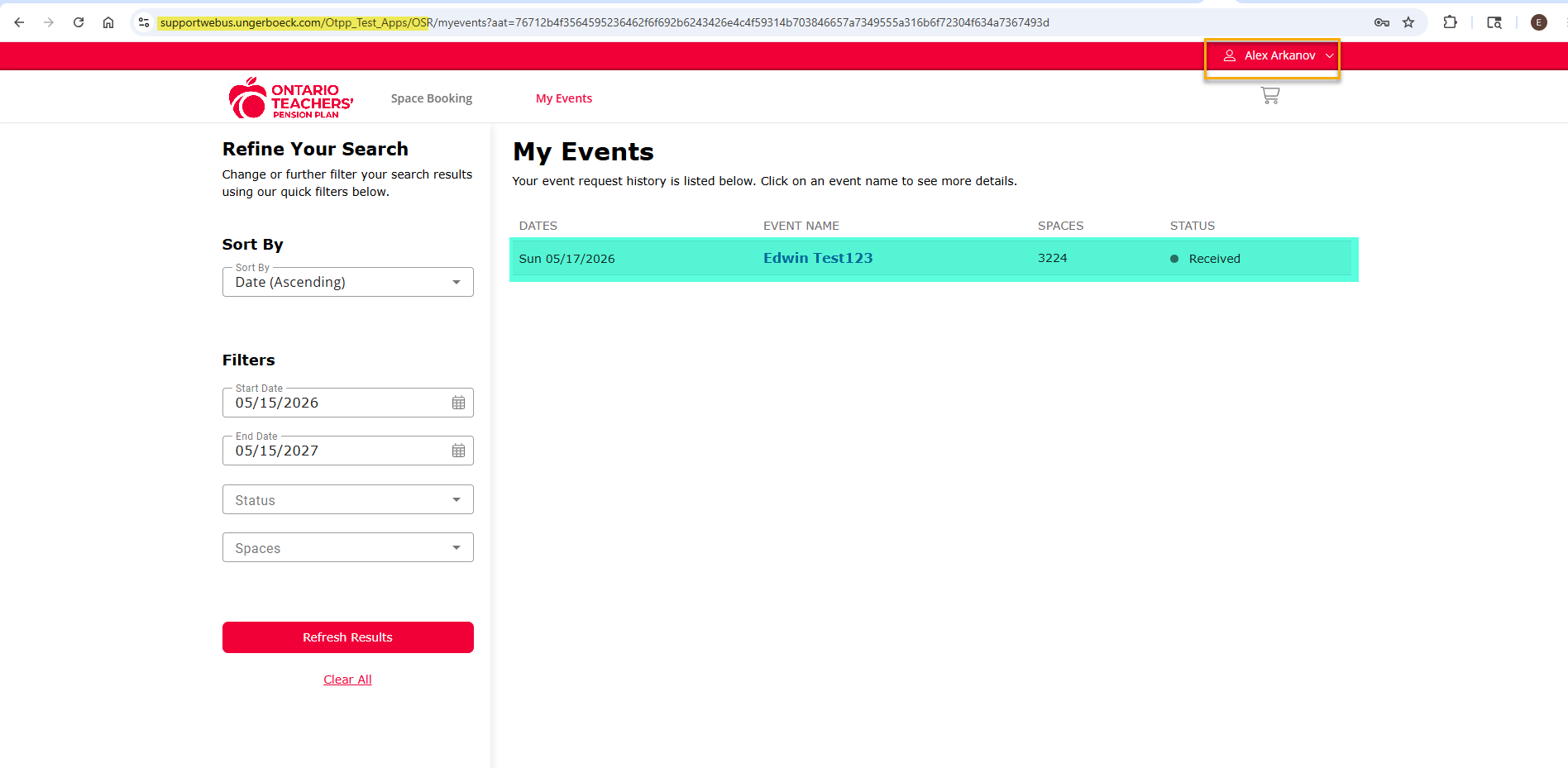
9. Log in to OSB as the associated contact and verify that the event does not appear under “My Events”
10. OSB configuration Link: https://supportwebus.ungerboeck.com/Otpp_Test_Apps/OSR?aat=76712b4f3564595236462f6f692b6243426e4c4f59314b703846657a7349555a316b6f72304f634a7367493d
OSB Login: test@gomomentus.com/123456
...
Observed vs. Expected Results: Events created via the API are not automatically associated with an OSB Configuration with the call I am using
What does the client want to accomplish: The client wants to seamlessly integrate event creation from Outlook into Momentus via API, with events automatically linked to their OSB Configuration. This would allow end users to immediately access and manage their events in OSB (My Events) without requiring any manual setup in BackOffice, improving efficiency and user experience.
Attachments:
Attachments or screenshots:

-

Edwin Hernandez Where did you get "OsbConfigurationId": in your call from? If I run an API call for events on an event that has an OSB config (6501)…
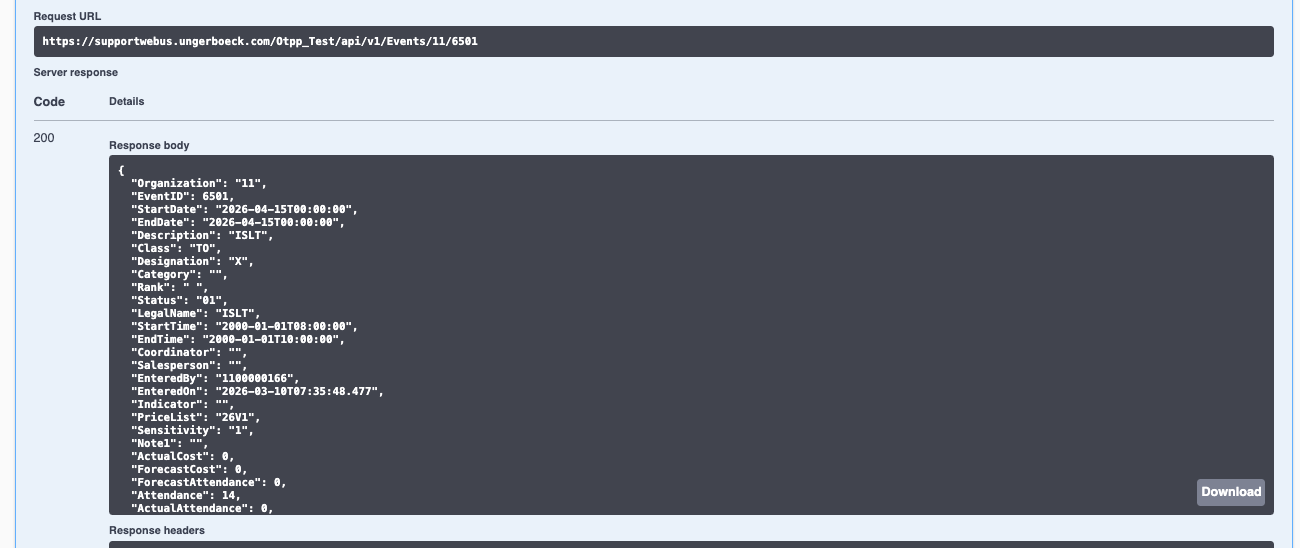

This is the response body. I don't see OSBConfigurationID as a value they can set.
{
"Organization": "11",
"EventID": 6501,
"StartDate": "2026-04-15T00:00:00",
"EndDate": "2026-04-15T00:00:00",
"Description": "ISLT",
"Class": "TO",
"Designation": "X",
"Category": "",
"Rank": " ",
"Status": "01",
"LegalName": "ISLT",
"StartTime": "2000-01-01T08:00:00",
"EndTime": "2000-01-01T10:00:00",
"Coordinator": "",
"Salesperson": "",
"EnteredBy": "1100000166",
"EnteredOn": "2026-03-10T07:35:48.477",
"Indicator": "",
"PriceList": "26V1",
"Sensitivity": "1",
"Note1": "",
"ActualCost": 0,
"ForecastCost": 0,
"ForecastAttendance": 0,
"Attendance": 14,
"ActualAttendance": 0,
"Search": "ISLT",
"Type": "MTG",
"OnSiteOffice": "",
"InDate": "2026-04-15T00:00:00",
"OnSitePhone": "",
"OutDate": "2026-04-15T00:00:00",
"SecondCoordinator": "",
"Account": "00000021",
"BillTo": "00000021",
"InTime": "2000-01-01T08:00:00",
"OutTime": "2000-01-01T10:00:00",
"WebAddress": null,
"ParentEvent": null,
"PreviousEvent": null,
"Description1": "ISLT",
"Description2": "ISLT",
"LegalName1": "ISLT",
"LegalName2": "ISLT",
"ThirdCoordinator": null,
"FourthCoordinator": null,
"ChangedBy": "1100000166",
"ChangedOn": "2026-03-10T07:35:48.477",
"AnchorVenue": null,
"Release": "2026-03-10T00:00:00",
"ActualRevenue": 0,
"OrderedRevenue": 0,
"OrderedCost": 0,
"ForecastRevenue": 0,
"RevisedRevenue": 0,
"RevisedCost": 0,
"Reason": null,
"CancelledBy": null,
"CancelledOn": null,
"MajorGroup": "",
"MinorGroup": "",
"BookingEnteredBy": "1100000166",
"BookingEnteredOn": "2026-03-10T07:35:48.477",
"BookingChangedBy": "1100000166",
"BookingChangedOn": "2026-03-10T07:35:48.477",
"AlternateEvent": null,
"Decision": "2026-04-15T00:00:00",
"Public": "Y",
"BoxOffice": "N",
"Abbreviation": "ISLT",
"EventDays": 0.25,
"Contact": "00000166",
"GLDistribution": "",
"GLSubAccount": "",
"EarlyDeadline": "2026-04-15T00:00:00",
"Description3": "ISLT",
"Description4": "ISLT",
"RevisedAttendance": 0,
"Description5": "ISLT",
"LegalName3": "ISLT",
"LegalName4": "ISLT",
"LegalName5": "ISLT",
"StandardDeadline": "2026-04-15T00:00:00",
"Insurance": "N",
"Note2": "",
"Requester": "00000021",
"OrderUserFieldsType": "Z4",
"PaymentPlan": "",
"LostTo": null,
"Firm": null,
"FunctionUserFieldsType": "",
"OtherActual": 0,
"OtherOrdered": 0,
"OtherForecast": 0,
"OtherRevised": 0,
"BillToContact": "00000166",
"RequesterContact": "00000166",
"ContractRequired": "N",
"InventoryChain": "",
"PurgeIndicator": null,
"PurgeValidationDateTime": null,
"PurgedByUserID": null,
"AverageDailyRate": 0,
"BookedArea": 16,
"PeakNumberofRooms": 0,
"SpaceToGuestRoomRatio": 0,
"ServiceOrderIssueClass": "C",
"JobAsset": null,
"FunctionIssueClass": "C",
"PurgeValidationByUserID": null,
"EconomicImpact": 0,
"TaxScheme": "",
"Facebook": null,
"Twitter": null,
"LinkedIn": null,
"OutlookEvent": "N",
"ExhibitorIssueClass": "",
"ExhibitorIssueType": null,
"BookControl": null,
"GLCoreDimension01": null,
"GLCoreDimension02": null,
"TimeZone": "",
"EventUserFieldSets": [
{
"Header": "EventUDF",
"Class": "C",
"Type": "Z3",
"UserNumber01": null,
"UserNumber02": null,
"UserNumber03": null,
"UserNumber04": null,
"UserNumber05": null,
"UserNumber06": null,
"UserNumber07": null,
"UserNumber08": null,
"UserNumber09": null,
"UserNumber10": null,
"UserNumber11": null,
"UserNumber12": null,
"UserNumber13": null,
"UserNumber14": null,
"UserNumber15": null,
"UserNumber16": null,
"UserNumber17": null,
"UserNumber18": null,
"UserNumber19": null,
"UserNumber20": null,
"UserNumber21": null,
"UserNumber22": null,
"UserNumber23": null,
"UserNumber24": null,
"UserNumber25": null,
"UserNumber26": null,
"UserNumber27": null,
"UserNumber28": null,
"UserNumber29": null,
"UserNumber30": null,
"UserDateTime01": null,
"UserDateTime02": null,
"UserDateTime03": null,
"UserDateTime04": null,
"UserDateTime05": null,
"UserDateTime06": null,
"UserDateTime07": null,
"UserDateTime08": null,
"UserDateTime09": null,
"UserDateTime10": null,
"UserDateTime11": null,
"UserDateTime12": null,
"UserDateTime13": null,
"UserDateTime14": null,
"UserDateTime15": null,
"UserDateTime16": null,
"UserDateTime17": null,
"UserDateTime18": null,
"UserDateTime19": null,
"UserDateTime20": null,
"UserText01": "Ana Aleixo",
"UserText02": null,
"UserText03": null,
"UserText04": "256",
"UserText05": null,
"UserText06": null,
"UserText07": null,
"UserText08": null,
"UserText09": null,
"UserText10": null,
"UserText11": "COST",
"UserText12": null,
"UserText13": null,
"UserText14": null,
"UserText15": "N",
"UserText16": null,
"UserText17": null,
"UserText18": null,
"UserText19": null,
"UserText20": "N",
"UserText21": "Y",
"UserText22": null,
"UserText23": null,
"UserText24": null,
"UserText25": null,
"UserText26": null,
"UserText27": null,
"UserText28": null,
"UserText29": null,
"UserText30": null,
"UserText31": null,
"UserText32": null,
"UserText33": null,
"UserText34": null,
"UserText35": null,
"UserText36": null,
"UserText37": null,
"UserText38": null,
"UserText39": null,
"UserText40": null,
"UserText41": null,
"UserText42": null,
"UserText43": null,
"UserText44": null,
"UserText45": null,
"UserText46": null,
"UserText47": null,
"UserText48": null,
"UserText49": null,
"UserText50": null
}
]
}You can only update the fields included in the API endpoint. If OSBConfigurationID is not available as a field in the endpoint, it would be an enhancement to add it.
-
Mike Schepker – I couldn't find any OSB API end points at the event level. I tried to use that from another endpoint to see what it does

-
Edwin Hernandez Ah, ok. That won't work. The field needs to actually be available via the subject's endpoint in order for it to be updated. It doesn't look like this one is. I think the ability to add a back office event to an OSB configuration was added later, so the API was probably never updated for it.
-
Mike Schepker - Thanks! so should I let the client know that this would need an Enhancement request? Thanks again for reviewing this case!
-
Edwin Hernandez Yes, it would be an enhancement request.
-

Edwin Hernandez yes you can't just import events to OSB.
You can import the event (using events endpoint i assume) and manually associate it with an OSB configuration. But i know of other customers that have done this and there were issues (such as with Denver University). I seem to remember issues with conflict check status. I think this was the documentus post where DU was doing this:
https://documentus.zendesk.com/hc/en-us/community/posts/32452635287447
Jeremy Elmore has the most background here.
Please sign in to leave a comment.
Comments
6 comments
Date Votes