OSB Event Configuration - Statuses
Investigating
Zendesk Ticket: https://ungerboeck.zendesk.com/agent/tickets/357188
Account: University of Denver
Region: Americas
Articles used in your research:
https://supportcenter.ungerboeck.com/hc/en-us/articles/4408511074199-Online-Space-Booking-OSB-Configuration
General
Business impact if not resolved: From Customer, "We are not able to advise users how to book during busy season."
Short Summary of issue (issue description): In the release notes for 24.2, OSB conflict checking was changed to only check existing bookings, not potential bookings. However, this customer in 25.1 is not detecting conflicts unless both the existing status and new booking status were at or above the conflict check level in OSB.
Macro Vertical: Education
Debug Environment:
Customer DB Location: Hosted
Database: DenverUniv_Prod_1317468655_USI
Server: Debug-US,1433
Version: 25.1_20250526 (Customer currently has 24.32025012101)
V30 Link: https://supportwebus.ungerboeck.com/DenverUniv_Prod/app85.cshtml?ReturnUrl=%2fDenverUniv_Prod#/
User Login: usiadmin / ITRocks2014
OSB Login:
test@gomomentus.com / test123
Recreation Steps:
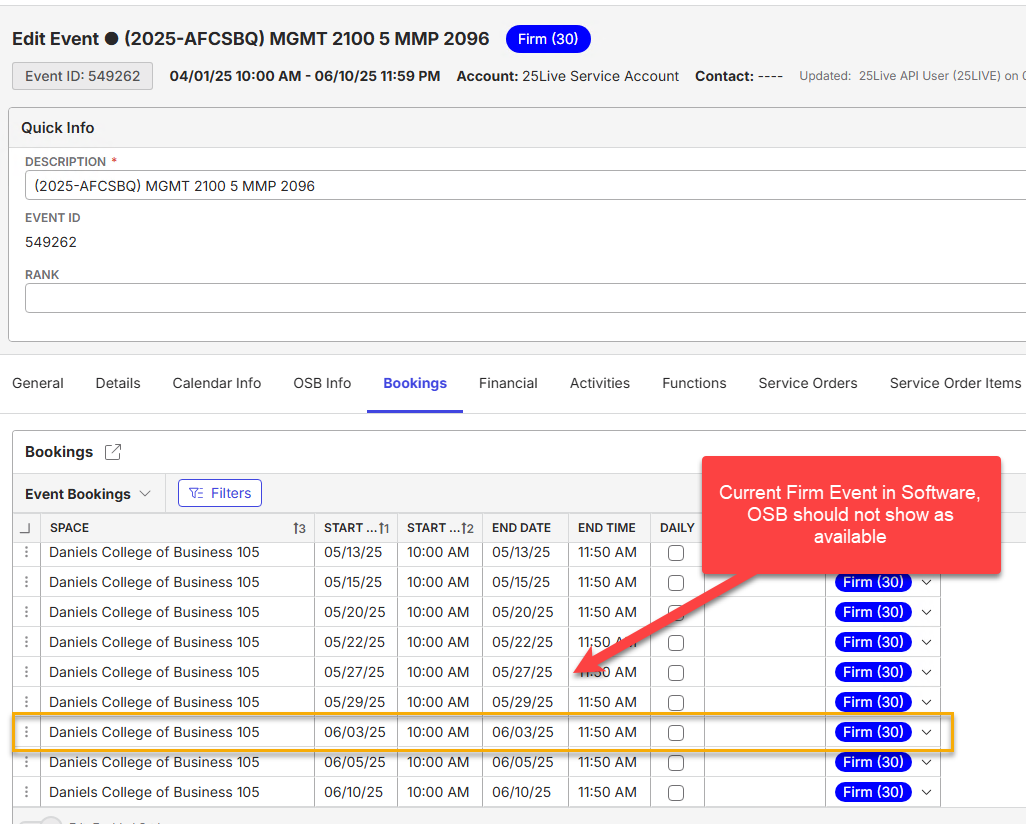
To find current event conflict (Event 549262 on 6/)
- From the Navigation Bar, select Events. In the search criteria, enter the Event ID: 549262.
- When Event (2025-AFCSBQ MGMT 2100 5 MMP 2096) appear, right click > Edit Event
- From the Edit Event window, go to the Bookings Tab
- On the Bookings Tab, scroll down to the booking on 6/3 for Daniels College Of Business 105
- This is a Firm event in the calendar
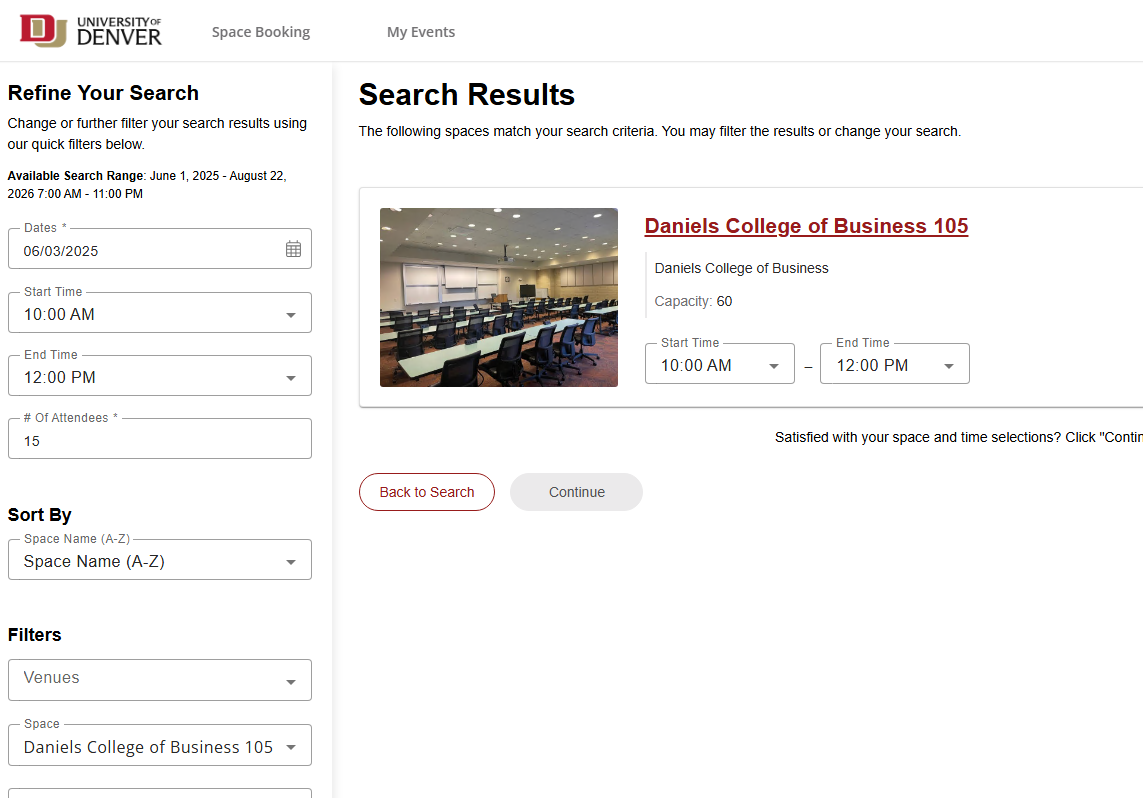
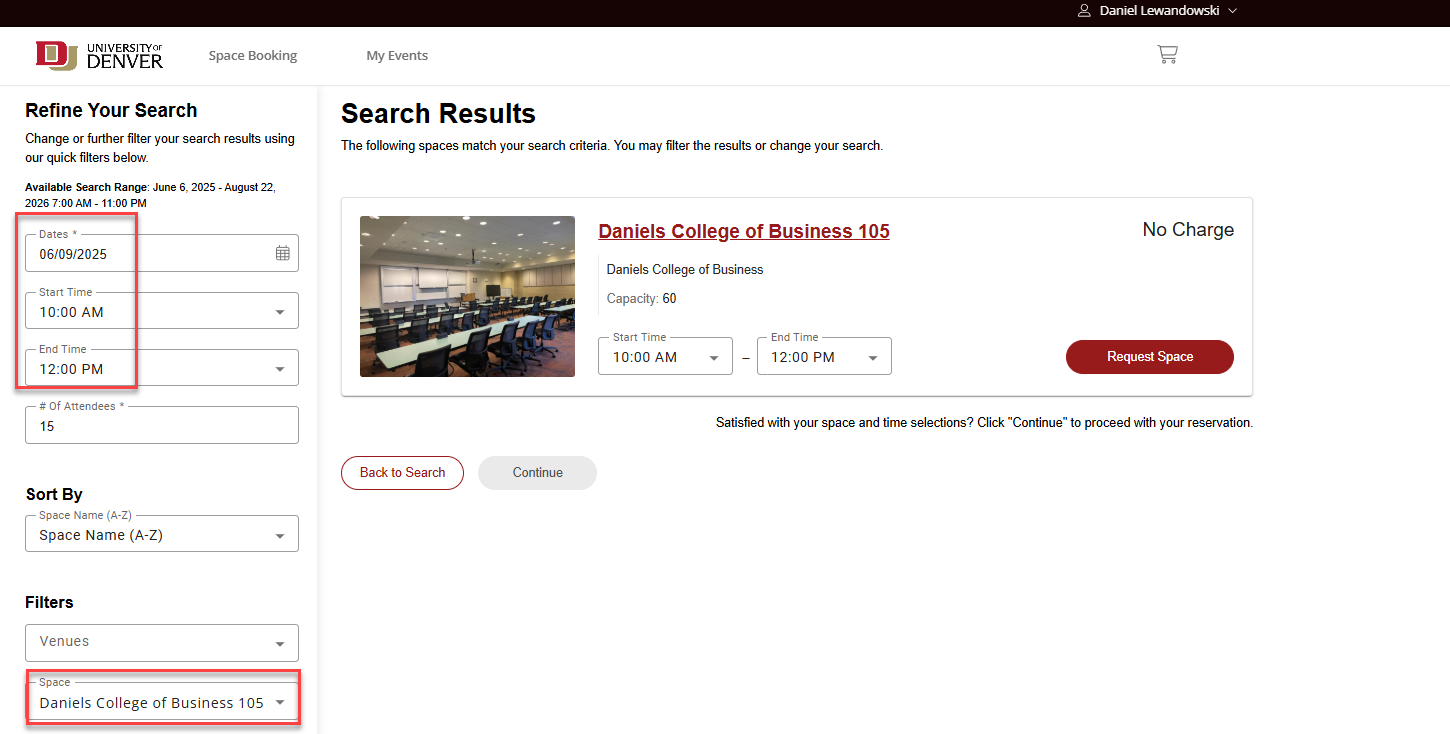
Now we can go to the OSB to search for that specific time and it will show as available.
- From the Main Menu, search Online Space Booking Configuration
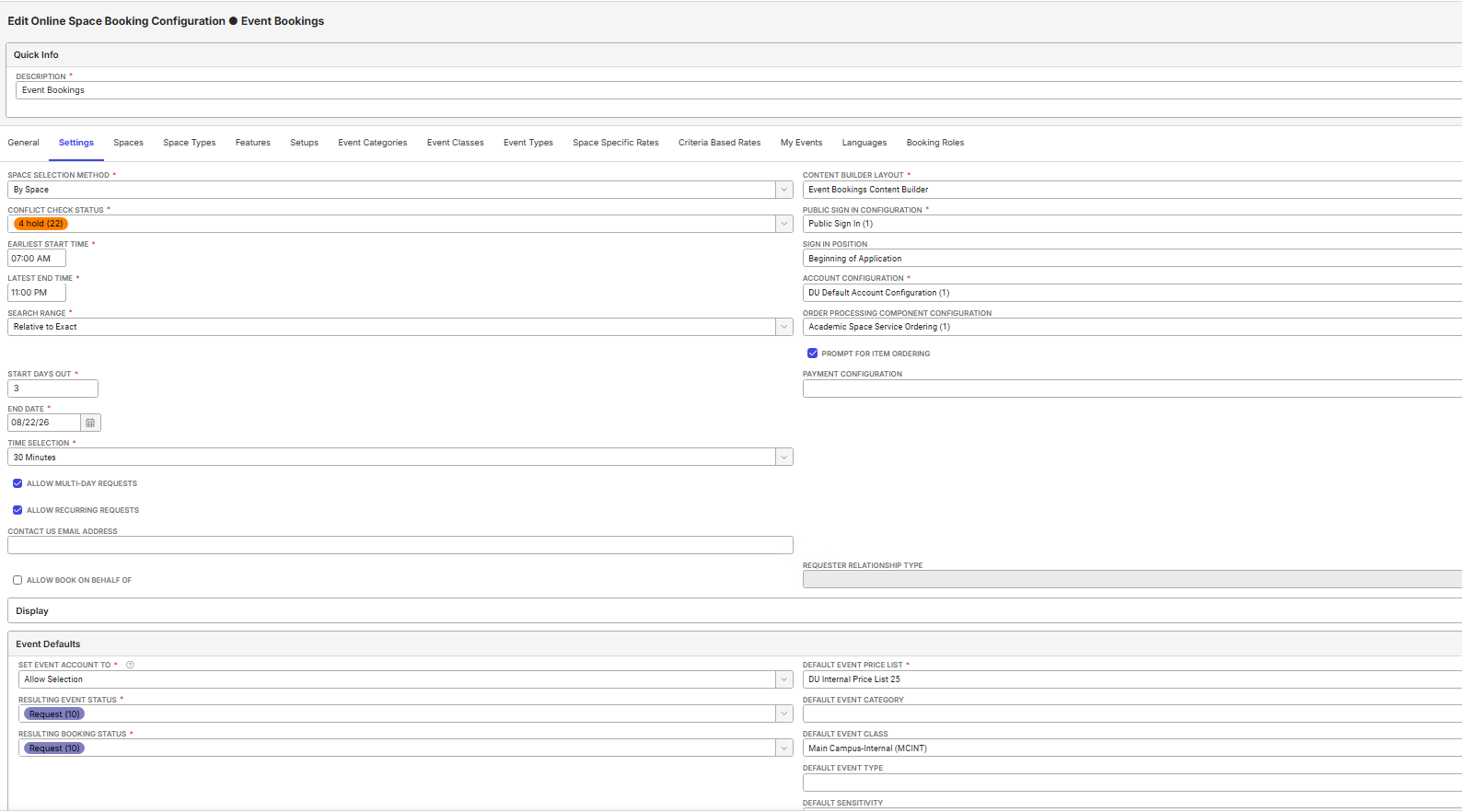
- On the OSB Configurations window, right click on Event Bookings (ID5) and select Edit Online Space Booking Configuration.
- On the Edit OSB Configuration-Event Bookings Window, click on Actions dropdown and select Copy Shortcut
- Select Yes on the Copy Shortcut prompt, then paste the shortcut into a new tab of the browser.
- Use login credentials - test@gomomentus.com / test123
-
Select the Space Booking tab at the top of the screen. In the search criteria
6/03/2025
Start Time: 10:00 AM
End Time: 12:00 PM
'# of Attendees: 15
Spaces: Daniels College of Business 105
-
After the Search is complete, the room shows as available in OSB.
...
Observed vs. Expected Results: OSB to not show/allow for booking requests if date/time has a Firm event already on the calendar.
What does the client want to accomplish: Get correct configuration for using OSB.
-
@...
-

@... - per engineering, BK 086 and BK 002 need to be set up for conflicts to work properly.
Do you know if the customer has these set up?
-
@... Here is what I found


-
@... We are thinking the BK 002 setting may be too high, can they try making that set to 20?
-
@... In the local site, I adjusted the BK002 parameter to be 20 and the space still shows available for the date/time which already has a Firm event.
-

Following
FYI @... i would not tag Max on OSB questions. If you tag me i can triage to the best person
-
Tagging Mike Schepker to help with this question
-

Cathy Herrick Do you know this?
-

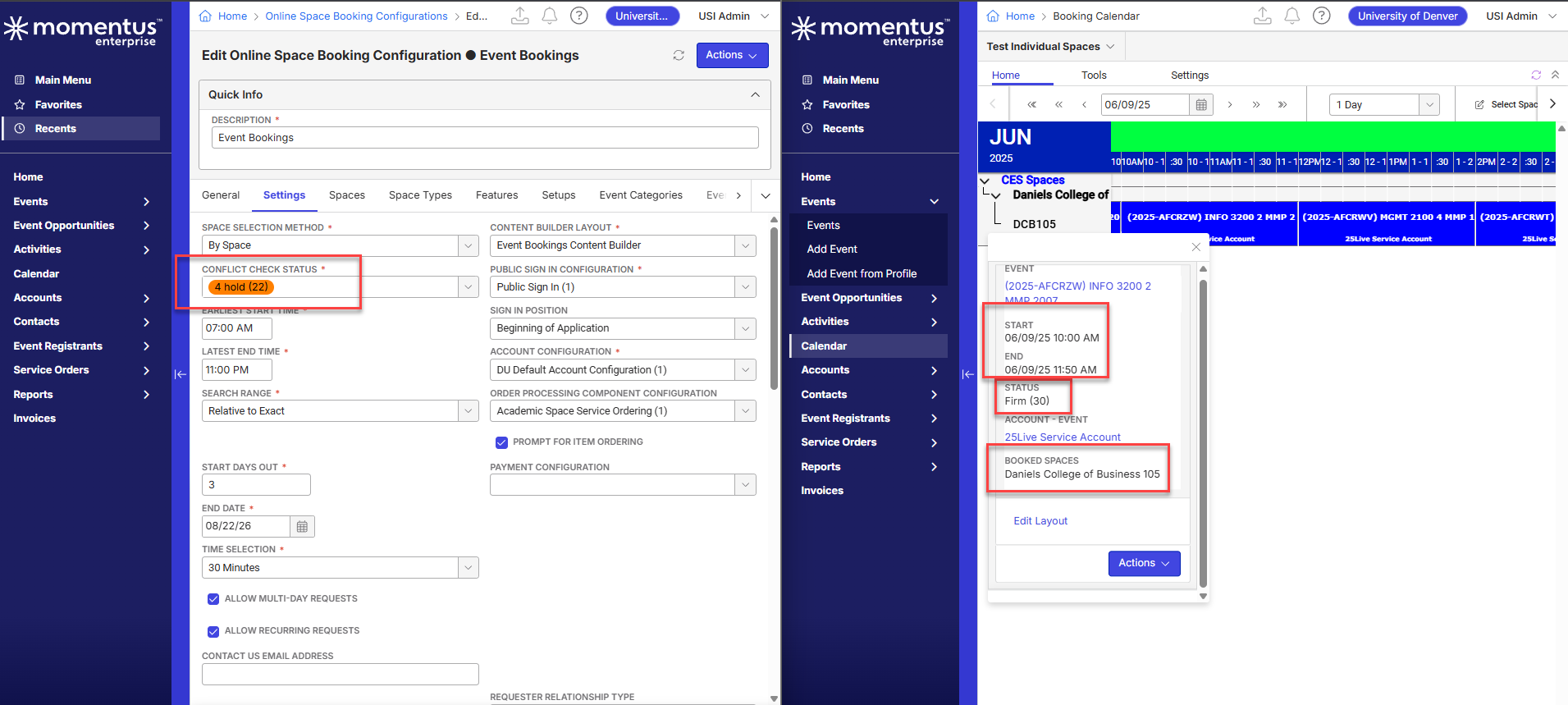
Seth Halvaksz - Connor and I just reviewed together. I am leaning towards this being a bug.
The Conflict Check Status on the OSB config is at 4, and the event we are seeing is at 30 (see screenshots).
- Conflict Check Status: Determines which existing bookings are considered in conflict with new space reservations. A conflict will be detected if there is a booking that is at or above the minimum conflict check status; the space is considered unavailable for that day and time range and will not show in search results.
-
Cathy Herrick i see this is for Denver University. Did they load these events via the API?
I had a previous discussion with Jeremy Elmore and understood DU is importing events via API and then associating the events with an OSB Configuration.
Assuming that's the case, there's an API parameter to bypass conflict checking.
https://github.com/UngerboeckAPI/242/blob/main/Examples/Operations/Bookings.cs
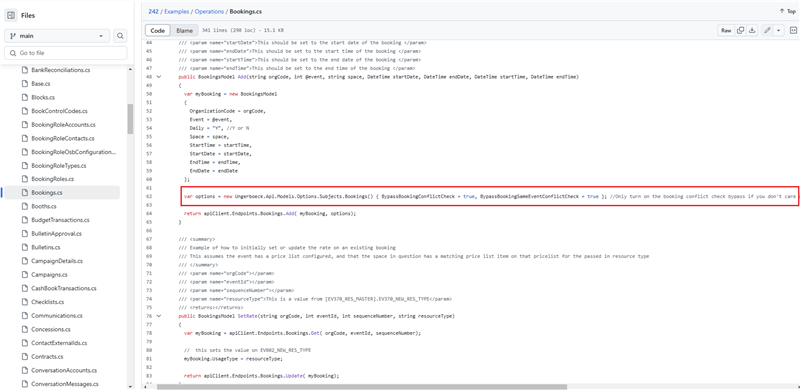
Assuming the above is true, we would need the full details of how the event was created via API in order to investigate this.
Please sign in to leave a comment.
Comments
10 comments
Date Votes