Payment Portal V2 - Event Balance Behavior

Zendesk Ticket: https://ungerboeck.zendesk.com/agent/tickets/379474
Account: Los Angeles Convention Center
Region: US
Articles used in your research:
https://supportcenter.ungerboeck.com/hc/en-us/articles/1500006547962-Embed-Anonymous-Payment-Portal-Links-into-Email-Templates
https://supportcenter.ungerboeck.com/hc/en-us/articles/236066028-Payment-Applications-and-Configuration
General
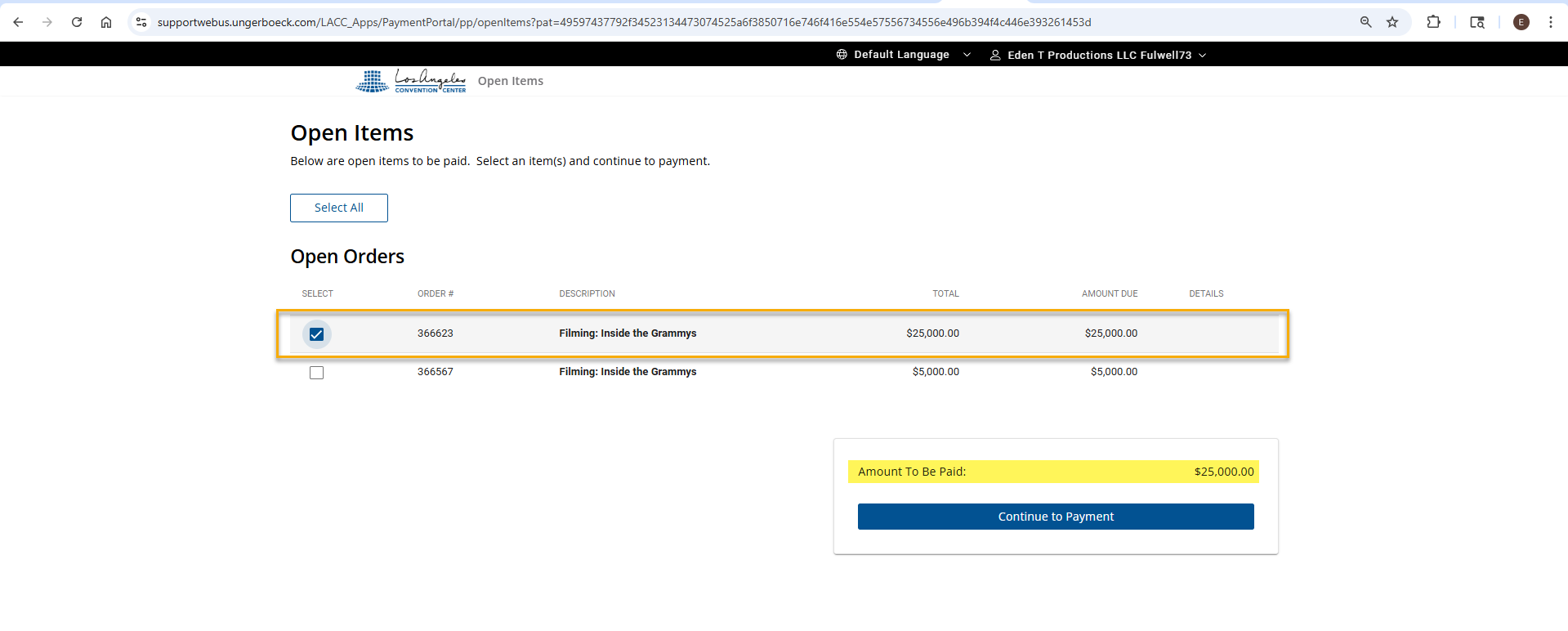
Short Summary of issue (issue description): In Payment Portal v2, Service Order 366623 is showing an amount due of 25,000. To offset this, the client created a second service order (366568) in Backoffice with an amount of –25,000, intending to cancel out the original balance. Despite the offset order being created, the portal continues to display Service Order 366623 as due, instead of showing a net balance of 5000 or removing the order from the list.
Macro Vertical: Convention Centers
What does the client want to do? Why do they want to do this?
In this event scenario, the client is intending to collect from the user a $30,000 upfront payment, which includes a $25,000 security deposit prepayment. The deposit is refunded in BackOffice. The event currently contains:
• Service Order 366623: +$25,000 (security deposit)
• Service Order 366568: –$25,000 (deposit return)
The expectation is that these two orders cancel each other out on the front end, leaving only the remaining $5,000 due. However, when accessing the Payment Portal V2 link, the portal still displays Service Order 366623 as an outstanding amount due.
The client would like clarification on the following:
• Is this behavior working as designed?
Specifically, should Payment Portal V2 consider negative service orders and net them against positive ones?
• If this is intended behavior, is there any configuration or workflow available that would prevent Service Order 366623 from appearing as due in Payment Portal V2?
Business impact if not resolved: Creates confusion for the client because the payment portal continues to show an outstanding balance that in this business case is intended to cancel.
Debug Environment:
Customer DB Location: Hosted
Database: LACC_Prod_1322158997_USI
Server: Debug-US,1433
Version: 25.4_2026020501
V30 Link: https://supportwebus.ungerboeck.com/LACC_Prod
User Login: test@gomomentus.com/123456
Payment Portal Link: https://supportwebus.ungerboeck.com/LACC_Apps/PaymentPortal/?pat=5356434e6552364f4d566c50476a772b492b7737337a78426f566f713745436d44343665634f39585677383d
Payment Portal configuration: LACC Payment Portal v2 (sequence 11)
Recreation Steps:
1. Log into: https://supportwebus.ungerboeck.com/LACC_Prod >> User Login: test@gomomentus.com/123456
2. Navigate to Events and search for event 45071 and open it for editing
3. Go to the Service Orders tab and note Service Orders 366568 and 366623 with offsetting amounts.
4. Right-click the order > Tools > Send Email > In the pop‑up window, click Continue.
5. The Email window will open, Enter "Payment Options - Event Expenses v2" into the Select Email Template field
6. Click Yes in the confirmation pop‑up, then go to Actions > Preview Email.
7. In the Preview window, Scroll down and locate the payment portal link and click it
8. When the Payment Portal loads note that Service Order 366623 still appears as due.
Observed vs. Expected Results:
Observed Result: When accessing Payment Portal V2, the system displays Service Order 366623 with a $25,000 amount due, even though Service Order 366568 contains a –$25,000 offset intended to cancel out the deposit. As a result, the portal shows the full deposit order as payable instead of reflecting only the remaining $5,000 from Service Order 366567.
Expected Result: The client expects the Payment Portal to recognize the negative service order and net it against the positive one. Their goal is for the user to see only the $5,000 balance that should actually be collected upfront. In other words, they want the portal to exclude Service Order 366623 from the list of amounts due and display only the true payable amount.
What does the client want to accomplish: Collect $30,000 upfront, which includes a $25,000 refundable security deposit. The deposit is returned in BackOffice via the –$25,000 service order. In the Payment Portal, they want only the $5,000 (from Service Order 366567) to appear as due. They are asking whether the system can be configured to hide or net out Service Order 366623 so it does not appear as an outstanding charge.
Attachments:
Attachments or screenshots:


-

Edwin,
I'm honestly confused as to why they are doing it this way, but to be honest, I'm not a financial expert. They have two separate orders. Wouldn't it have made more sense to add the deposit as a payment on the original order? Then the only thing that would be left for the customer to pay is the remaining balance. Maybe I'm missing something here.
-

Is there a reason why they don't use invoices? I think it'll be handled beautifully with payment plans… That's how APAC uses it.
-

This client is currently in the Boost program and security deposit management and payment plans in portals will be addressed with them.
Please sign in to leave a comment.
Comments
3 comments
Date Votes