False “Area Title is Required” Validation Message in Location Manager

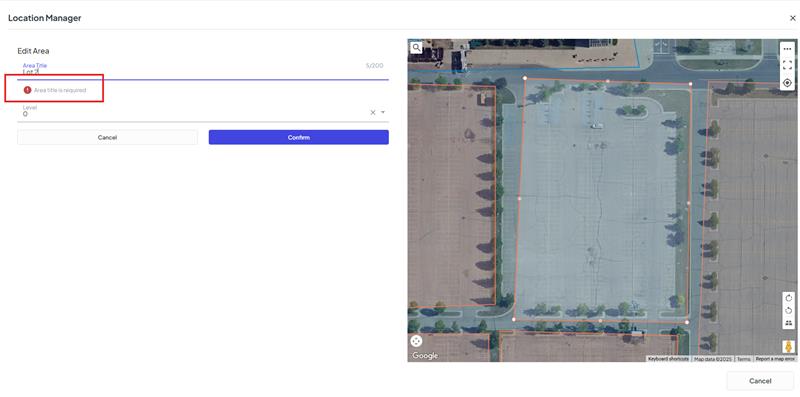
Description: When creating or editing an Area within Location Manager, the system displays a red error flag stating “Area Title is Required” even when an Area Title has been entered. The Area can still be saved, but the message incorrectly signals a blocking issue.
Business Impact: This messaging can cause confusion for end users. Customers may assume they are doing something wrong when maintaining their Areas within WeTrack, which can create unnecessary hesitation and additional support needs.
Environment Details
Site URL: aleruscenter.wetrack.com, also reproduced in DBH and RBC accounts
Affected Users: Megan, Hayley, and the WeTrack Admin account
Reproduction Steps
- Navigate to: Project Name > Location Manager > Areas
- Create a new Area OR edit an existing Area.
- Enter a valid Area Title.
- The red validation flag “Area Title is Required” appears even though the field is populated.
- The Area still successfully saves.
Verification
Notes: Behavior is consistent across multiple tenants (Alerus Center, DBH, RBC) and across multiple internal accounts. The validation error appears every time an Area is created or edited, even though the record saves without issue.
Behavior Description
Actual Outcome:
The “Area Title is Required” validation error appears despite the field being filled in. The Area can still be created or updated.
Expected Outcome:
The validation error should only display when the Area Title field has been left empty. If a valid title is entered, the form should not display an error.
Supporting Evidence
-

This is a bug, please raise on Jira.
-
Thanks Vernica - Ready for support: Ticket: #374303
Please sign in to leave a comment.
Comments
2 comments
Date Votes