Booking Rates for Performance Arts / Concert Halls
Answered
Hi team,
I am looking for the Best Practice when it comes to Booking Rates for Concert Halls (Performance Arts).
I have a customer in EMEA who is struggling with the Room Rental per Day when the Concert Hall is rented from let's say 07.00 - 02.00 hrs. When they set this up with U/T = Day, the system does not allow this:
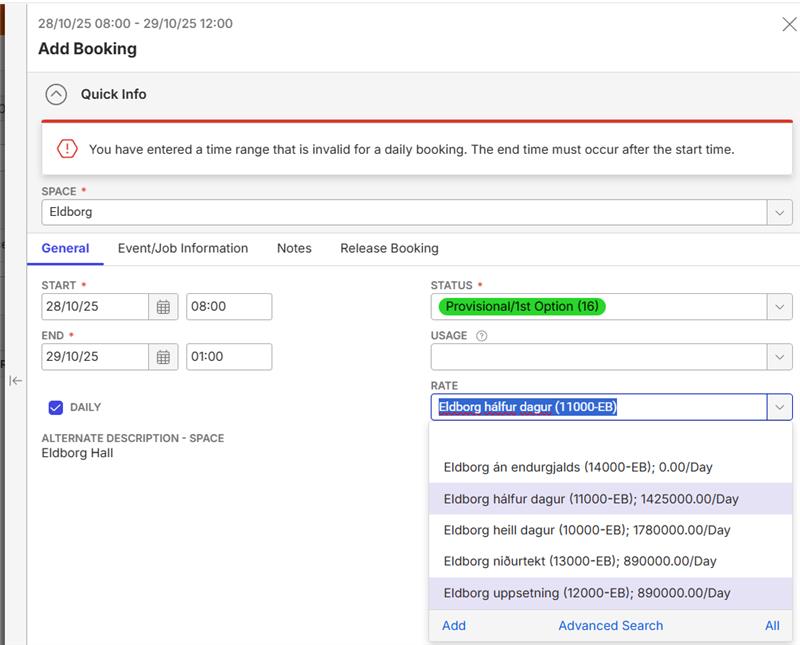
Unlike conference centres, it seems quite logical to me that concert halls/venues would also consider a few hours of the night to be “daytime”. How are other venues working with this? Or what do we recommend in this case? Is the U/T ‘EACH’ the only way to go, or is there hidden configuration trick to make this happen?
Tagging Hayley Burkhardt Martin Wooding Anthony Costantino
Thanks
Minka
-
Thanks to Anthony Costantino , I have found the solution. There is a setting in the Booking Configurations Window which gives the result we are looking for.
Set the Calendar Overlap Cutoff Time in Booking Configuration >> General Tab >> Default Booking Values.
Corresponding Support Centre Article:

The article makes it sound like it only pertains to the Calendar view but the order item calculations seem to respect it too.
@... this might be a good addition for the article.
-

Seth Halvaksz It looks like the “Calendar Cutoff Overlap Time” setting does more than what we have documented. Could you maybe ask someone in engineering the true scope of the feature so we can get that fully and accurately documented? This is an important feature for live event type venues that often have load outs past midnight.
-

I am tagging Carissa Harrison to review and respond to this.
FYI There are a couple other posts related to bookings that run past midnight:
https://documentus.zendesk.com/hc/en-us/community/posts/31950358850199
-

Hi,
I think we might be off the right track here. I do not believe this is an issue of cutoff overlap times (that feature is specific to the calendar)
The error message in the original post is because you have the “Daily” flag checked, but the bookings time span is not valid for a Daily entry.
A valid Daily booking is any booking whose lead/strike times (which are a super set of Start/End) occur within 24 hours of a day and do not extend over in any direction.
For example, a booking from 10AM - 12AM (a 14 hour total time) is valid for a daily booking.
Your example, 8AM - 1AM is not valid, because one hour extends beyond into the next day.
You can find the support center article on Daily bookings here:
https://supportcenter.ungerboeck.com/hc/en-us/articles/204562628-Configure-Daily-Bookings-Serial-Bookings
I will note that this article doesn't really describe what makes for a “Valid” Daily time which might be a slight oversight.
Is unchecking “Daily” to make this a contiguous booking not sufficient for a fix? -
Thank you Benjamin Schwenke for your input! You are right, the error message is solved by unticking the Daily tickbox.
However, I am still looking for our Best Practice how to calculate a Day Rate when the room is booked for one or two hours overnight. Anthony Costantino managed to get this to work in Masterdemo (25.3), as per screenshot below (Event ID #15417)

But when I try to recreate this in the database of the customer, it doesn't work. In my example the Daily Rate is 890, but the system counts it twice, despite the fact the Units are set on 1.

Any suggestions for this case?
-
Thanks to @... we have found the correct setting! When you want to calculate a ‘day’ rate for a time frame including overnight (mostly used for hotels and concerts) you need to use the Units of Time with Calculation Method Nightly and code NGT (to be on the safe side):
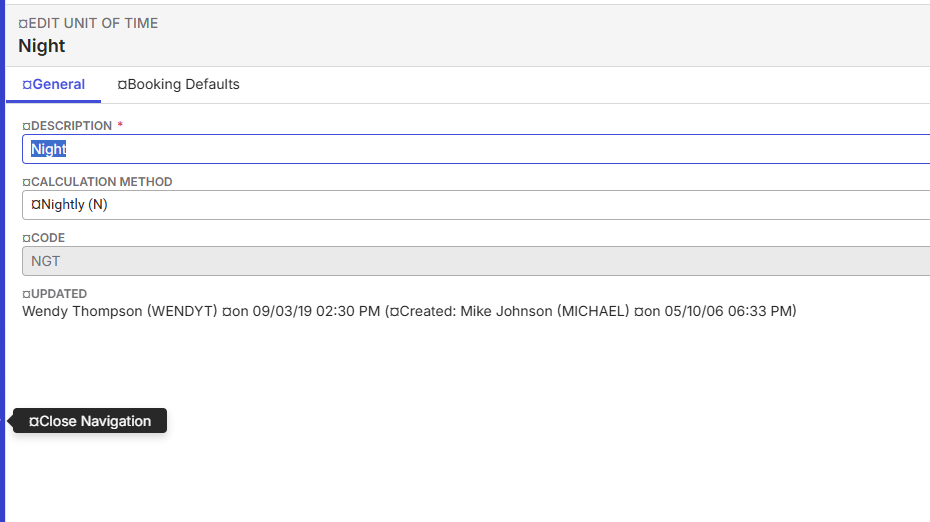
Thanks also to Benjamin Schwenke to add Dave in this discussion.
-
Thanks all for the help here.
I know @... is watching and will make sure we get this documented.
Please sign in to leave a comment.
Comments
7 comments
Date Votes