Resintate Cancelled Statistic Orders
Answered
Zendesk Ticket: 355786
Account: Events East Group - Halifax Convention Centre
Region: US
Articles used in your research: Statistic Resources, Add and Manage Event Statistics
General:
Business impact if not resolved: Confusion on reports
Short Summary of issue (issue description): Event with statistic items was mistakenly cancelled and then reinstated but they have not been able to reinstate or delete the cancelled statistic orders. Can statistic orders be reinstated? If so, how?
Macro Vertical: Convention Centers
Debug Environment:
Customer DB Location: Hosted
Database: EventsEast_Prod_0992137444_USI
Server: Debug-Canada,1433
Version: 25.1.9210
V30 Link: https://supportwebus.ungerboeck.com/EventsEast_Prod
User Login: usiadmin / ITRocks2014
Recreation Steps:
- Click on the username in the upper right corner and select Change Organization
- Select Scotiabank Centre and click OK
- Navigate to the Events window from the Global Nav bar
- Search by event ID for 13314 and right-click > Edit
- Navigate to the Statistics tab
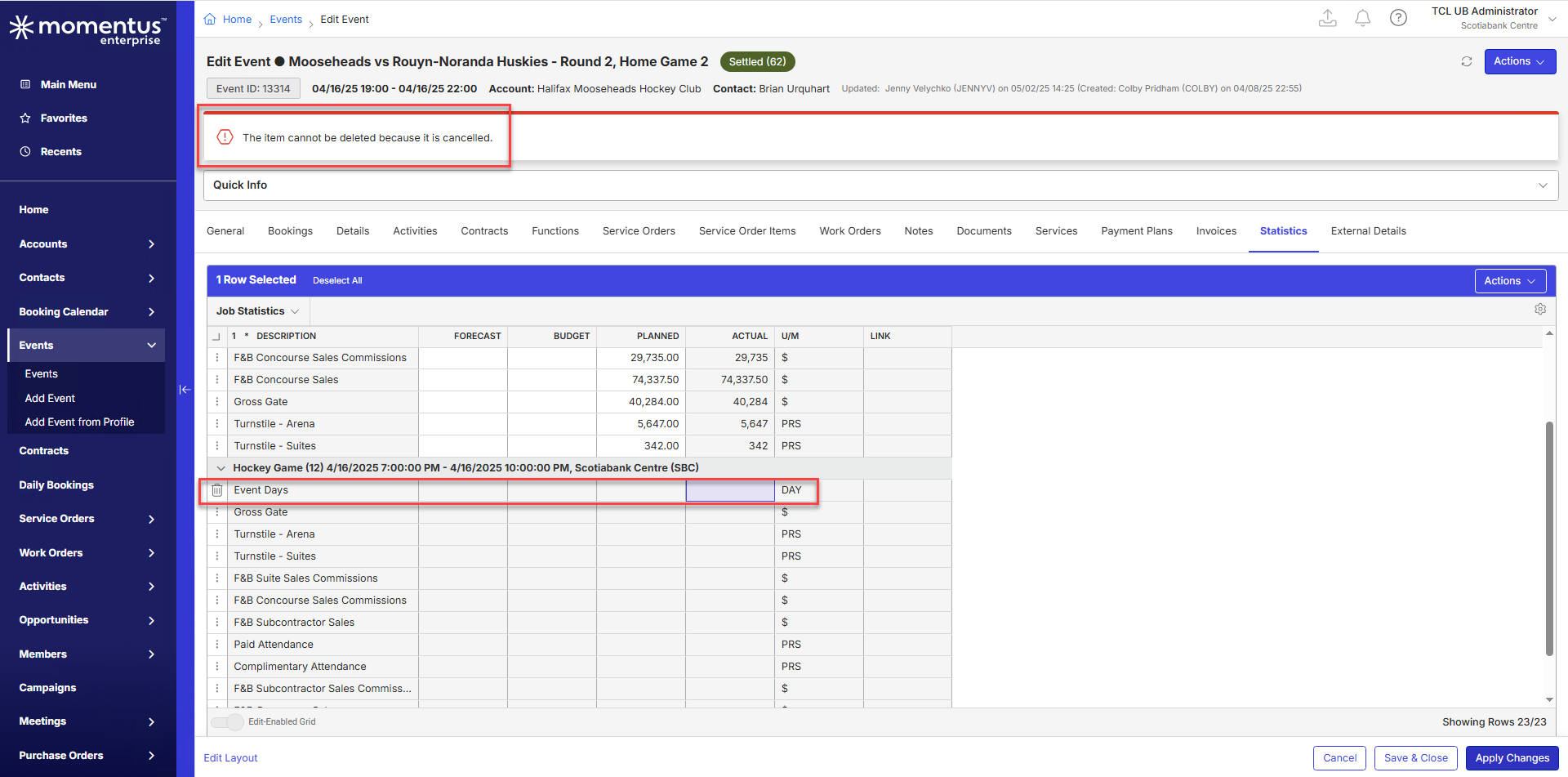
- Notice there are some statistics that have no values in them - these are the ones that were cancelled when the event was mistakenly cancelled
- If you right-click > Mark for Delete then click Apply Changes, a warning message appears saying that the item cannot be deleted because it is cancelled
- Navigate to the Work Orders tab within the event and find the work order 13487, right-click > Edit
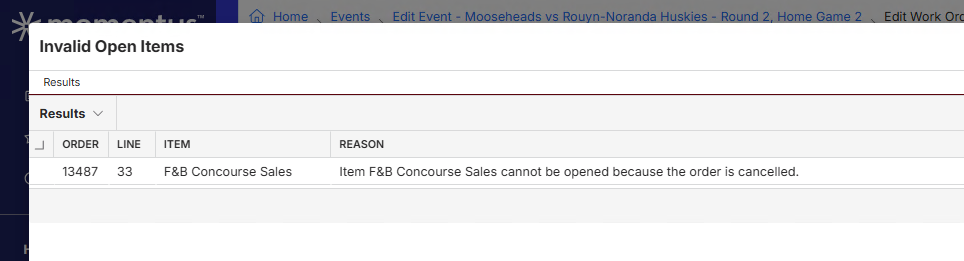
- Actions > Open Work Order results in a warning message that says Cannot open work order - Order is cancelled and cannot be changed"
- Right-click on one of the work order items > Open Item results in a message that says "Item cannot be opened because the order is cancelled"
Observed vs. Expected Results: It seems there is no way to reinstate a cancelled statistics order or order item
What does the client want to accomplish: Reinstate cancelled statistic orders or delete them
Attachments:

-

Mike Schepker do you know if there's a way to reinstate a cancelled statistics order or order item
-

I'm not sure on this. I just tried an event in the QE database that had statistics and cancelled it and reinstated it and the work orders reinstated as well. I'm not sure why they didn't for the customer. My knowledge of statistic orders is very limited though.
-
Thanks for confirming Mike.
Do you have time to connect with Heather to see what may be different for this customer?
-
I'm out the rest of the afternoon. I'm not sure who the SME on Stats orders would be. @... would you happen to know the answer to this?
-
Thanks Mike. Will see what Sam has to say here.
-

I am afraid I cannot be any help on this one. I did very little work with event statistics.
-
Tagging Anthony Costantino and Martin Stephens to ask if they are familiar with statistics orders
-

Statistic orders cannot be reinstated. They are not ‘Normal’ orders. This has been a problem for a long time.
Normal service orders have the structure: Function > Service Order > Work Orders. When you cancel a Service Order, it also cancels the Work Order. You have the ability to reinstate the Service Order - which also restores the Work Order. You cannot restore a work order without a service order.
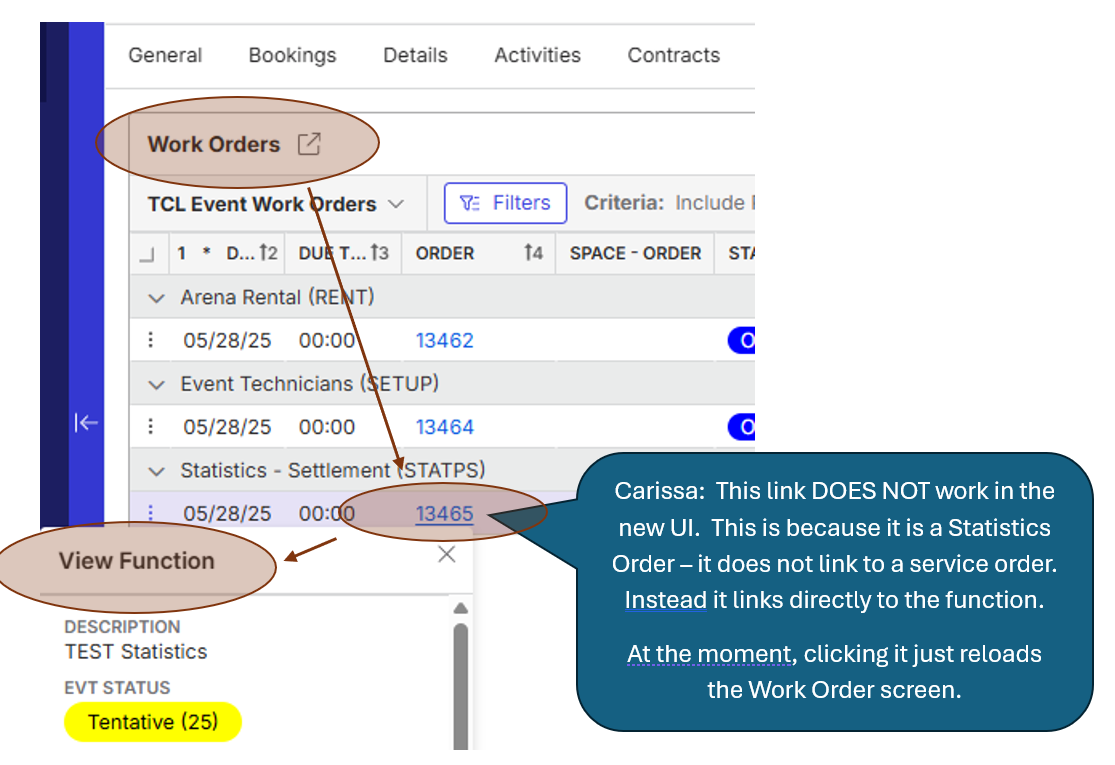
Statistics orders have the structure: Functions > Work Orders. Note the Service order is missing! The Work Order links directly back to the function.
The image below demonstrates this. Carissa Harrison - the statistics order link does not work in the New UX - see image below.
There are two ways to delete statistics.
1. Delete them from within the event. You can do this by deleting the items one-by-one on the Statistics section OR by deleting the statistics function. In both cases, the statistics are permanently deleted and cannot be restored.
2. Cancelling the event puts the statistics work order into the Cancelled status. If you reinstate the event, the statistics work order remains cancelled and CANNOT be reinstated. The only option is to delete the statistics function - this will also delete the statistics. Then you need to manually add them back in.
Work around: When Statistics are deleted, the deletion is tracked in the audit log. The log includes the value of the statistic when it was deleted. You can reference this when manually adding the statistic back.

TO SUM UP: I rarely recommend statistics to clients due to the ‘fragile’ nature of how they interact with events. They have landmines that clients need to avoid. They complicate other event processes. Here are some of the challenges:
- Statistics DO NOT have a service order and cannot be reinstated.
- The Event Price list cannot be changed if an event has statistics. This is compounded if you have configured statistics to be automatically added to events.
- Statistics Items can have tax schemes applied to them. The process of managing/deleting these is not easy.
- If actuals are applied to the Statistics Item, you have to manually delete the actuals before you can delete the item.
- Steep learning curve - most clients that try using Statistics later decide they are not worth the headache!
This is not the easiest issue to describe - I am happy to hop on a call to demonstrate the behavior if that helps.
Please sign in to leave a comment.
Comments
8 comments
Date Votes