Required fields for Add Contact not showing as required when selected from Contact dropdown.

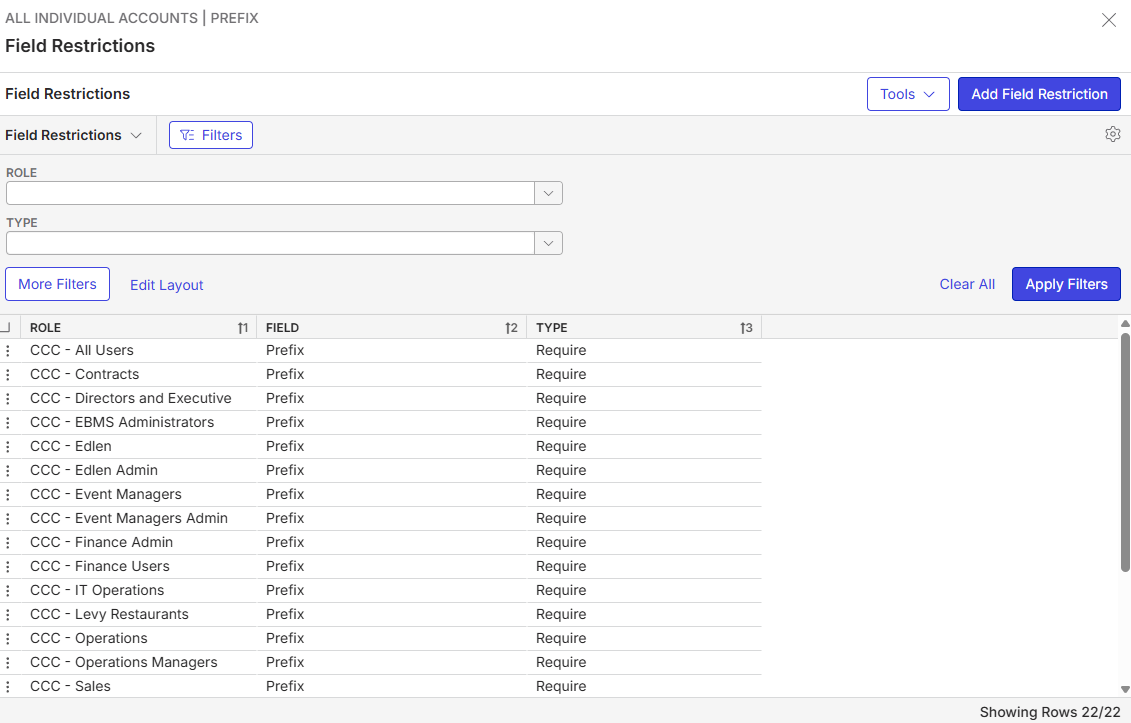
- Description of the issue: Required fields in the Add Contact page are not showing as required when you add contact from the Contact dropdown (Event, Service Order, etc.)
- Account name: Huntington Convention Center (Cleveland)
- Region: AMER
- Client version: 26.2
- Steps to reproduce:
- Open an Event and go to Event Info tab
- Click the dropdown arrow beside Contact and select Add - drawer opens up for Add Contact. - Observed results vs Expected results: only Type is a required field. But Prefix and Gender ID should also be required fields.
- What is the job the client is trying to accomplish: Prefix, Gender ID and Type should all be required fields from any Add Contact window.
- Business impact if not resolved: missing data because it's not showing as a required field.
- Links to articles where you've looked for solutions and also other steps you've taken to research the issue: N/A
- Local v30 URL: https://huntingtoncc.ungerboeck.net/prod/app85.cshtml


-
Mike Schepker Seth Halvaksz - should I have the customer submit this as a bug/support ticket?
-

Field restrictions are context-specific.
Check out this post
https://documentus.zendesk.com/hc/en-us/community/posts/39306830781847
Can you check this first.
-
Thanks Seth Halvaksz ! I'll have them try removing the context field, if the context field is left blank does that mean it will apply to all areas?
-
That i am not sure.
However i get a lot of questions about this so tagging Monika Dudani to ask if she review the article on field restrictions.
-
Monika Dudani the article does not reference “Context” anywhere, but it does say “When you set up a field restriction, it is used wherever the field is available, not just the page where you set up the field restriction.”
Please sign in to leave a comment.
Comments
5 comments
Date Votes