Issue Purchase Order & Related Crystal Report
Refer to Support
Hi team / Ryan Ungerboeck
I have a customer who uses Purchase Orders and has developed a custom report to replace the standard Purchase Order report. However, it appears that the standard report is still linked to the 'Issue' action. Is there a way to replace the standard report tied to the Issue action with one of their custom reports?
Recreation Steps:
> Open Purchase Order
> Tools > Issue
> Run Report

Thanks
Minka
-
Official comment

I think what you would have to do for this particular report is to import the custom report as a custom version of the standard report.
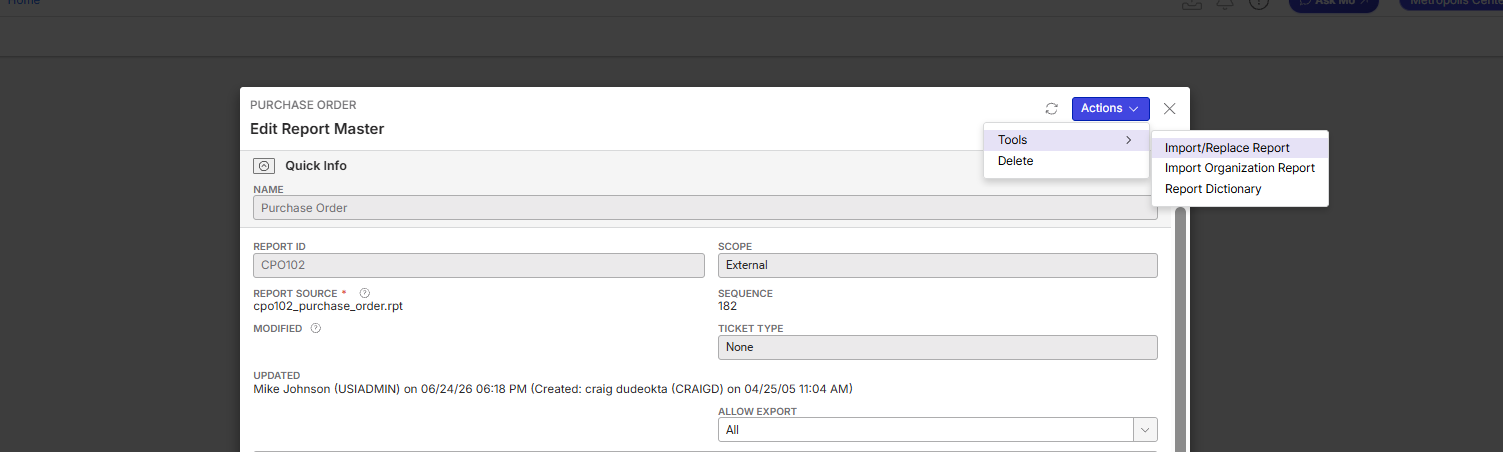
We could always enhance it to work like Invoice prompt where the report is selectable in the workflow - but I think the option above will work fine. -

Following
-
Thanks Ryan Ungerboeck, ASKMO suggested the same :-) . However, I am not able to replace the standard report. I have downloaded the custom .rpt file and used the Tools > Import/Replace Report. The system shows “Success” but did not replace the report. You can also see that the Updated Field is not Updated, the last modification date is the 12th of June.
The customer is on version 26.2.9655.31889 (20260608)

-
I'd submit a ticket on this - I am not familiar with the reports but this is what I was told was the solution so I will need someone from the reporting team to look at this
-
I have created a Support Ticket for this: https://ungerboeck.zendesk.com/agent/tickets/393123
Please sign in to leave a comment.
Comments
5 comments
Date Votes