Issue Purchase Order & Related Crystal Report
Refer to Support
Hi team / Ryan Ungerboeck
I have a customer who uses Purchase Orders and has developed a custom report to replace the standard Purchase Order report. However, it appears that the standard report is still linked to the 'Issue' action. Is there a way to replace the standard report tied to the Issue action with one of their custom reports?
Recreation Steps:
> Open Purchase Order
> Tools > Issue
> Run Report

Thanks
Minka
-
Official comment

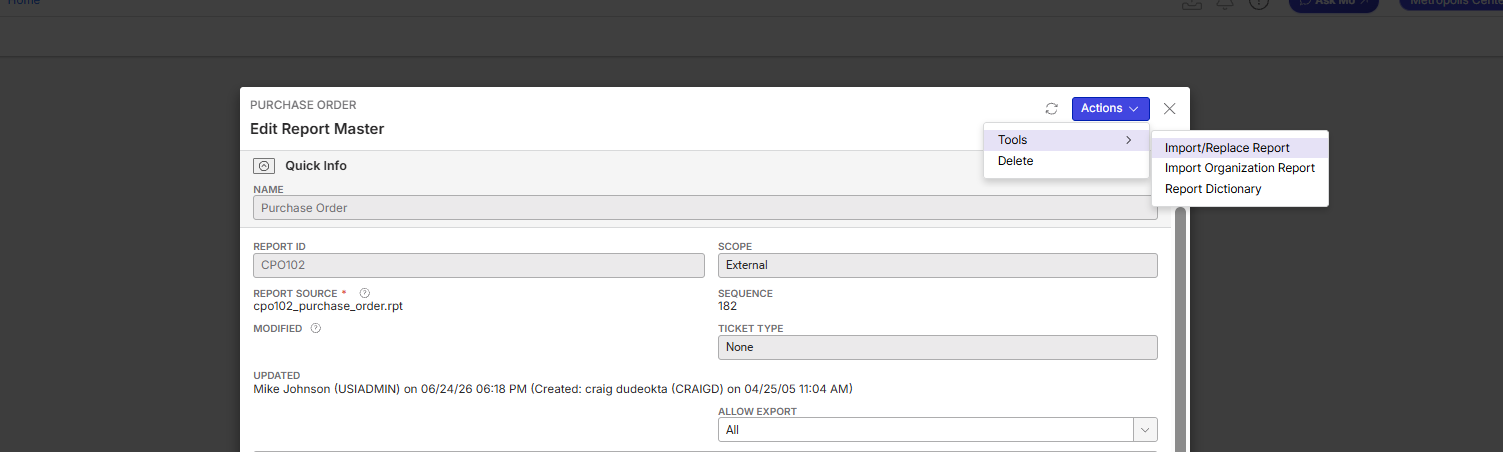
I think what you would have to do for this particular report is to import the custom report as a custom version of the standard report.
We could always enhance it to work like Invoice prompt where the report is selectable in the workflow - but I think the option above will work fine. -

Following
-
Thanks Ryan Ungerboeck, ASKMO suggested the same :-) . However, I am not able to replace the standard report. I have downloaded the custom .rpt file and used the Tools > Import/Replace Report. The system shows “Success” but did not replace the report. You can also see that the Updated Field is not Updated, the last modification date is the 12th of June.
The customer is on version 26.2.9655.31889 (20260608)

-
I'd submit a ticket on this - I am not familiar with the reports but this is what I was told was the solution so I will need someone from the reporting team to look at this
-
I have created a Support Ticket for this: https://ungerboeck.zendesk.com/agent/tickets/393123
-

As per Ryan's request, here's the Jira ticket: https://ungerboeck.atlassian.net/browse/ME-8952
-

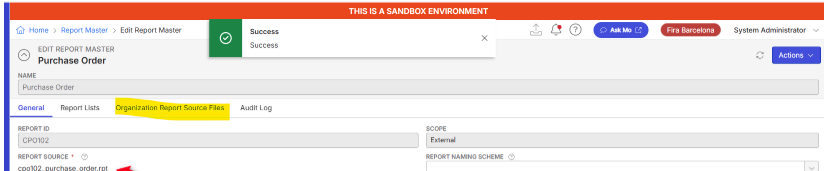
The image verification from 25 days ago is incorrect. Importing a customized report file does not change anything on the report master entry; you navigate to the Organization Report Source files. On success, you should see 2 records now, both org 99. One is standard; the other is custom. You could add another custom layer on top of it by importing an organization-specific file, which would be specific to that org. When the report master entry is run, whether custom or standard, we check for a custom org-specific record, then a custom system record (org 99), and then use the existing report file if standard to load the report file to run with.
-
Hi Dustin, thanks for the explanation. I am trying to find the Organization Report Source Files, but it doesn't show in the Main Menu. Where can I find this option?
-
Minka Verkaar, its not main menu, its a tab on the report master only.
-
Hi Dustin Banks , thanks, I found it. I have followed your steps ( I think) and now it looks like this:
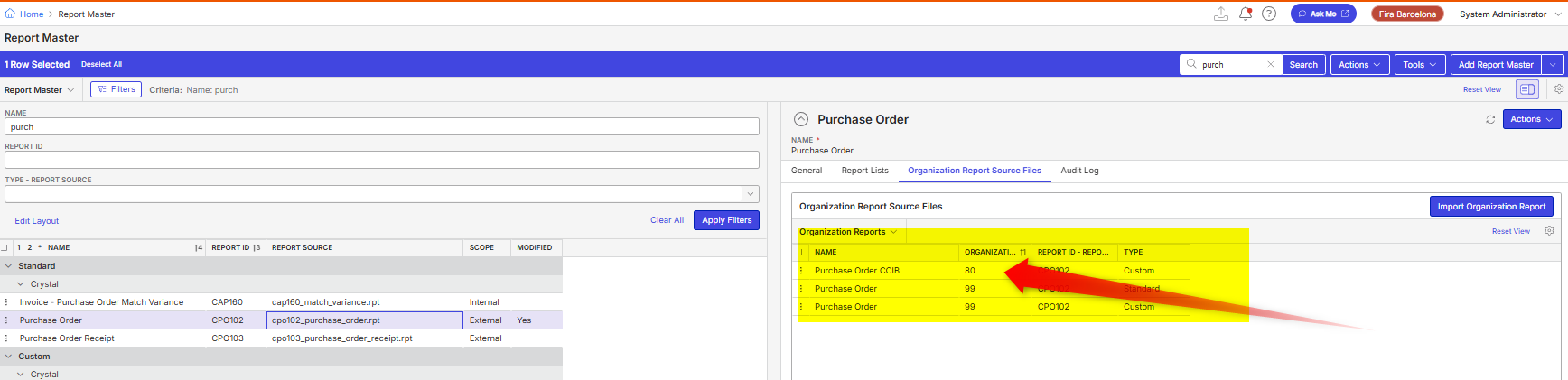
Should this replace the standard report with the custom report?
When I test this in their SANDBOX enviroment, I am not getting the result I was hoping for; the report doesn't run at all. I know there is a kind of legacy with GL Events and a shared report server, so before I ask them to test this on PROD on their end, I want to make sure that I have processed the right steps on our end when it comes to the configuration.
Thanks
Minka
-
So they have the standard, a custom system and a custom org for 80. When it runs in org 80, it pull the only org specific file. If it runs against any org NOT 80, it will use the custom system. Since there is an existing custom system, the standard system will not be pulled. This can also be verified in the report audit log that specifies what report file was used.
-
Hi Dustin,
I have been testing a few scenario's, but I am not getting the result I am hoping for. What I have configured and tested:
Standard Report: Purchase Order (CP0102) > Updated Organization Report Source Files
> I don't want to use this report anymore, so I have added a ‘new layer’ in the Organization Report Source Files (ORG80).
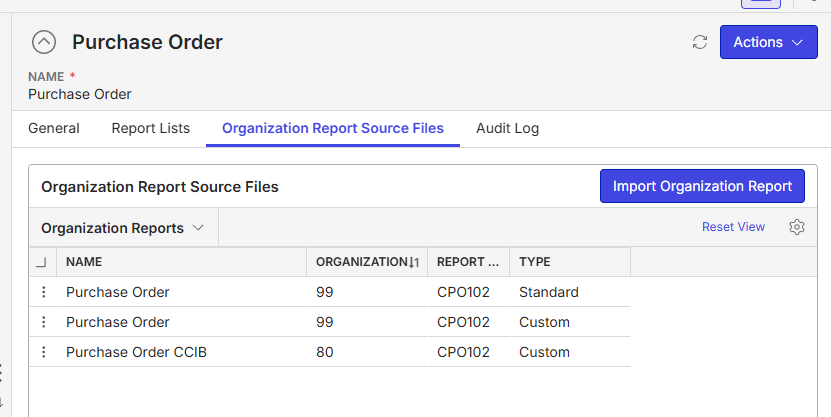
Based on this configuration, I am still getting the standard report when I click on ‘Issue Purchase Order’. Also, the Audit Log in this Report Master is confirming that.
The custom report they would like to use is:
Custom Report: Bon de commande achat - Purchase Order (CP0102A) > Updated Organization Report Source Files
> I have also updated the Organization Report Source Files here, just to see if that did the trick. This is the report they would like to use.
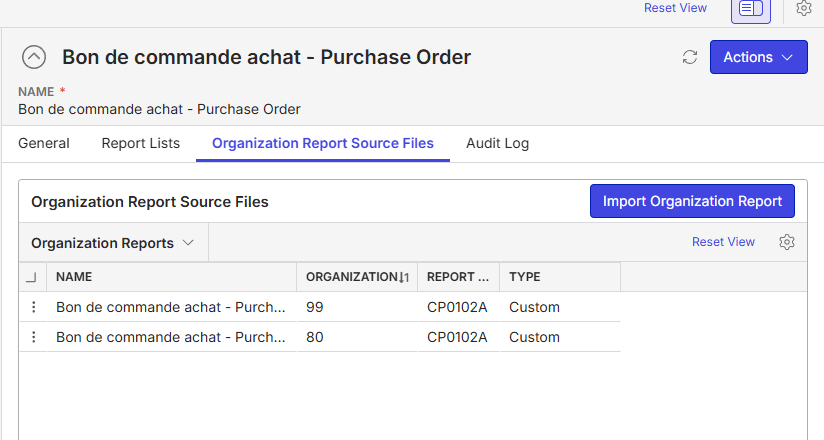
I have tested this also with another consultant in another database and had the same result; the system was still using the ‘standard’ report. What are we missing? Let me know if you want me to re-open the ticket.
Customer Database is on 26.2 and both the customer and myself are linked to ORG80.
Thanks
Minka
Ps. I have also checked the Organization Parameters and it seems we have a few parameters to default a standard report, like Default Event Invoice Report (BL100), Default Customer Statement Report (AR110). Do we have such parameter also available for Purchasing maybe?
-
Could you schedule some time with me? There is no ‘guessing’ on what file was run, it's in the report audit log. That log will tell you exactly which report file was ran.
Please sign in to leave a comment.
Comments
13 comments
Date Votes