Inactive resources being retained as active price list items

- Description of the issue: Inactive resources being retained as active price list items
- Account name: RFAL
- Region: APAC
- Client version: 26.1
-
Steps to reproduce:
- Main menu > Pricelist ex: 'Theatre Price List FY 25/26'
- Note two resources > one active at resource level (Technician - Sound & Vision) and another inactive at the resource level.(BMC Danish Chairs)
- Copy this pricelist. Note that the items which are inactive at the resource level are not copied but active ones are copied.
- As per the KB article - ‘change the resource status to Inactive to prohibit it from being added to future price lists and orders’ - this holds correct.
- Can we have an option to sort the pricelist items based on being active or inactive at the resource level? This will help the pricelist being loaded with inactive items.
- In third scenario, If the item has resource level status as inactive and it is active in one of the pricelist. And if that pricelist is copied > then that item is still active. What is the expected behavior?
- Please see the doc attached in the Zendesk
-
Observed results vs Expected results:
- All inactive items get copied into the new pricelist and the customer has to sort the active ones.
-
What is the job the client is trying to accomplish:
- Inactive resources being retained as active price list items
- Business impact if not resolved:
- Links to articles where you've looked for solutions and also other steps you've taken to research the issue:
- Link to Zendesk ticket: https://ungerboeck.zendesk.com/agent/tickets/390393
- Local v30 URL:
- https://supportwebap.ungerboeck.com/RFAL_Test_1577298467_USI_V30/app85.cshtml?
-
Nicole Loh Satya Ram Nukala please advice
-

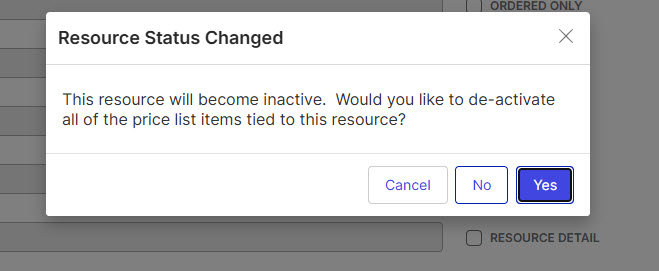
Seth Halvaksz I believe this needs to be reviewed by Dev. An Inactive resource is just adding to the price list with an active status if they don't select yes and deactivate all price list items. The article doesn't have this additional point included
-

Satya Ram Nukala Reading that screenshot, I would expect:
1) if click “Yes” then it would add the resources as inactive resources
2) if you click “No” then it adds the resources as active resources
I'm not sure what to expect if you click Cancel or the X button. My initial thought is that it should keep you on the previous screen and do nothing. When is this prompt displayed?
Please sign in to leave a comment.
Comments
3 comments
Date Votes