Invoice User Reference was automatically changed

Description of the Issue:
When an invoice is created a webhook will give the invoice a user reference. In their Accounting System they see User References …0024 till …0026.

Looking into momentus the same invoice have a different user reference which goes from …0049 to …0051.
Before and after that the sorting seems to be correct.

Is this a known behaviour? What could be the reason this has changed after their Accounting System already has the data set.
Client:
Kortrijkxpo_PROD_0317661473
Version:
25.42026040601
zendesk:
#389491
-

I mean, if they have a custom webhook that is updating that field, there's really no telling without more information. What changes did they make to the invoice that triggered the webhook to run? What does the webhook actually do? Does their custom app take into account updates to invoices and filter out those requests?
-
Here's the answer to rhe questions from the client and I'm having a thread open with TS at the moment as well which has not proven to be much help yet.
"We have 2 webhooks regarding our invoices, both made by Momentus. The first one runs simultaneously with creating the invoice and creates a unique number based on the code of the price list of the associated order. As sometimes the first webhook doesn't run, a second webhook was created to fill in the empty user references of created invoices. After a couple of minutes, this webhook fills in the blanks.To be honest, I hoped Momentus could tell me what was changed to these invoices. As there is no logging and the entered on + changed on are basically the same, I suppose nothing was changed (except from sending an email with the invoice).
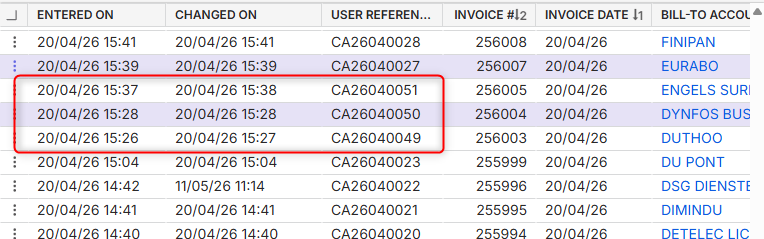
Our accountancy system uploads the data from Momentus once a day. The invoices with the first user reference were uploaded on day X and the same invoice with a different user reference were uploaded on day Y. The application viewed those invoices as new data. "
-
Mike Schepker TS took over. No need to review further.
Please sign in to leave a comment.
Comments
4 comments
Date Votes