Emails sent to spam after SendGrid enablement - Input from PM/Development

Zendesk Ticket: https://ungerboeck.zendesk.com/agent/tickets/386373
Account: University of Calgary (Theatre Services)
Region: US
Articles used in your research:
https://supportcenter.ungerboeck.com/hc/en-us/articles/204552688-User-Management
https://supportcenter.ungerboeck.com/hc/en-us/articles/204552178-Manage-User-Personnel-Accounts
General
Business impact if not resolved: Emails sent from the system may be flagged as spam, impacting communication reliability and business operations.
Short Summary of issue (issue description): The client is transitioning email sending from the @ucalgary.ca domain to a newly configured @uts.ucalgary.ca domain in SendGrid. They would like to confirm whether updating the personnel account email domain will impact other email-related functionality within Momentus.
Macro Vertical: Arts & Culture
Description of the issue
What does the client want to do? Why do they want to do this: The client wants to send emails using the newly configured @uts.ucalgary.ca domain in SendGrid while maintaining existing workflows and email reliability.
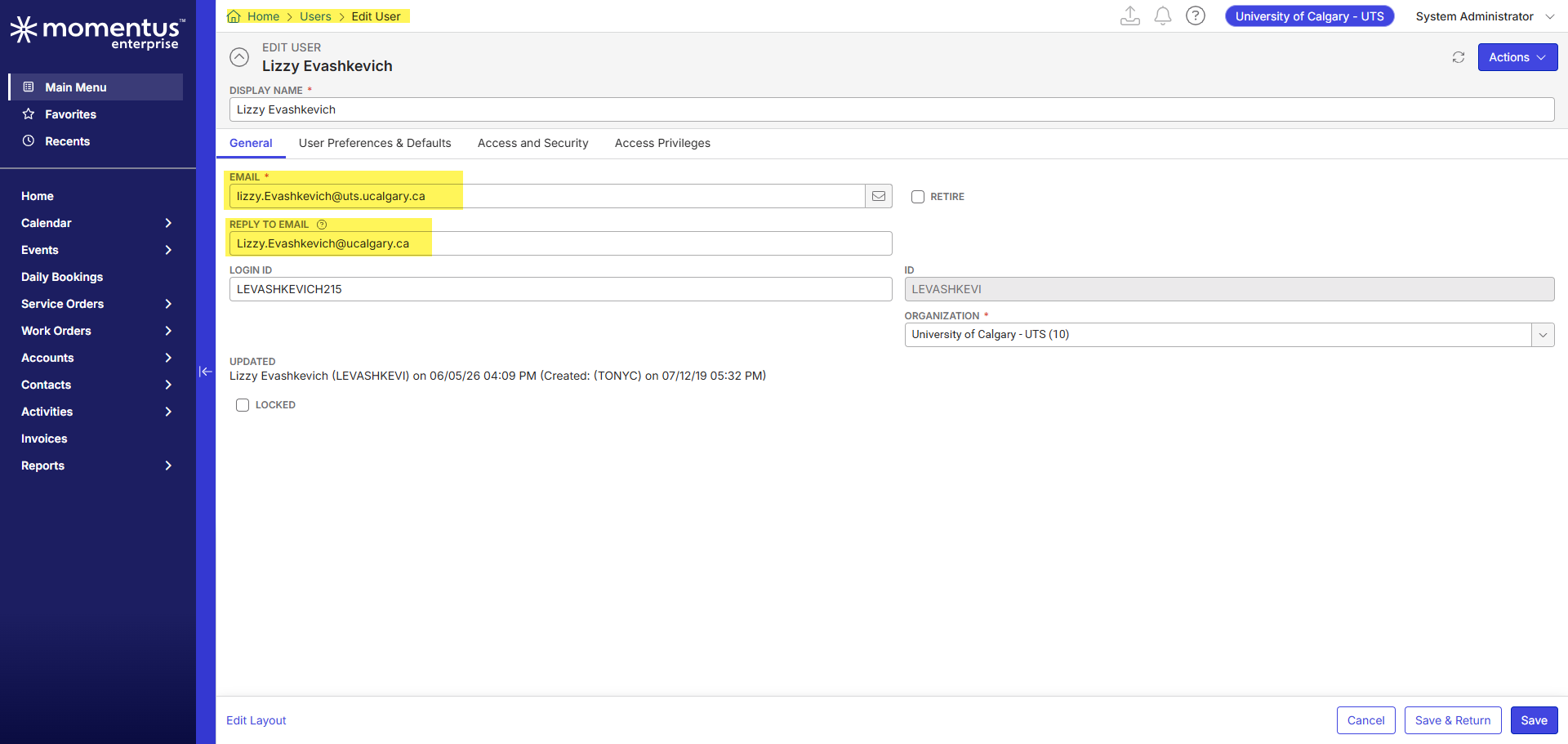
What you've already tried or suggested: We have SendGrid configured for the @uts.calgary.ca domain and the client tested changing the personnel account email address from @ucalgary.ca to @uts.ucalgary.ca and confirmed that it resolves the immediate issue of emails being flagged as spam.
Client Question / Concern:
The client would like confirmation on the following:
- If the Personnel Account email address is changed to @uts.ucalgary.ca, while the Reply-To Email Address remains @ucalgary.ca, will users continue to receive:
- System-generated emails
- Notifications
- Workflow messages
- Other platform communications
- How are the Personnel Account Email Address and Reply-To Email Address used within Momentus?
- Could changing the personnel account email domain have any unintended impact on inbound or outbound email functionality?
Debug Environment:
Customer DB Location: Hosted
Database: UofCalgaryUTS_Prod_0698734439_USI
Server: Debug-Canada,1433
Version: 26.1.9606.16192 (20260420)
V30 Link: https://supportwebus.ungerboeck.com/UofCalgargyUTS_Prod
User Login: usiadmin/ITRocks2014
Recreation Steps:
1. We have SendGrid configured for the @uts.calgary.ca domain. Emails using coming from that domain and passing through SendGrid should not get flagged as spam if the email address is updated from @ucalgary.ca to @uts.ucalgary.ca
2. We would like to confirm if the personnel account email address is changed to @uts.ucalgary.ca, while the Reply To Email address field remains set to @ucalgary.ca, will the user continue to receive all system-generated emails, notifications, workflow messages, and other platform communications as expected?
3. Please confirm how the personnel account email address and Reply To Email address are used by the platform, including whether changing the personnel account domain could have any unintended impact on inbound or outbound email functionality.
...
Observed vs. Expected Results:
Observed:
- Emails sent from @ucalgary.ca without proper DNS (CNAME) configuration are more likely to be flagged as spam
- Updating the personnel email to @uts.ucalgary.ca resolves the spam issue
We need input from PM/Development to confirm whether updating the Personnel Account email domain (from @ucalgary.ca to @uts.ucalgary.ca) while the Reply To Email address field remains set to @ucalgary.ca, will have any impact on other email functionality within Momentus, including:
- System-generated emails
- Notifications
- Workflow messages
- Inbound and outbound email processing
What does the client want to accomplish: The client is looking to send emails from the @ucalgary.ca domain and transition to the newly configured @uts.calgary.ca domain in SendGrid.
Attachments:
Attachments or screenshots: (More screenshots provided in the SD ticket: https://ungerboeck.zendesk.com/agent/tickets/386373
-

I think the only place the system would send to the email address on the user is doing user-specific actions, like resetting a password for the back office user. All others typically go to the personnel contact tied to the user.
Please sign in to leave a comment.
Comments
1 comment
Date Votes