Event Sync issues for Momentus Managed Spaces

I am configuring Outlook Calendar Integration for State Library of Queensland and we have run into some issues with the sync for Momentus managed spaces.
The configuration article mentions that for Momentus Managed Spaces, the Outlook room resource must have auto accept set to off and not have delegates assigned.
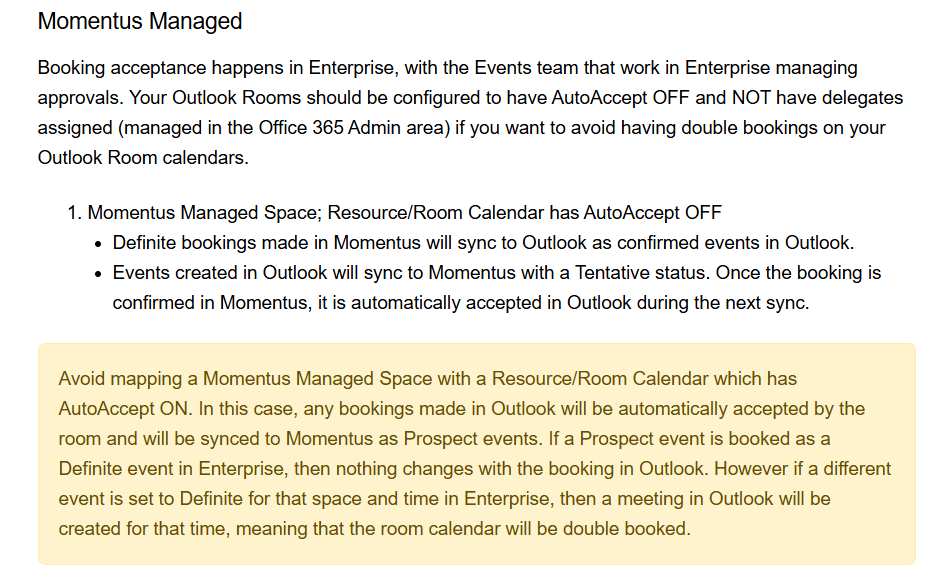
However, the customer is saying that MS requires the 365 admin to either have auto accept on or assign a delegate for approval as confirmed when I did a Google search.

So I am confused about this.
This meant that the admin had to set the delegate to approve and we are seeing that events booked from Outlook are coming through at a tentative status (working as configured) but events created/booked from Momentus are not booking the space in Outlook nor is it sending an approval to the delegate to confirm the booking in Outlook.
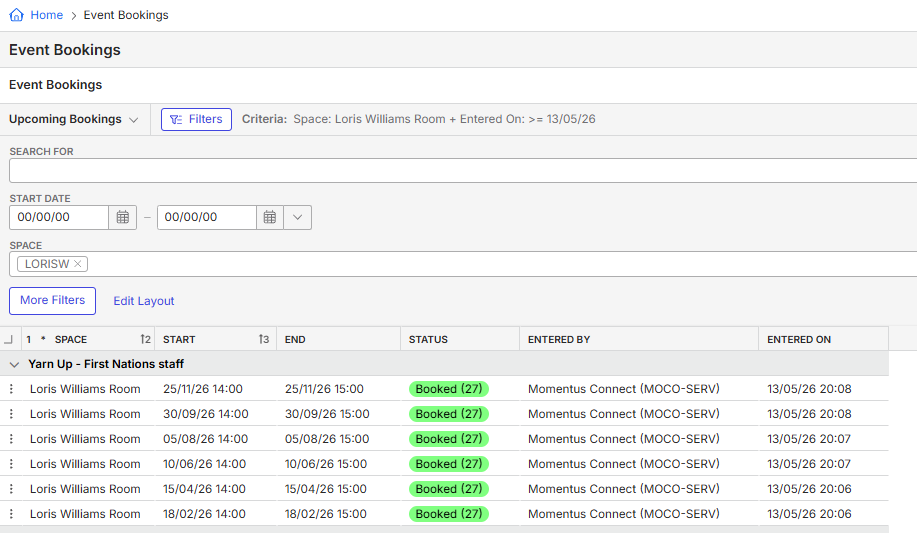
Additionally, the customer is using Online Space Booking in the interim until the Outlook Calendar Integration is launched. What we are also experiencing is double event creation in Momentus e.g. The user books the space on OSB and it creates an event. Then a new event is also created with a tentative booking in Momentus that has Entered By “Momentus Connect” and even though we had configured for it not to sync existing events, it seems to have brought in some older events after the configuration was turned on (13th May 2026).
Question is:
1. What is the configuration needed for Outlook room resources if it is Momentus Managed?
2. Can Momentus Managed Spaces be both booked in Momentus and Outlook but only approved in Momentus? Reading the configuration article, it seems to be possible but not working.
3. Will OSB bookings interfere with Outlook Calendar Integration for Momentus Managed Spaces?
-

Tagging tier 3 on this post Mike Schepker Pieter Fourie Nicole Loh Satya Ram Nukala
-

Hi Chanh Huynh, see below some comments.
1. What is the configuration needed for Outlook room resources if it is Momentus Managed?The customer is correct, and the existing Momentus documentation needs clarification. For a Momentus Managed space, the Outlook room resource calendar does NOT need to have auto accept turned off. What matters is that the room's Outlook behaviour does not override Momentus as the approval authority.
The two supported configurations are:
- Option A: Auto accept ON in Outlook (no delegate required) - bookings from Outlook are automatically accepted by the room resource, and Momentus manages the booking status.
- Option B: Auto accept OFF in Outlook with a named delegate - the delegate handles the Outlook-side approval, and Momentus manages the booking status for events originating in Momentus.
When advising customers, recommend Option A (auto accept ON) for most Momentus Managed spaces unless there is a specific business reason to require manual Outlook-side delegate approval. It is simpler, eliminates the need for delegate management, and reduces friction in the sync workflow.
@... , this is as a documentation improvement. The current wording creates confusion and could lead customers to an unworkable Microsoft 365 configuration.
2. Can Momentus Managed Spaces be both booked in Momentus and Outlook but only approved in Momentus? Reading the configuration article, it seems to be possible but not working.
Yes, Momentus Managed spaces are designed to allow bookings from both Momentus and Outlook, with approval happening only in Momentus. However, the reason it may appear to work in the configuration article but fail in practice is probably misconfiguration of the Outlook resource calendar settings. Specifically, if the Outlook resource calendar for a Momentus Managed space has delegate approval enabled or auto-accept turned on at the Outlook level, the two approval systems clash and break the expected workflow. Could you confirm whether this is the case?
3. Will OSB bookings interfere with Outlook Calendar Integration for Momentus Managed Spaces?
I checked their Outlook Integration in Prod and the space “Loris Williams Room” is not mapped. In fact, no spaces are mapped. My questions are:
- Are double bookings happening even though no spaces are mapped?
- Was this space ever mapped before?
Thanks,
Victor. -
Thanks so much for your detailed response. This is much appreciated and clears things up.
Sounds like Option A is the way to go and I will advise the customer. I'd also like to check that I should also be saying in order for Momentus to manage the Outlook room resource status, we should also have the auto accept turned off in Momentus Connect too right? My understanding of this was that if the customer books from Momentus or from Outlook, it starts at a tentative status in Outlook until the Momentus Event is set to a confirmed status - is that right?

We will set the Outlook room resource back to auto accept and test this to see if this will work for them.
In relation to the OSB issue, we originally had set the Loris Williams Room to be Momentus managed but has to remove it because the room was getting too much usage from their staff and caused issues with double ups. We have since switched to testing it on The Edge Window Bay 1 space instead as this has low real life usage.
Below are some of the examples of bookings we think are duplicated:
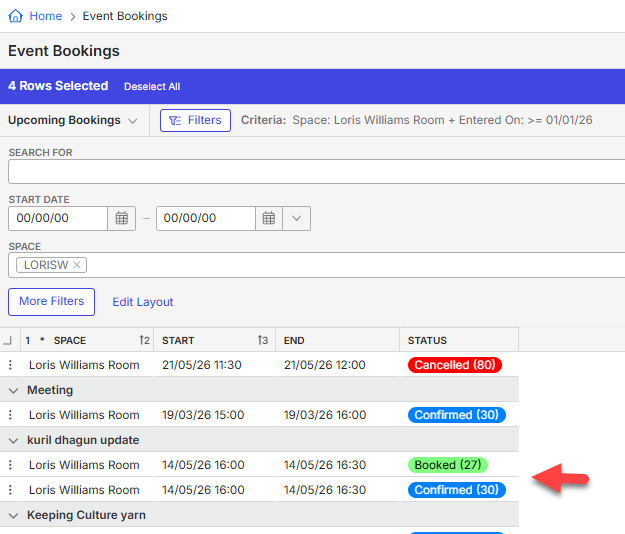
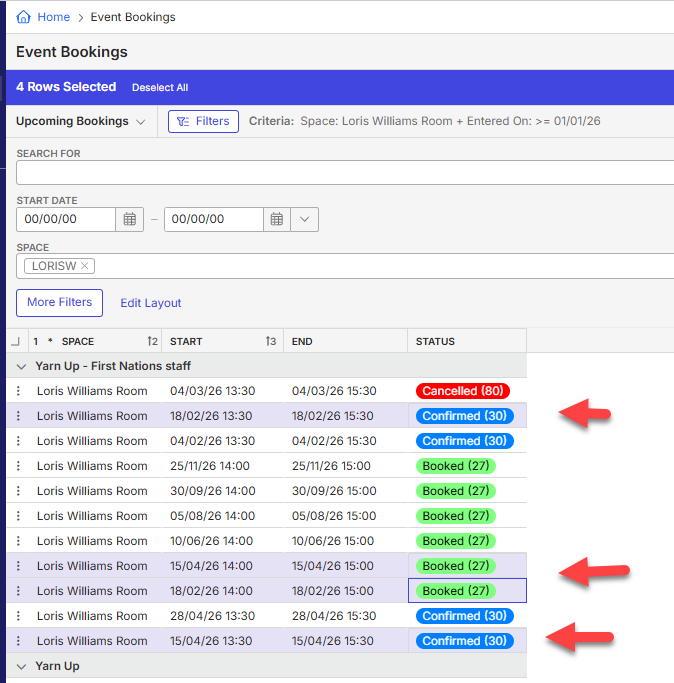
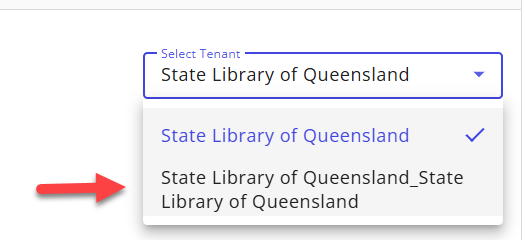
For SLQ, their Momentus Connect setup was weird. When we went to Apps, we then had to select the second option in the tenants in order to configure as the customer only had this option in theirs.
-
Hello Chanh Huynh ,
I’m writing to provide an update on the double booking issue. We’re still investigating it and will post more information as we reach a conclusion.
Thanks,
Victor.
-
Hello Chanh Huynh ,
Our engineers reviewed the logs and couldn’t find the duplicate entries for the events shown in the screenshot. It’s likely the customer deleted the duplicate manually so it’s not in the logs anymore. Could you confirm if they’re still experiencing this problem?
They could try creating a new event in their mapped rooms and let us know if they encounter any issues with the exact duplicated event name. This information will help us debug the issue.
Thanks,
Victor.
-
The customer has confirmed that they had to manually remove these in Momentus as it is their Prod system and needed to keep it clean.
They have raised some further sync issues in their testing which I'm hoping you can help with - let me know if this needs to be raised as separate posts in Documentus.
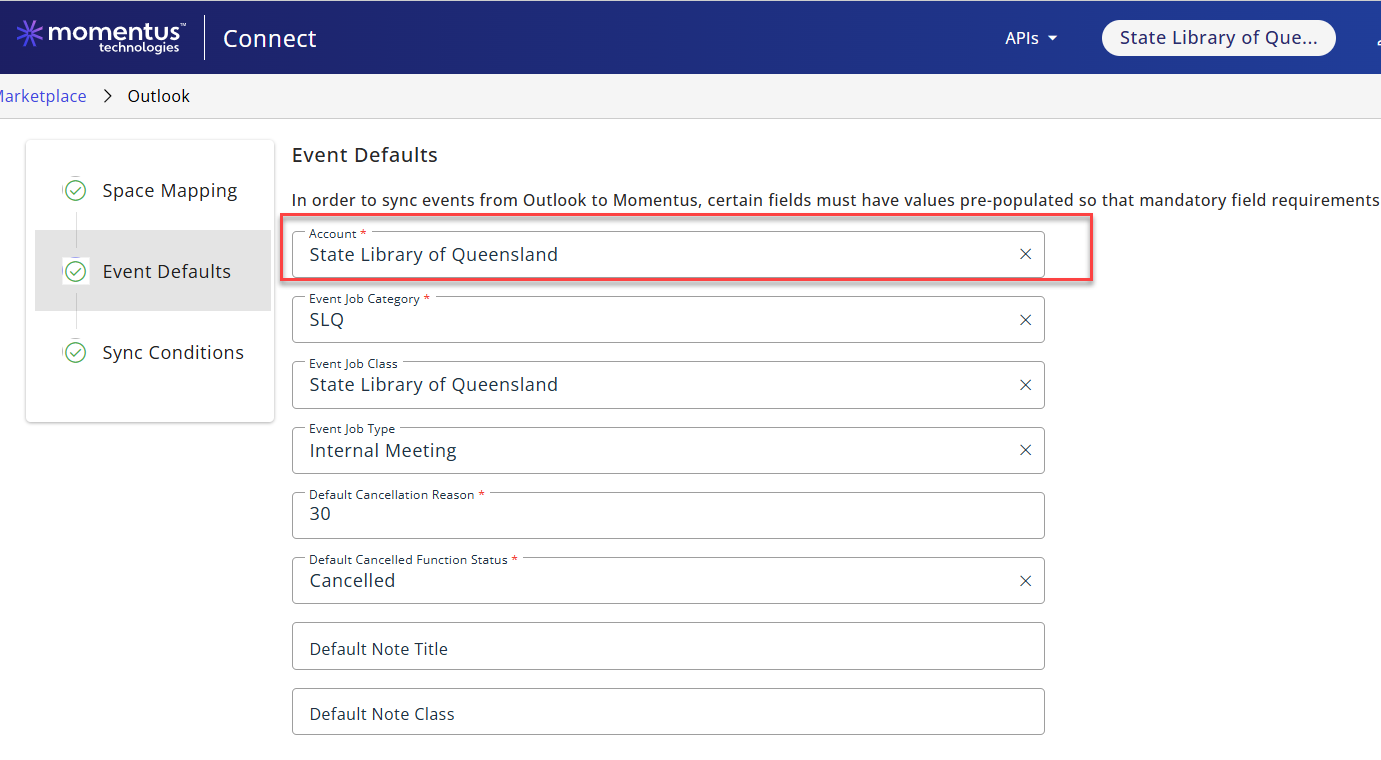
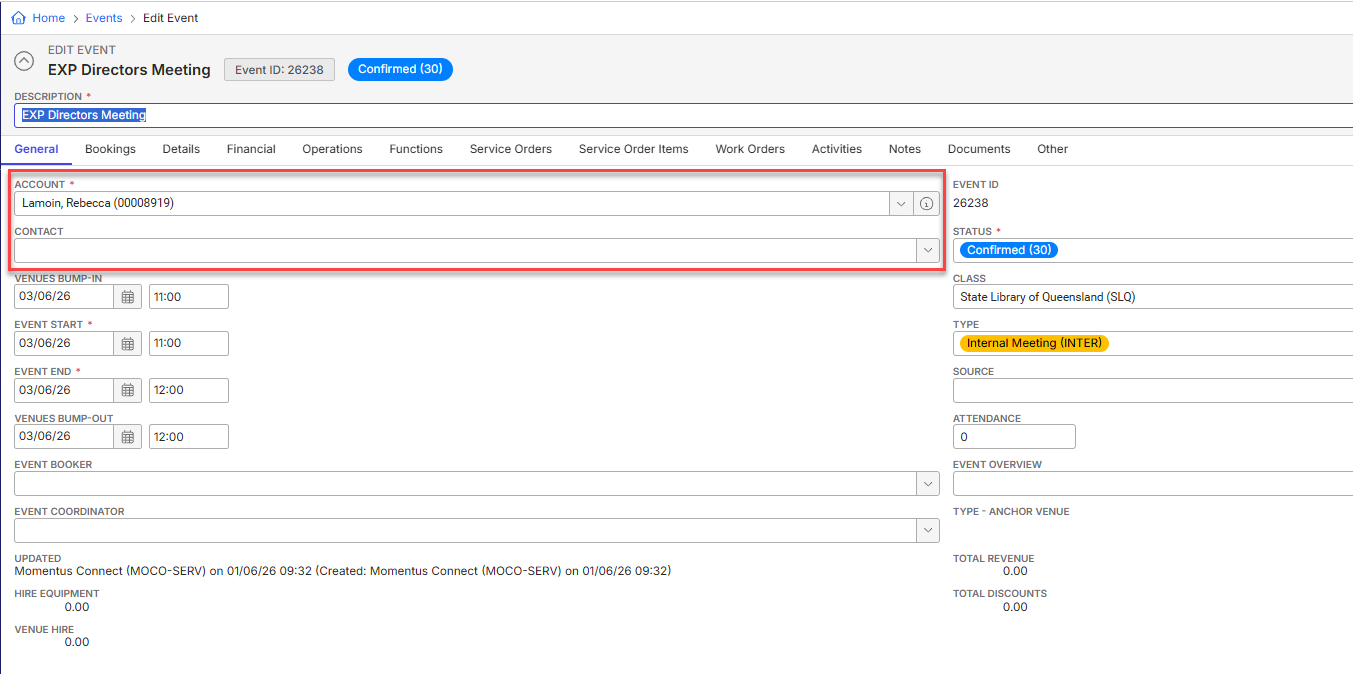
1. Account and Contact Sync: Although we have configured the Account to be State Library of Queensland, it is syncing the booker as the Account when we expected the Account to be SLQ and the Contact to be the booker.
2. Momentus Connect notifications: It seems the sync or the notifications are batching every hour and sending out 8-9 minutes after the hour. Is this expected?
3. Notification Sync Failures: There was a sync failure for a booking that was Outlook Managed due to the space in Momentus already previously booked. Momentus Connect Notifications were sending multiple email failure messages which the customer and myself received 7 of them. Is this meant to be the case and how many attempts before it stops? Looks like 7?
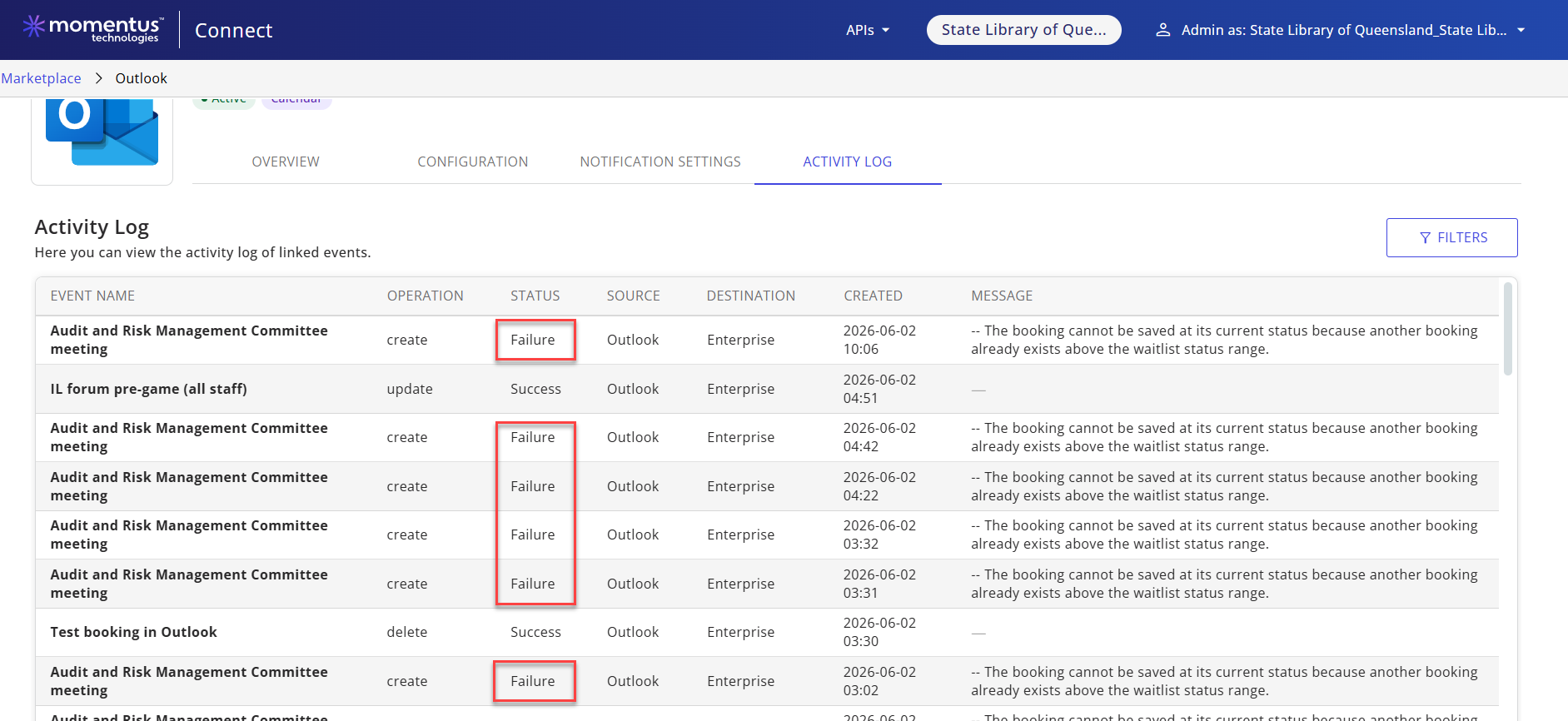
- Event: Audit and Risk Management Committee Meeting
- Date/Time: 3 June 2026, 2:30-4:30pm
- Space: SLQ Boardroom
- Error: "The booking cannot be saved at its current status because another booking already exists above the waitlist status range"
4. Outlook Managed spaces: Can I confirm that the workflow for cancelling a booking that was originally booked in Outlook that is Outlook Managed, needs to be cancelled only in Outlook in order to update Momentus? If the customer is cancelling in Momentus, this does not cancel the booking in Outlook.
5. Outlook Booking not showing up in Momentus or Logs: The customer created a booking in Outlook but it did not sync over and I cannot see it in the Activity Log. Is there any other logs we can check?
- Outlook Test Booking 5
- 4 June 2026 | 9-10 am
- Outlook auto accepted the booking
The customer was expecting that a Momentus Connect notification would come through at 1:08pm, however, no notification has been received at all, and the booking has not populated in Momentus.
Here are screenshots of the booking in Outlook:

Thank you
-
Hi Victor Nogales Junior - do you have an update for me on the above as I'm hoping to give the customer an update on them. Should I raise ZD tickets for each of the things they have asked?
-
Hi Chanh Huynh , a quick update, we are investigating and will come back to you.
Thanks, Victor. -
Hi Victor Nogales Junior - Checking in to see if we have anything the customer's project implementation is delayed and I'm trying to wrap things up with them. Thank you
-
Hello Chanh Huynh , apologies for the delay. See below the comments sent by our engineering team.
Thanks,
Victor,
1) Account showing the booker instead of SLQ, and Contact not being set
This is expected. When a booking comes from Outlook, the integration checks whether the booker's email matches an existing account in Enterprise. If it matches, that account is used; if there's no match, it falls back to your default account (SLQ). So seeing the booker's account is correct when their email matches an existing account.
On Contact: the integration does not set a Contact on the Enterprise event at all. There is no field mapping for it today, so nothing populates there automatically.2) Notifications arriving a few minutes after the hour
Expected. The calendar sync itself is real-time (usually within 30–60 seconds). The email notifications, however, are sent by a process that runs once an hour — so a notification landing a few minutes past the hour is simply that hourly run. Nothing is wrong.3) Multiple "sync failed" emails for the SLQ Boardroom
Expected, and here's the reason. Looking at that event in Outlook, it was edited several times, a few minutes apart. Every edit sends a fresh sync request to Momentus. Because the Boardroom already has a confirmed booking for that slot in Enterprise, each request is correctly rejected — and each rejection creates its own failure entry in the Activity Log (with a timestamp) and its own failure email. So the number of emails matches the number of times the event was updated in Outlook.4) Cancelling — does it have to be done in Outlook?
No. You can book from either system and cancel from either system. It does not matter where the booking was originally created. Cancelling in Momentus should cancel the Outlook event, and cancelling in Outlook should cancel the Momentus booking. If you have a specific case where you cancelled in Momentus and it did not cancel in Outlook, please send us the event details (event name/ID) and we'll investigate that particular booking.5) An Outlook booking that didn't sync and doesn't appear in the Activity Log
This comes down to two things:
- The Activity Log only shows jobs that ended in Success or Failure. This booking ended in a Cancelled state, which we intentionally don't display — there are several reasons a sync gets cancelled, and showing them all would cause more confusion than clarity.
- Why was it cancelled here? The event had two resources on it — Jasmin Gordon and State Library Boardroom — and they have not accepted the invitation, so the sync couldn't proceed.
- On top of that, the event had multiple rooms added to it. Booking multiple rooms on a single Outlook event is not supported by the integration today, so this event wouldn't sync as expected regardless.
Recommendation: use one room per Outlook event, and make sure the room resource accepts the invite. -
Thank you for the responses.
I would like to further understand our design logic for point 1 as I had thought the solution was designed for corporates and universities where they would have contacts recorded under the account and would need to know who is the booker under the account. Wouldn't it make more sense to have the account and at least the contact or requester as the booker?
The current design means that the customer would then need to update the event each time to reassign back to the main account and change the booker to be the contact. This is additional effort that does not make sense to me.
For point 5, as the solution is new to the customer, they are wanting more activity tracked to ensure it is working as intended. Their biggest concern is where their CEO or executives would book a room and not have this flow through correctly but them not also being aware it has not worked. It could then lead to the CEO walking into a meeting with their guests and finding someone else had booked the room instead.
On testing, they are getting mixed results with some events being created in Momentus and others not - and they are unable to see anything in the activity logs which then creates mistrust in the solution working. They have also said they have received email confirmations and not see the event being created in Momentus - ZD: #392546. They have also encountered some weird behaviour with the sync creating Outlook bookings when they are making changes in an event #392553
They are wanting more visibility with the audit log / activity log to ensure they can keep an eye on the solution during their launch phase.
I shall update the customer with your response but would like for us to pursue points 1 and 5 a little more please.
Right now, the customer is still testing and is preparing for launch but have big concerns and trust in the solution working. I have implemented it based on the available documentation and my understanding of it. Could one of your team review State Library of Queensland's Outlook Integration configuration to ensure there is nothing that is causing these issues? Thank you
Troy Enright and Damian Olsen - these are some of the issues we have faced during the implementation.
-
Hi Chanh Huynh ,
Absolutely, let’s go deeper into points 1 and 5. I’ll meet the team tomorrow morning to discuss both.Regarding #392553, I can’t find the attachment. Is it just me or did the customer forget to attach it?
Thanks,
Victor. -

Thanks for logging this Chanh Huynh. The customer has also reached out to me to escalate and flag their concerns. Looking forward to feedback from Victor Nogales Junior and his team.
-
Hello Chanh Huynh ,
-
Default Account (point 1) - There isn’t a strong reason for booking the event against the account rather than the contact. That said, we’re happy to evaluate this and confirm whether there are any technical constraints or other considerations that would prevent us from assigning the contact as the booker.
We’ve logged this as a feature request on our side and will review it as part of our product evaluation.
-
#392553 - We believe there is some confusion about the distinction between Outlook-Managed and Momentus-Managed.
Regardless of which setting is selected, events are synchronized in both directions between Outlook and Momentus.
The Outlook-Managed or Momentus-Managed setting determines which system is responsible for managing the space and deciding whether a booking request is accepted or confirmed. It does not determine where a booking can originate.
For example, Outlook-Managed does not mean bookings must be created in Outlook. A booking can be created in either Outlook or Momentus, and it will be synchronized to the other system. The difference is that Outlook is the authoritative system responsible for validating availability and confirming the booking.
Similarly, Momentus-Managed means that Momentus is the authoritative system for managing the space and confirming booking requests, while events continue to synchronize in both directions.
-
#392546 - We have one question: is this behavior occurring only for a specific room? Our initial suspicion is that it may be related to the room’s Exchange configuration, but we’d like to confirm whether the issue is isolated to that room. At this stage, this is only a hypothesis.
Thanks,
Victor.
-
Please sign in to leave a comment.
Comments
14 comments
Date Votes