Incorrect entered on user details in the payment plan > AR tab

- Description of the issue: Unable to trace user in entered on column in payment plan
- Account name: Cairns Convention Centre
- Region: APAC
- Client version: 25.4
-
Steps to reproduce:
- Main menu > Cancelled and Archived Events and edit event 20432 > Payment plan tab > Edit > click tab AR Recap
- https://app.birdie.so/library/abc3bbeb-bf24-48d5-a986-80074af24547
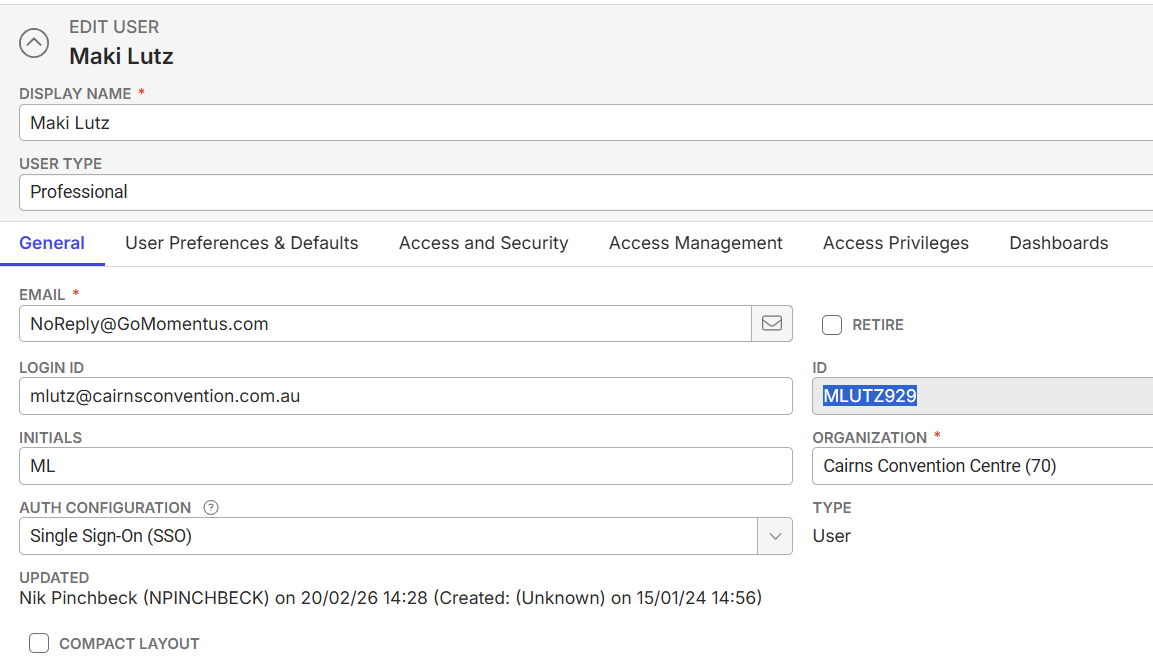
- Note that the user in the entered by column cannot be traced. (mlutz@cair) display does not seem right.
- Go to Main menu > User window > (mlutz@cair) is not available. Could be possibly be user Maki Lutz (MLUTZ929).
- The entered by should be displayed as MLUTZ929
- Is this entry a bug ?
-
Observed results vs Expected results:
- Correct user ID/email should be entered
- What is the job the client is trying to accomplish: Customer want to know if this is a bug ?How can this be avoided
- Business impact if not resolved: Normal
- Links to articles where you've looked for solutions and also other steps you've taken to research the issue:
- Link to Zendesk ticket: https://ungerboeck.zendesk.com/agent/tickets/386970
- Local v30 URL: https://supportwebap.ungerboeck.com/CairnsCC_Prod_1084401438_USI_V30/app85.cshtml?


Additional issue:
-
The Entered By column is not selected in the Show Columns list, but it is still visible in the AR Recap tab. Adding again results in duplicate column (noted in the same video)
-
Satya Ram Nukala Nicole Loh please advice
-

Anitha Khairnar, this looks like a bug to me! Try to add information in AR Recap as MLUTZ929, capture what the entered by stamps says and then cancel the event, see if the information changes. we can send this to dev based on that
Please sign in to leave a comment.
Comments
2 comments
Date Votes