Service Order Items - Billable is greyed out
Answered
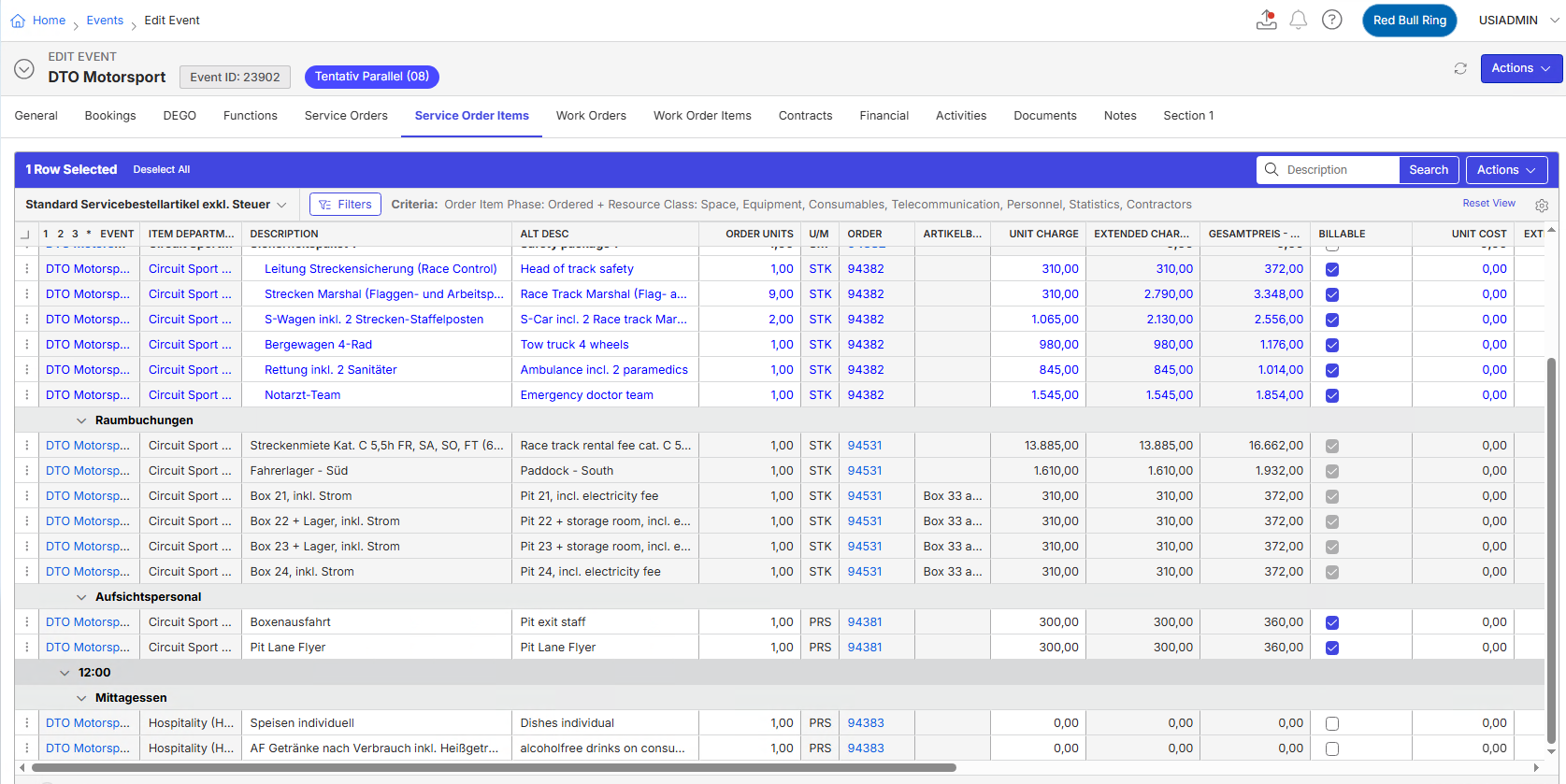
- Description of the issue: After copying an event, the customer noticed that the ‘Billable’ checkbox in the ‘Room bookings’ service order items is greyed out.
This also happens when they delete the ‘Room bookings’ and re-enter them. All other items in the ‘Billable’ column can be edited. How come that these items are not billable? - Account name: Redbull
- Region: EMEA
- Client version: 25.4
- Steps to reproduce:
- From Main Menu go to Events and search Event ID 2309.
- Click on service Order Item Tabs. Make sure the view is set to " Standard Servicebestellartikel exkl. Steuer"
- Scroll down to check "Raumbuchungen"
- Check the billable column which is disabled - Observed results vs Expected results: The billable column is disabled, but it should be possible to edit it
- What is the job the client is trying to accomplish: The client wants to edit the Billable column after copying an event
- Business impact if not resolved: It is difficult to work on a copied event.
- Links to articles where you've looked for solutions and also other steps you've taken to research the issue:
- Verified the account as well and it is active
- Verified Function "Raumbuchungen"
- Verified the usage details
https://supportcenter.ungerboeck.com/hc/en-us/articles/204567758-Non-Billable-Service-Order-Items - Link to Zendesk ticket: https://ungerboeck.zendesk.com/agent/tickets/381746
- Local v30 URL: https://supportwebemea.ungerboeck.com/Redbull_PROD
Pieter Fourie Mike Schepker Nicole Loh Satya Ram Nukala
-
-
Pieter Fourie Mike Schepker Nicole Loh Satya Ram Nukala Any idea? Thanks!
-

Seth Halvaksz Mike Schepker is there anything we can do here
-

Tagging Ryan Ungerboeck if he can comment
This looks like it would be an enhancement request, to make the billable column editable after copying the event.
-

Are these items part of a package or tied to a booking order or do they have Fixed checked?
https://ungerboeck.zendesk.com/agent/tickets/138622
https://ungerboeck.zendesk.com/agent/tickets/138118
https://ungerboeck.zendesk.com/agent/tickets/289877
On the local copy all these items are cancelled now, so none of them are editable.

-

Mike listed above the most common reasons an item would not be editable:
1.) Tied to a booking
2.) Internal
3.) Waitlisted, cancelled or suspended item
4.) Fixed Item
5.) Department Access security
Please sign in to leave a comment.
Comments
6 comments
Date Votes