Exhibitor Store Cart Not Clearing

Please fill out the information below before sending to Development:
- 🐛 Bug - Exhibitor Store Cart Does Not Clear After Purchase
-
Environment Observed
- Where was the issue observed? NA
- Account Name WCD - Baird Center, Miller High Life Theatre, UWM-Panther Arena
- Account ID account-1521-A
-
Is this a converted account?
- Yes
- Date Converted (if known) 2019-06-16
-
Issue Scope
- How widespread is the issue? Multiple Customers
- Event Name CheeseExpo 2026
- Event ID event-62534-A
- Exhibitor Store URL: https://exhibitors.venueops.com/exhibitorStore/account-1521-A/exhibition-5455-A
-
Was the issue reported by the client?
- Yes
- Client Contact Name (if yes) Courtney Covey
- Client Contact Email (if yes) ccovey@wcd.org
-
What’s the problem?
- Describe the issue clearly and concisely
The customer reported a system issue causing duplicate exhibitor orders due to carts not clearing after successful transactions, leading exhibitors to believe orders failed and reorder. This has resulted in over12 duplicates and frequent manual refunds over two weeks, impacting order processing during a high-volume period. The issue affects multiple events and users, indicating a broader system behavior rather than isolated cases.
- Describe the issue clearly and concisely
-
Is the issue reproducible?
- No
-
If reproducible, where?
- Demo
- Demo/Staging/Pitstop Account S - Ignacio's Demo Account
- Demo/Staging/Pitstop Event ID - event-91-A
-
Steps to reproduce the issue
- Step 1: Logged in as Ignacio > System Admin > Settings > Payments
- Step 2: Edit Exhibitor Store > Enable > Set Payment Type to Payment Gateway
- Step 3: Edit Payment Gateway > Set to Authorize.net
- Step 4: Go to Event Thrashers v. Minnesota Wild (event-91-A) > Exhibitors > Configure Exhibitor
- Step 5: Apply invoice template > Apply Service Order Template
- Step 6: Add Price Schedule
- Step 7: Use Exhibitor Store Link > Create User account
- Step 8: Add items to cart > Checkout
-
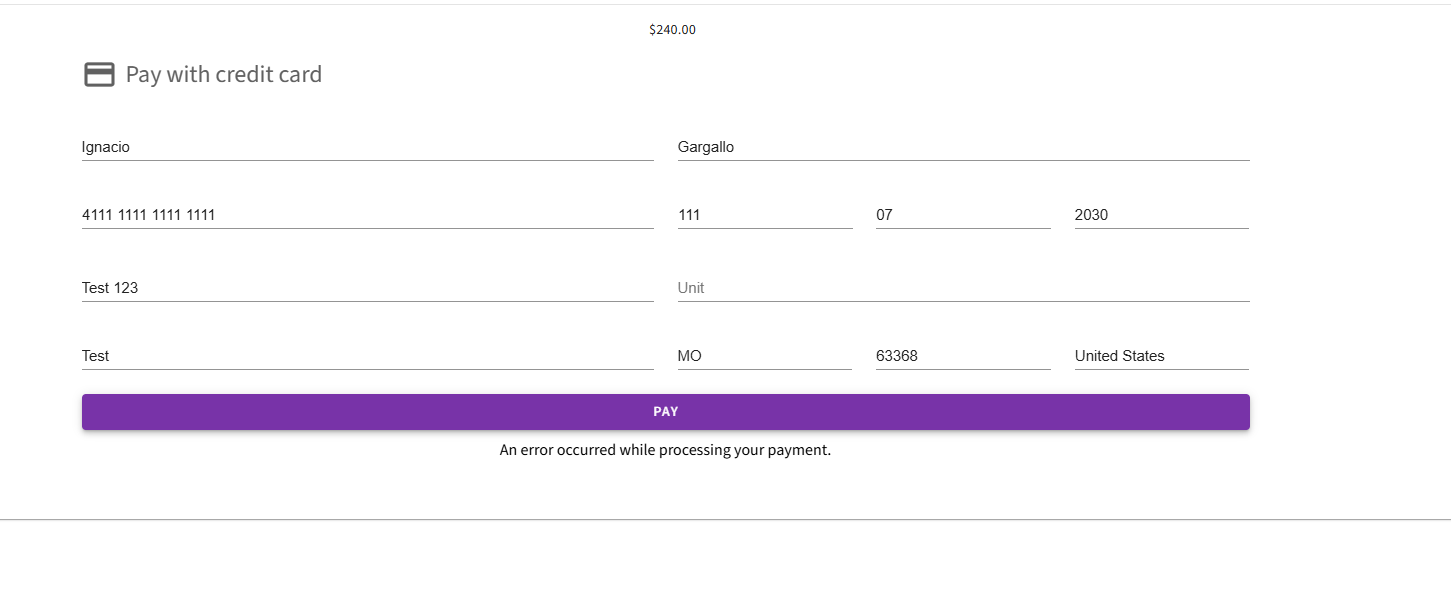
Note: The test credit card numbers provided from Test Credit Card Account Numbers resulted in errors and was not able to reproduce. Tested multiple iterations of CSVs, dates, and addresses.
-
Expected behavior
- When user checks out in the Exhibitor Store the cart clears and the order is processed as expected.
-
Troubleshooting steps already taken
-
Setting up an Exhibitor Store in Demo Account
- Verifying that everything is in place for Exhibitor Store to function correctly
- Exhibitor Store Enabled > Payment Gateway > Account & Event are Configured for Exhibitor Ordering
-
-
Workaround identified?
- No
- If yes, describe it
-
Attachments available?
- Screenshots or videos: Included
- Zendesk ticket link (for Support use): Ticket: Duplicate Exhibitor Orders - Bug – Momentus Support Center – Zendesk
-

Determined this is a bug with John. Ignacio Gargallo please go ahead and just create this as a Jira and link it back to the post here via normal process
Please sign in to leave a comment.
Comments
2 comments
Date Votes