Mobile Work Order - Assign To

- Description of the issue: when selecting two or more work order items and choosing “Edit Multiple,” it indicates that you are editing the two (or more) selected Work Order Items. But in the list, it then shows that it is editing all Work Order Items on the order — not even limited to the same department. When you then select Assign To, all items on the Work Order are assigned to the employee, not just the two (or more) that were selected at the time of editing.
- Account name: Svenska Mässan
- Region: EMEA
- Client version: 26.1
- Steps to reproduce:
- Go to Work order Item option from main menu
- Select any 2 work order items using control and right click to edit multiple
- While using Assign to option check the the above expand area where it says you are editing 2 word order items
- If you expand the tab you could see there are multiple work order items which were not selected and cannot be uncheck it - Observed results vs Expected results: When you then select Assign To, all items on the Work Order are assigned to the employee, not just the two (or more) that were selected at the time of editing.
- What is the job the client is trying to accomplish: They are trying to assign multiple work order items to an employee
- Business impact if not resolved: They are currently implementing Mobile Work Order, where Assign To at the Work Order Items level is crucial for us to be able to use the module at all
- Links to articles where you've looked for solutions and also other steps you've taken to research the issue:
https://supportcenter.ungerboeck.com/hc/en-us/articles/204568228-Assign-Work-Orders-or-Items-to-Staff - Link to Zendesk ticket: https://ungerboeck.zendesk.com/agent/tickets/381489
- Local v30 URL: https://supportwebemea.ungerboeck.com/Svenska_PROD/
Pieter Fourie Mike Schepker Nicole Loh Satya Ram Nukala Should I report it as a bug?
-
Hi Pieter Fourie Mike Schepker Nicole Loh Satya Ram Nukala,
The customer wrote this is very important for them.
Should I report it as a bug?
Thanks! -

Hi Pieter Fourie Mike Schepker Nicole Loh Satya Ram Nukala , customer has escalated this with me last week. Can one of you follow up on the above case with Francesco? I think main question: is this a bug or enhancement request?
Thanks!
FYI: Josiane Mikhael
-

Hello Pieter Fourie Mike Schepker Nicole Loh Satya Ram Nukala i do think the reported issue is a bug, can you please confirm?
-

What happens if you select a single work order item and assign instead of from Edit Multiple? Is the behavior the same?
-
Mike Schepker When you select a single work order, everything works fine.
I think the problem happens only when the “Edit Multiple Work Order Items” window is open:
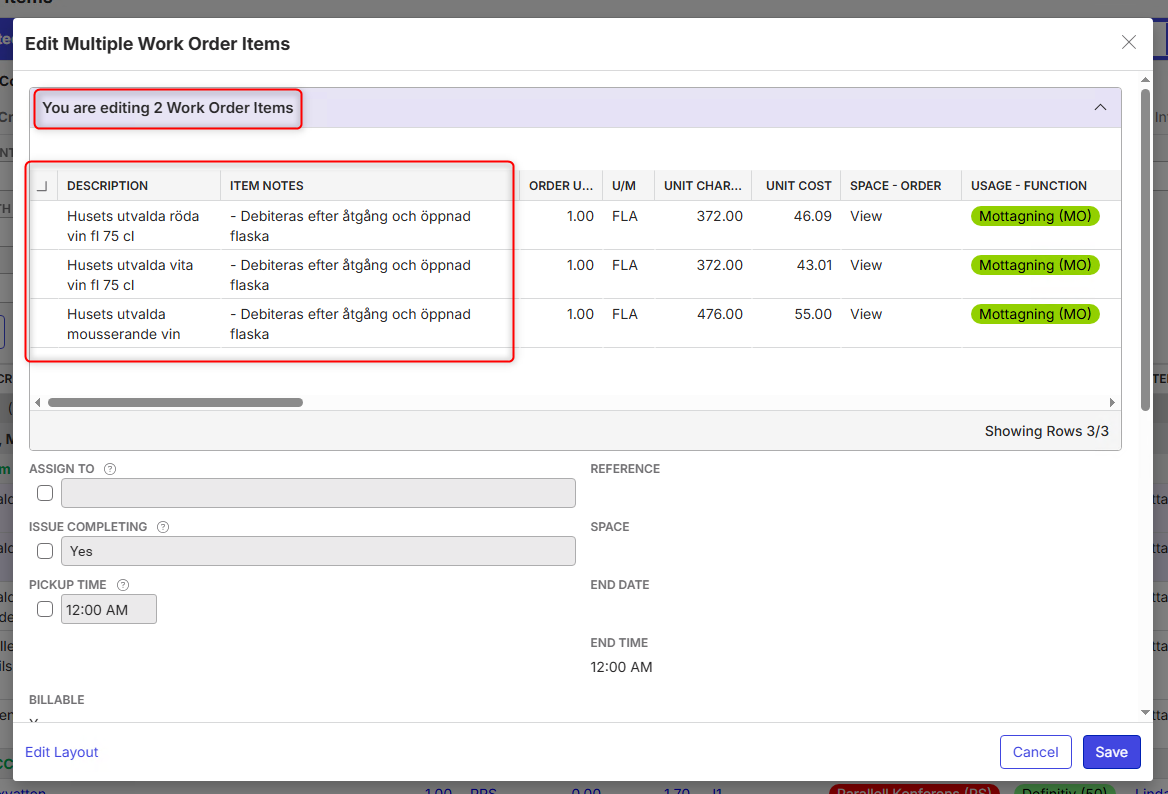
-
If the behavior is different when editing multiple than it is when editing a single, I'd lean to that being a bug. The behavior should be the same.
-
Thank you, Mike Schepker !
I will report it to the Dev team and post the Jira ticket link here. -
Here's the link to the Jira ticket:
https://ungerboeck.atlassian.net/browse/ME-8312 -
As requested in Jira ticket, I logged a Pendo feedback:
-
I informed the customer about the enhancement request, but they didn't accept this feedback. They logged new tickets and/or reopened closed ones:
"Hi Francesco,This is not an enhancement. The enhancement is regarding being able to” assign to” on work order items and not only work orders.
This ticket is regarding the issue that when you are choosing “edit multiple” in work order items views the system is editing not chosen items – please see the images for example.
//Linda"
Is there a workaround we can offer while they wait for the enhancement request?
Thank you! -
Adding Richard Marmura and Vernica Lodha to this thread as they had a meeting with this customer about MWO. Maybe you can help here on how we can help Svenska? Linda addressed this issue in the meeting as high urgent for them.
-

Hi Laura de Jong and Francesco Torchia - as mentioned, currently assignment is linked to a MWO, not an item. Which means that the central entity - owner at a MWO level is what is being changed when user is trying to change the MWO item. I do agree that the UX is poor, given it gives the user a feeling of editing items, when its actually editing the MWO. However, this is an architectural change, and as menitoned already a part of our enhancement queue. Unfortunately, at this time, there is no workaround as the entity is associated at a MWO level, not Item.
Please sign in to leave a comment.
Comments
12 comments
Date Votes