Lead / Strike Calendar Colors Not Showing
Answered
- Description of the issue: Customer has configured lead and strike times to appear in a different color on the calendar via Booking Configuration. The colours are not displaying.
- Account name: RMIT
- Region: APAC
- Client version: 25.4
-
Steps to reproduce:
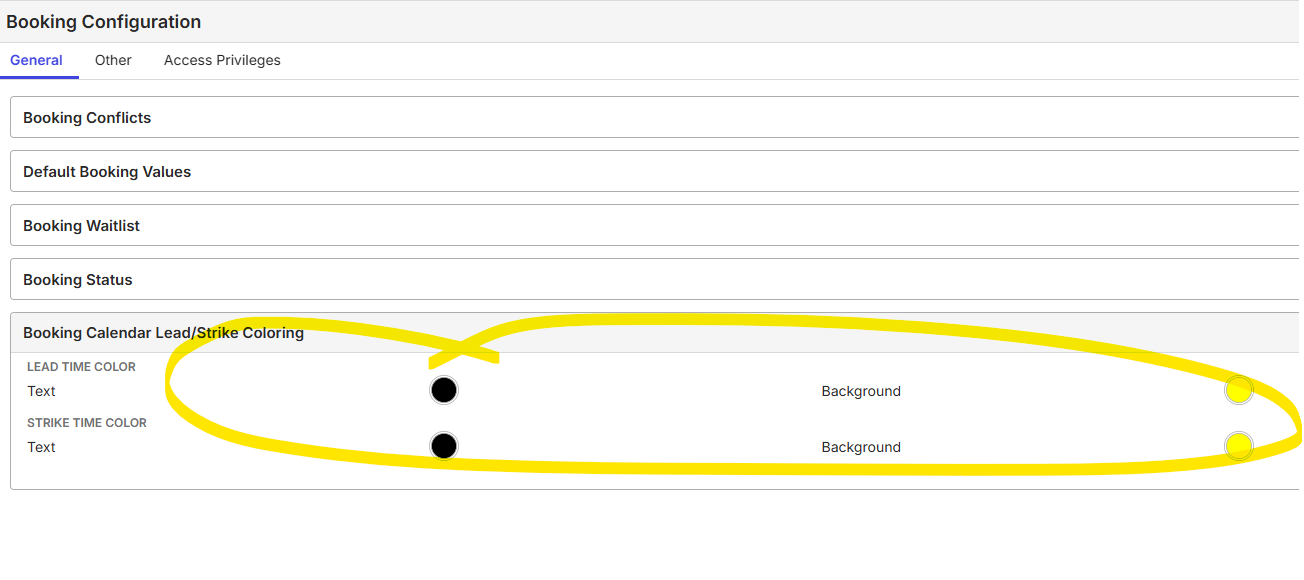
- Navigate to Booking Configuration - General Tab
- Expand Booking Calendar Lead/Strike Coloring
- Seclect a text and bacjkground colour for lead and strike.
- Navigate to Spaces
- Edit a Space and enter a lead and strike number of hours
- Navigate to the booking calendar
- Book the space edited
- Observed results vs Expected results: Lead and Strike show no colour at all and appear not booked.
- What is the job the client is trying to accomplish: A view on the calendar clearly showing when the move in and out time buffer times are in comparison to the bookings
- Business impact if not resolved: Customer will not know when the times are and will have to manually add them as bookings. The can't be the same colour unless they use a different status for move in and out.
- Links to articles where you've looked for solutions and also other steps you've taken to research the issue: None found
- Link to Zendesk ticket: No ticket yet
-
Local v30 URL: https://rmit.ungerboeck.net/prod/app85.cshtml?db7efb85c5f448ecb137477e02394dd4=63c7f1acb8564a8ebd7bdc23dc9435aa
This is the booking on the event showing the lead and strike

This is the calendar (yellow highlights where the coloring should be.

This is the config on the Booking Configuration
-

Tagging tier 3 to review Satya Ram Nukala Nicole Loh Mike Schepker Pieter Fourie
-

Hi, it's a configuration on the calendar.
-
Seth Halvaksz I spoke to Martin on Teams and it seems that there is a different field on the Booking Configuration for the lead and strike colour that our Priava customers are used to. However when we configured this in Enterprise, it doesn't seem to be respecting the configuration in booking calendar. The fact that fields are there makes me wonder whether it used to work or whether we should treat it as a bug as it would make our Priava customers happy.


-

Hi team,
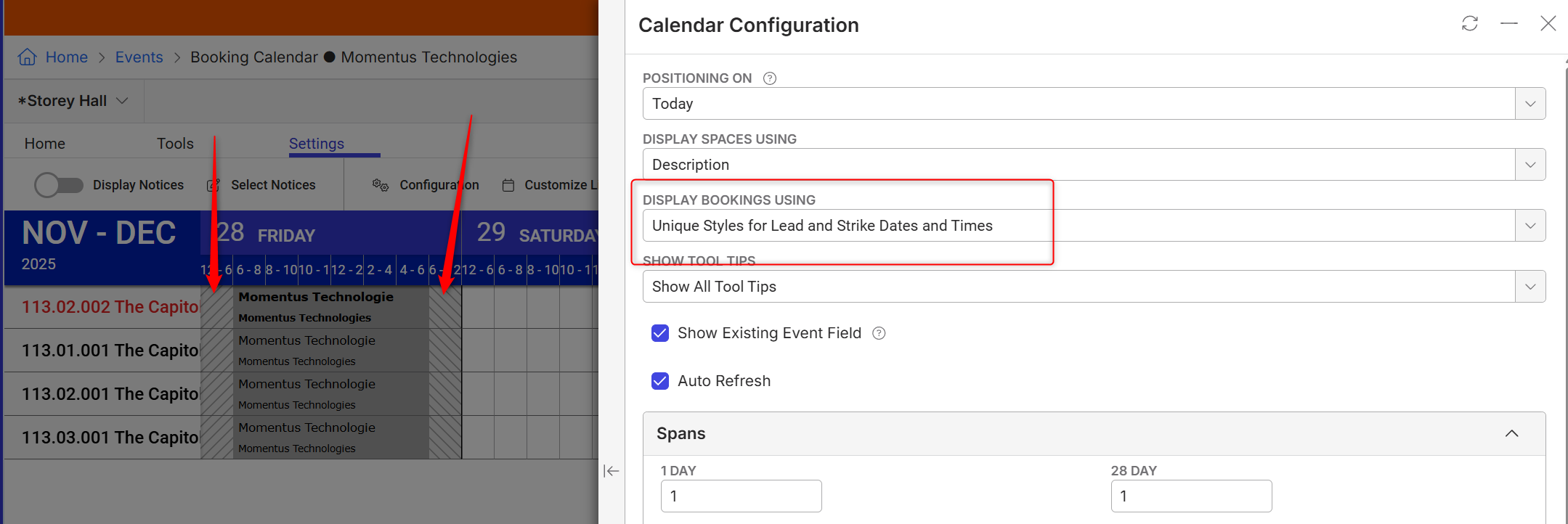
We deprecated the unique colors in favor of the stylistic striping you see today.
As Nicole points out, this is configured via the settings window on the calendar (use distinct styles for lead/strike)
The “bug” is really that we never removed access to the coloring fields on the Space, which is something we could or should consider doing.
At the time the calendar was built (back in 2017 or so), the design decision was that the unique coloring options was more of a legacy v19 feature and made the calendar look quite ugly when many bookings were present with multiple distinct colors.
This is the first time in my 11 years here I have heard a request to add the unique colors back, so curious on the business value here.
Let me know if I can help with anything else.
Regards,
Ben -
Martin/Nicole, note that lead/strike times show up as stripes in the calendar.

This is where you configure it:

-
Thanks for the update Benjamin Schwenke. I think we need to remove it from the layout. This customer found it with AskMo. Whilst no one I know has ever asked for it in my 26 years using the software, all 4 Priava migrations to Enterprise have asked about it, because that is how it displays in Priava. If we are going to remove something from the software, there needs to be a process so it is removed from everything including learning materials. I will let the customer it has been removed and replaced with the shading.
-
You got me beat on tenure for sure!
I'll talk to Seth about cleaning the layout. As for the learning materials, I am not aware of what is out there. Might need some assistance to get that cleaned up.
Seth Halvaksz
Please sign in to leave a comment.
Comments
7 comments
Date Votes