Registration Configuration - Enable Automatic Sign Out

TLDR: We would like to understand the intended functionality of the “Enable Automatic Sign Out” configuration in the Registration Confirmation form and how this could have impacted potential registrants being redirected both during form completion and during payment processing in MoPay.
Additional context and A LOT of detail are included below.
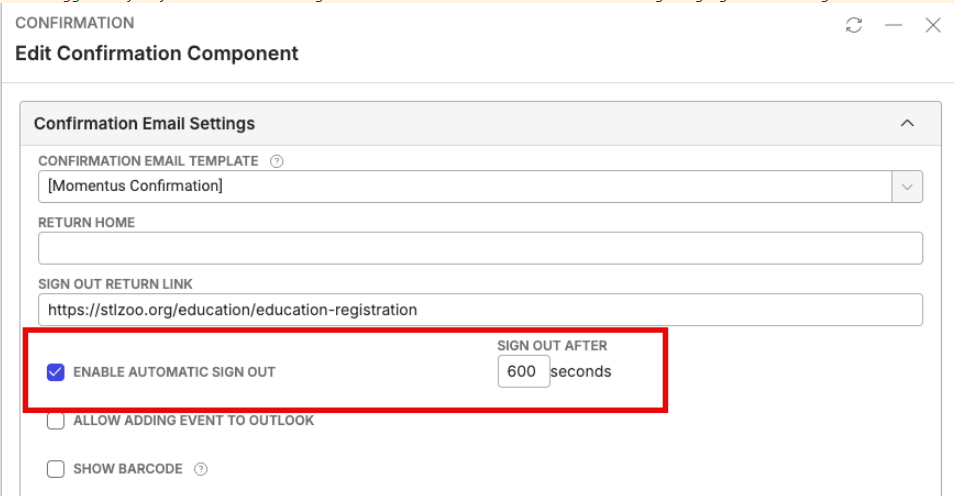
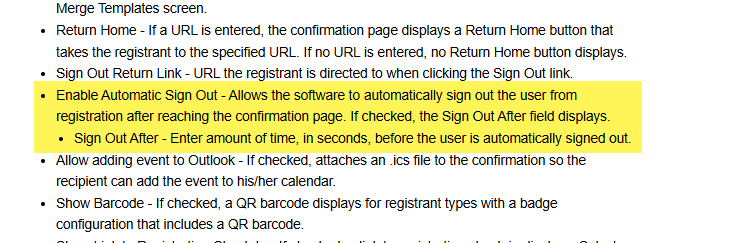
The St Louis Zoo opened their summer camp registration which is an extremely high volume day (few hours) for them. Due to a history of server issues, we had prepared by boosting resources and having SRE provide live monitoring. Additionally, the Zoo team partnered with Queue It as a way to manage flow of registrants into the registration form. This was the second year for this Queue It partnership.
In 2025, the partnership with Queue It and live monitoring of server resources by our Momentus team resulted in a very smooth registration experience for the Zoo staff and registrants.
This year (2026), much of the experience was smooth but the Zoo team had an increase in phone calls for two specific reasons.
1 – Some registrants were randomly redirected from the registration form either back into the Queue or to the Zoo’s homepage. This occurred at various places for the registrants. Sometimes they were attempting to login when they were redirected. Sometimes they were on page 2 of the registration form when they were redirected. ZenDesk tickets were submitted for support to begin troubleshooting. These tickets are now closed, but the general suggestion from support was to turn off the Automatic Sign Out configuration in the Confirmation Form.
https://ungerboeck.zendesk.com/agent/tickets/380564
https://ungerboeck.zendesk.com/agent/tickets/380572
https://ungerboeck.zendesk.com/agent/tickets/380561
https://ungerboeck.zendesk.com/agent/tickets/380597
2 – Some registrants were in the payments page when the form failed, either redirecting or never loading. The Zoo uses Momentus Payments. Similar suggestion from support was to turn off the Automatic Sign Out config.
https://ungerboeck.zendesk.com/agent/tickets/380566
https://ungerboeck.zendesk.com/agent/tickets/380567
https://ungerboeck.zendesk.com/agent/tickets/380553
During this high volume time, SRE reported no issues or errors with CPU and memory resources or MoPay apps or servers.
Now that the high volume period is over, and we don’t have a way to recreate the issues the Zoo’s customers were experiencing, the tickets will be closed, but we’d like to gather some information on how the Auto Sign Out configuration works.
Here is some additional context:
- We have always recommended the Zoo use this setting because it automatically closes or completes a registration session. If the registrant reaches the confirmation page and walks away with out signing out, it closes their session. The Zoo has always had server / resource issues on this high volume day so ensuring registrants sessions were officially ended and they were redirected out of the registration form was important.
- This setting was configured for the 2025 high volume registration day and they had few to no issues.
- In January 2026, we recommended they increase the length of time configured from 20s to at least 300s ahead of high-volume registration day due to an error they were experiencing earlier this year with payments being collected by MoPay but no order being captured in back office.
- It is the Zoo’s understanding (see KB Article linked above) that this auto sign out configuration time starts after the payment is processed and the order is confirmed. This setting is configured in the Confirmation section of the registration form template. The Zoo team did some testing of this functionality on February 12th, after we suggested they turn off this setting. The results of the Zoo’s testing is below in italics.
-
Separately, I had completed some testing on 12 February regarding the Auto Sign-out: For testing, I used Camp Program event in TEST and the Zoo Member configuration. Automatic sign out is set at 300 seconds.
-
First transaction:
- The order showed up on Registration Orders in Momentus at 2:25p while the test payment was still “processing”
- Then I was redirected to the Confirmation page
- The Confirmation page was open until 3:31p when I was redirected to the Education Registration webpage
-
Second transaction:
- Again, the order showed up on Registration Orders in Momentus at 2:36p while the test payment was still “processing”
- When I was redirected to the Confirmation page, I started a stopwatch
- After exactly 5 minutes (300 seconds), I was redirected to the Education Registration webpage
-
First transaction:
- The point seems to be that the timer starts after the payment is processed and not during the payment processing.
-
Separately, I had completed some testing on 12 February regarding the Auto Sign-out: For testing, I used Camp Program event in TEST and the Zoo Member configuration. Automatic sign out is set at 300 seconds.
Ultimately, the Zoo team would like to understand the expected functionality of this Auto Sign Out configuration for their use going forward and how it could potential impact their MoPay transactions as well.
Katie Solinski Barbara Key Jeremy Elmore
-

I tested this last week and the automatic sign out only comes into play once you hit the confirmation page, so that was not the cause for their users getting signed out because they never made it to the confirmation page.
Do we know how long registrants were waiting in Queue It? I could see a scenario where they go to the registration link, which starts their cookie session, then are then redirected to Queue It to wait. If they wait there for 30 minutes and then are taken back to registration, I could see a scenario where it could log them out because the session cookie expired. That's just a guess as to what might have been happening. Could also be an issue where one server was overloaded so it pushed the user to another server (which shouldn't happen because SRE says they use sticky sessions, but maybe there are scenarios where it doesn't respect that). It's kind of impossible for us to tell what was going on, especially since it was such high volume and they use Queue It.

Please sign in to leave a comment.
Comments
2 comments
Date Votes