Mobile Work Order Banner Dimension
Answered
Hi team.
I am working on configuring mobile work orders for a customer and could not locate the ideal dimensions for the banner size in the configuration documentation. The one supplied by the customer makes the image appear tiny in the mobile view from the browser.
Anthony Costantino mentioned it might be max-width=94px, max-height=39px, but we would like confirmation from Product on this and for this to be updated in the documentation / KB article. (Tagging you in @...)
Could you please assist? Thank you
-

@... do we have any articles on this topic
-

Looks like the banner is added to the Operations Suite Configuration and no, we don't have the image size. Happy to add it if you can let me know.
-
Confirmed dimensions with engineering
max-width: 94px;
max-height: 39px;That just means it can accept anything that is that size or within that size. Otherwise it will shrink it down to that size.
-
Configure Mobile Work Orders is updated!
-
Hi team,
I asked for this size format from the client and it still looks very small.
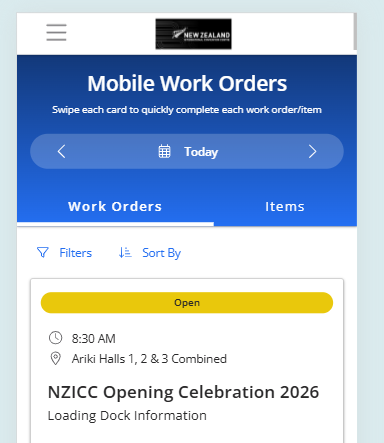
-
Chanh Huynh could you send me the exact image the customer is using? We'll test this. I agree it does not look right.
-

Hey folks! Our reccommendation is to use images sized 520x350px . We tested with a few sizes and realised that the appearance is consistent across different mobile screen sizes for 520x350 images. I hope this helps resolve the issue with the customer. Thanks!
cc: Chanh Huynh @... -
thank you so much Vernica Lodha - I will suggest this to the customer.
-
Re-updated the article.
Please sign in to leave a comment.
Comments
9 comments
Date Votes