🐛 Possible Bug -Formatting when saving contract docs to PDF
Refer to Support
-
Environment Observed
- Where was the issue observed? NA
- Account Name - Loud And Live
- Account ID-account-7827-A
- Is this a converted account? No
-
Issue Scope
- How widespread is the issue? Multiple users (with contracting permissions)
- Event Name -Feria De Sevilla
- Event ID -26TPECFDSEVILLA03
- Was the issue reported by the client? Yes
- Client Contact Name Gilbert Paz
- Client Contact Email gpaz@loudlive.com
-
What’s the problem?
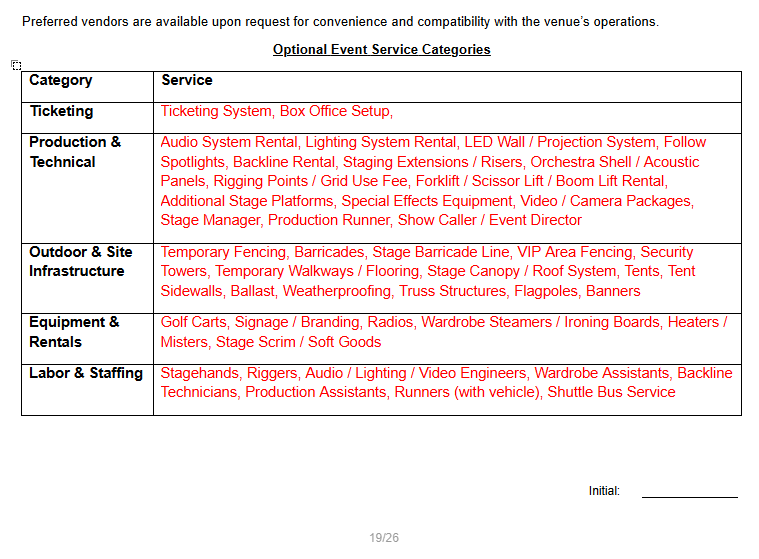
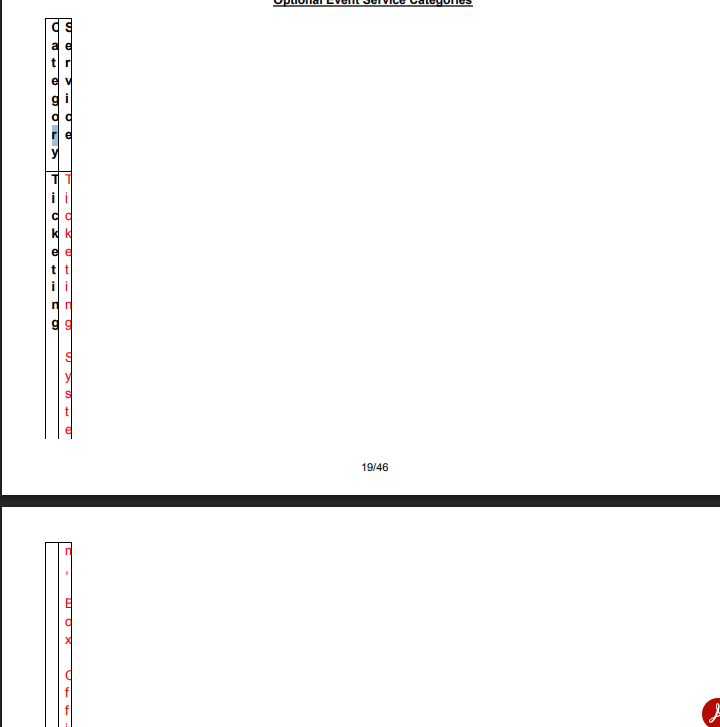
- Contract formatting changes after edits in in app editor and saving to PDF
-
Is the issue reproducible?
- Yes
-
If reproducible, where?
- Demo
- Demo/Staging/Pitstop Account Y - Consulting Premier- Amber
- Demo/Staging/Pitstop Event ID 815-65-65-2658
-
Steps to reproduce the issue
- Log in as AmberDemo
- Go to contract tab
- Generate a contract using Template Tropical Park Event License Agreement
- Ensure you select document type Microsoft Word DOCX and save.
- Open and see exhibit A is rendering as expected (page 19)
- Go into the contract and make an edit.
- Save
- Save a copy as PDF
- Go into PDF and see Exhibit A is formatting wrong on page 19.
-
Expected behavior
- I would expect the PDF would appear as in Word version.
-
Troubleshooting steps already taken
- I reviewed with the Insights team and we don't think it's on the template or in the Word editor.
-
Workaround identified?
- Yes
- If yes, describe it-create contract as Word. Edit contract. Save. Download to desktop. Upload into Momentus Contracting tab.
-
Attachments available?
- Screenshots or videos: Included / Not Available
- Zendesk ticket link (for Support use)
-

Elizabeth Fox Could you take a look at this?
-

Amber Lough , it appears that this is only occurring on that one form, from what I can see. Is that correct? Also, I'm noticing the issue seems isolated to the table. What kind of edits are being made in your case? I tested changing some text to italics. I'm wondering if this is a space issue with the formatting causing the table to not have enough space.
Kristi Miles or Emma Whitlock , do you know of any form issues related to tables specifically?
Since it's isolated to this one form, I hesitate to call it a bug unless we can identify more specifics around what the cause could be. Is there another form with this issue?
Thanks!
-
Hi Elizabeth Fox This is the only template that I see this behavior on, they don't have a table on their other contract template. The changes I am making are on page 1, like changing font color to red in the header. No edits anywhere near the table. We are not getting this behavior when we run as DOCX in Insights editor.
-
Is this a custom template?
Given it's only this one, I think there may be something else going on here, and we may need the Insights crew to take a look.
-
Hi Elizabeth Fox I used the contract base template then customized it from there, bringing in rich text files for this particular section. Emma Whitlock Kevin Ernsberger Kristi Miles Tagging you in. Thanks!
-

Elizabeth Fox we think this is a bug in the insights plug-in editor. If you're cool with it, we can push to Jira from here and have devs take a look.
-
Got it, thanks Kristi Miles and Amber Lough ! Kristi Miles , go ahead and raise a bug then.
-
Amber Lough , can you clarify a few things here:
- Where did the table in this document come from?
- Was it already in the document template, or did you add it, and when?
- When you say you're “bringing in rich text files” - can you say more about what you mean?
- Are you copying/pasting, or something else?
- Where did the table in this document come from?
-
Elizabeth Fox Hello!
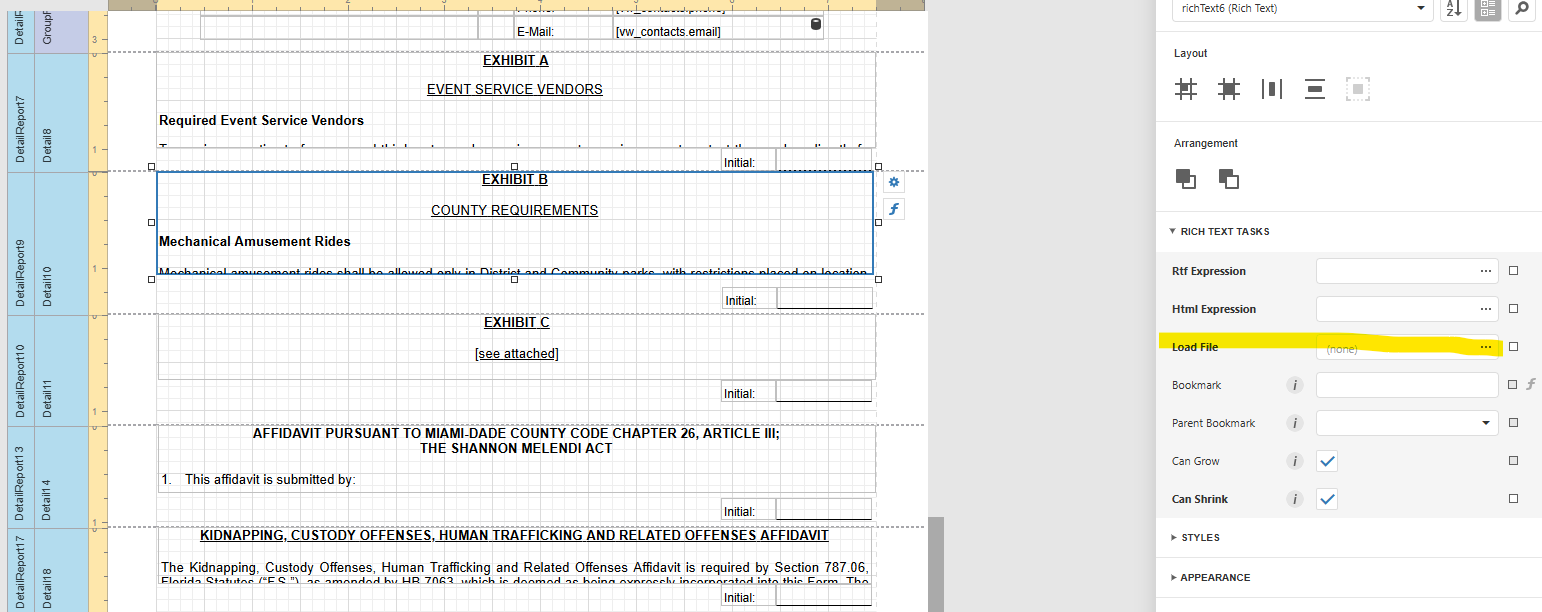
The table was already in the form. I took their contract document they sent me and downloaded it locally. I opened it and modified as per our standard process (ie formatting numbered lists) but didn't edit the table itself. I saved the document. Then I went into the detail band in Insights and clicked it to highlight it. That opens the rich text tasks on the right. I selected the three dots near “Load File” highlighted below. When the window opened, I selected the document and clicked open.
Please sign in to leave a comment.
Comments
10 comments
Date Votes