Forecast Event Ordered Charges by Gl Account
Answered
Explore Edmonton would like to create a report that forecasts revenue for Events based upon the ordered charges of event items.
They tried to accomplish this using the “Daily Revenue and Cost Analysis” section. We ran into a problem with multi-day space rates with the unit measure of Each. For example:
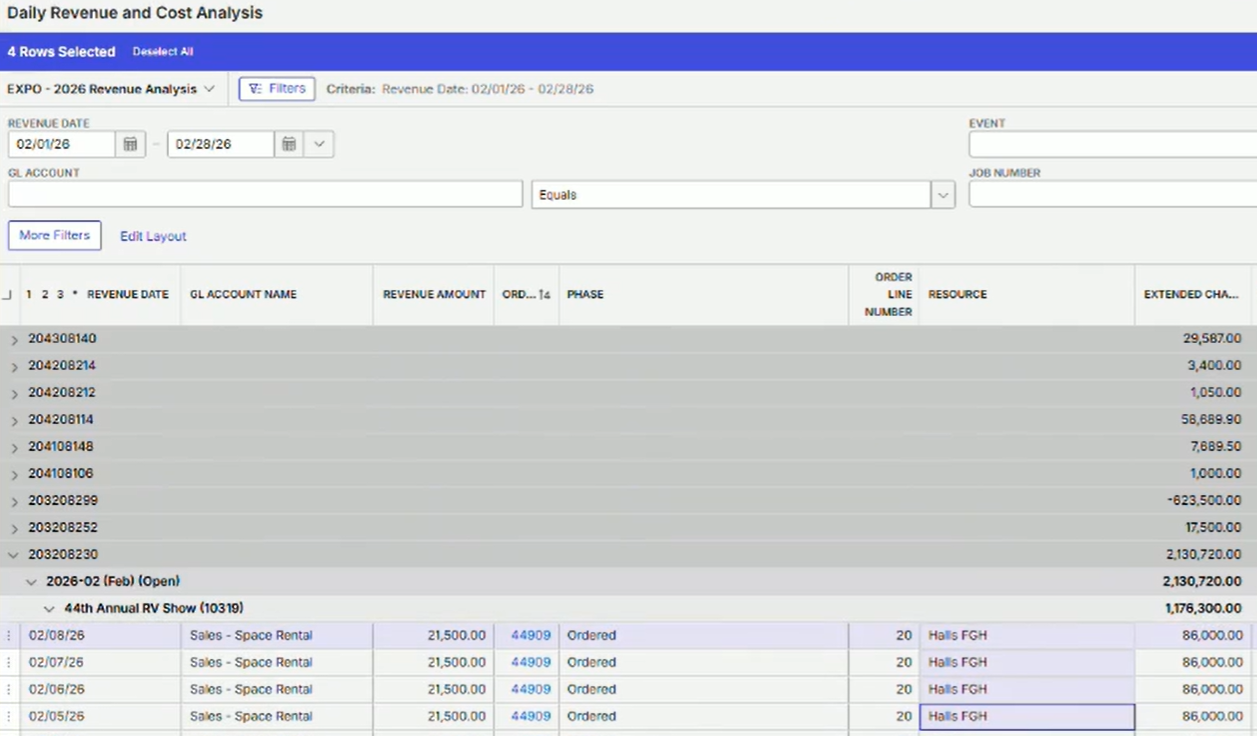
Halls FGH were booked for 4 days with a one time charge of $86,000. The report above recognized the charge for each day of the event. This results in incorrect totals (both for Event reporting and Daily reporting). It is definitely a functionality gap and could potentially be considered a bug.
Ryan Ungerboeck , for multi-day resource/space rates with one-time charges, would it make more sense to recognize this charge once (probably on the end date which is when revenue is typically recognized). Alternatively, we could divide the charge by the number of days and distribute evenly.
The workaround would be for them to change to using Daily Rate codes for all their resources, however this is not how they want to perform this process.
Potentially, we could also create a formula field:
- If(<Unit Measure is One-Time>, <Extended Charge> / <Number of days>, <Extended Charge>)
This should created a new Extended Charge field that does distribute these charges evenly. I will try this.
Does anyone have other suggestions on how to create a forecast report for ordered charges grouped by GL?
-
Official comment

I think we're just grouping on the wrong column here - the extended charge in the daily revenue is for reference purposes only and is the total extended charge of the related order item.
Grouping should be based on “Revenue Amount” which is the daily allocation of the order line item charge - and is the primary revenue field that reports should be generated upon.
Extended Charge = GL300_RES_EXT_CHRG = ER101_EXT_CHRG at the time the report was generated)
Revenue Amount = GL300_REVENUE_AMT = Daily allocation of the GL300_RES_EXT_CHRG
By default - the Daily Revenue process splits the order item extended charge evenly across the order item start date through the order item end date - so 21,500 per day.
There is an option to change this allocation in recent versions of the software to recognize all revenue on a date specified and NOT allocate by day:
Parameter: GL 302 - Daily Revenue Revenue Date Mode
Values:
ORDEND = Order Item End Date
EVTOUT = Event Move Out Date
EVTEND = Event End Date
Default / Any other option = Allocation by Order Item Start Date through Order Item End Date
I expect that this parameter implemented in 25.2 and above for patches since December 1, 2025. -

Following
-

Martin Stephens - It sounds like a bug to me as i logged into the DB to review this. I would have expected the Daily Revenues and Cost Analysis to split out the revenue for 4 days not calculating 4 times of the same revenue, so i was expecting above to what you stated under formula field.
Please sign in to leave a comment.
Comments
3 comments
Date Votes