Outlook Calendar Integration for Enterprise - Permissions
Answered
Victor Nogales Junior Seth Halvaksz We’re currently working with Nike on implementing the Outlook Calendar Integration, and they’ve raised concerns about the permissions involved. Could you confirm which Outlook permissions are needed? We were not able to find that in the Knowledge Base articles. Specifically, if User.Read.All is required, they’d like to know whether User.ReadBasic.All could be used instead.
I reviewed the below articles:
- Https://connectsupportcenter.ungerboeck.com/hc/en-us/articles/33406216186775-About-the-Outlook-Calendar-Integration
- Https://connectsupportcenter.ungerboeck.com/hc/en-us/articles/33406187081495-Outlook-Calendar-Integration-Configuration-for-Momentus-Enterprise
- Https://connectsupportcenter.ungerboeck.com/hc/en-us/articles/33406216294167-Book-an-Event-Using-the-Outlook-Calendar-Integration
- Https://connectsupportcenter.ungerboeck.com/hc/en-us/articles/33406216240151-Notifications-for-the-Outlook-Calendar-Integration
-

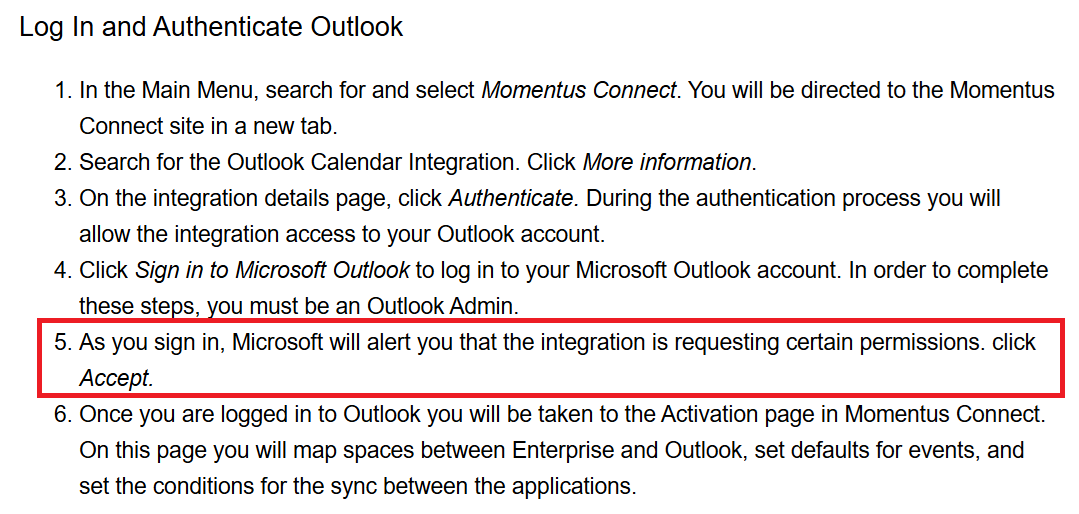
All i can see in the help articles is this statement in Outlook Calendar Integration Configuration for Momentus Enterprise:
Will need Victor to clarify the specific permissions when he's back.
-
Hi Victor Nogales Junior! Can you please help clarify this?
-

Hello Sydney Burgdorf,
Apologies for the late response. I came back from PTO this week and found a large list of items to followup. Let's go to your question…
We only explicitly request for two permissions: Calendars.ReadWrite and Place.Read.All
So ideally we never ask for User.Read.All or User.ReadBasic.All, see the screenshot of app resgistration:

But there is one catch, when admin grant the permission using admin grant screen, microsoft by default shows this
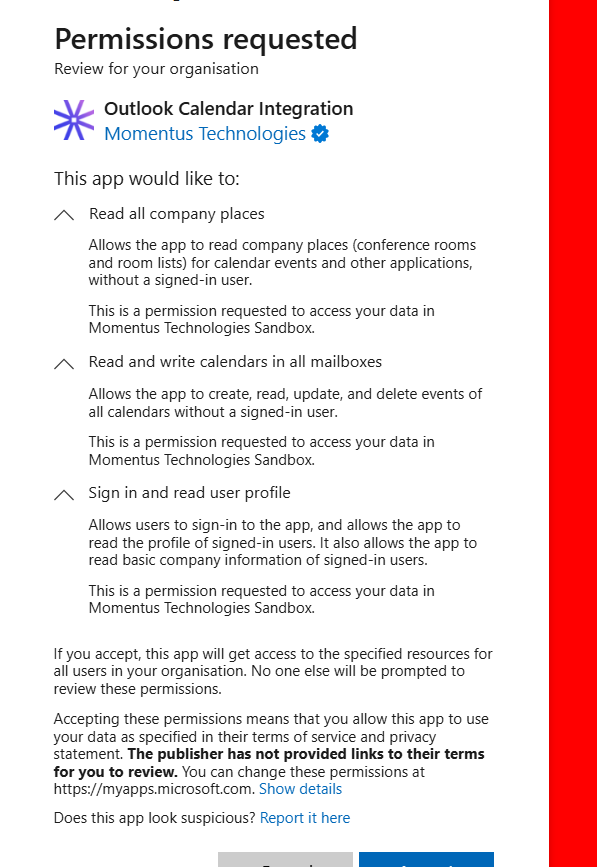
If you see the third permission listed above, note that we never explicitly request it. Microsoft automatically includes it by default because we use a multi-tenant app. Our integration uses application-only authentication (client credentials) and does not sign users in or access any user profile data.
So, in summary, we don’t need either User.ReadBasic.All or User.Read.All. Nike can remove or replace these permissions without impacting our integration
I hope that helps.
Victor.
-

Thank you Victor Nogales Junior for the clear explanation! I've created a new Outlook Calendar Permissions article with this information, handy for forwarding to client IT admins. This article is also linked from the Enterprise and Elite Config articles, in the step Seth showed above in his screenshot.
Please sign in to leave a comment.
Comments
4 comments
Date Votes