How to Un-Archive an Event in WeTrack?

Account name: HOST BROADCAST SERVICES (HBS) AG
Region: EMEA
Description of the issue: How to un-archive an Event in WeTrack?
What does the client want to do?: Customer needs to be able to un-archive or restore an Event that was archived
Why do they want to do this?: Customer archived an Event by mistake
Please give a descriptive user story: Customer archived an Event by mistake - how can the event be restored so it is visible again?
What you've already tried or suggested. Why does this not work?: I've looked into this and I can't find any option to locate an Event once its been Archived, much less un-archive the Event.
Business impact if not resolved: Event is not viewable/editable anymore
Articles Referenced (WeTrack):
Events Manager
Archiving Items in WeTrack
Closing or Archiving an Incident
-

Hi @... , I've tested this in a support site and searched out documentation and Jira, I don't see an option to unarchive an event. I think we'll need Vernica to weigh in once she's online to determine if this is the expected behaviour or not. Since the customer archived the event by mistake, I wonder if the engineering team could locate it and unarchive it as a one-time favour.
-

Hi @... How did they archive? The only option i see is to delete.
-
Hi Vernica Lodha , I was able to get to the Archive option from the Events List page:
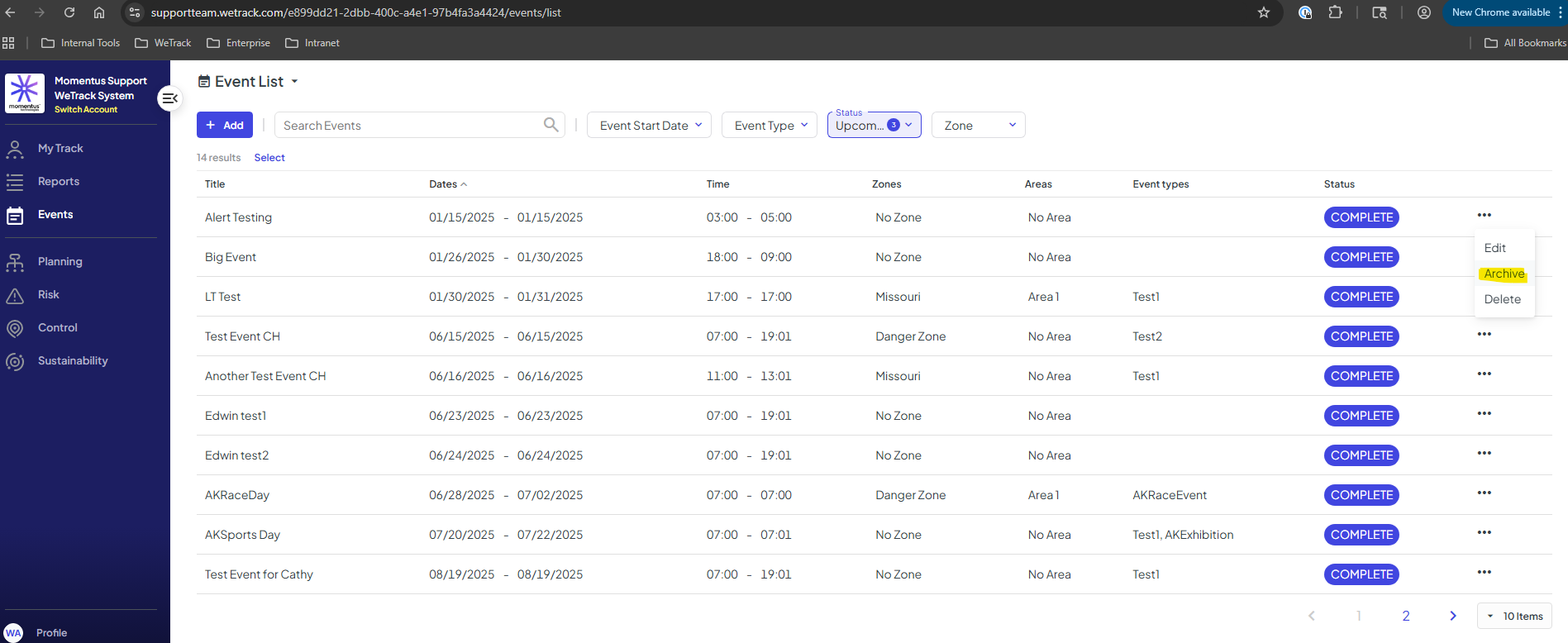

-
oh ok. We have bulk archive in a bunch of places but here we have bulk delete and so i was confused.
Is it really too much effort for the client to just recreate the event? To be able to unarchive, we would need a ticket and unless its actually painful, i dont think we should be dealing with these kind of requests. -

Vernica Lodha I'll create a task to update the knowledge base. Since we can't get an event back once it's archived, is there a functional difference between archiving and deleting? Why would a user do one over the other?
-
They can still pull reports on archived items, but not on deleted items, @...
We want to enable the option to unarchive on the front end but its not become a priority yet. -
Perfect, thank you! I'll create a task to get that into the KB when I do the event section.
-
Hi there Vernica Lodha - thanks for your insight. I can tell the customer that they will need to rebuild this Event in WeTrack. Regarding, this functionality - is a Jira need to address the gap? To add the functionality to restore an Event after it has been archived?
-
Hey! No, this is on Jira already so no immediate action needed. This has not become a priority for us.
Please sign in to leave a comment.
Comments
9 comments
Date Votes