RAG Labels differ from Report Filter Residual Risk Rating in the Hub

Issue Summary
- Description: When selecting the Residual Risk Rating in a new Impact Type Summary Risk Report in the Hub, it only shows the 5 default labels, and not the custom labels from the account you are running against.
- Business Impact: It is difficult to parse some reports when specific sites have multiple different labels or RAG grid sizes.
Environment Details
- Site URL: https://supportteamhub.wetrack.com/ (I am having trouble accessing the auth site necessary to get to the World Rugby Hub, however this is reproducible on the support site)
- Affected User Name: Nicola Alesbrook
- Affected User Email: nicola.alesbrook@worldrugby.org
Reproduction Steps: Pre-requisites: You must have altered either the labels in your WeTrack settings so that they are not default labels.
- Log into the Hub of your choice
- Go To the report builder
- Create a new report
- Select the Risk module
- Select the Impact Type Summary Report
- The title can be arbitrary, but is mandatory
- Add Filters > Add the account that has non-default labels
- Add Filters > Residual Risk Rating
Verification
- Reproduced on: Both
- Notes: This requires that different sites use non-default labels or grid sizes
Behavior Description
- Actual Outcome: The report pulls the default labels
- Expected Outcome: The report will pull the information using the labels that are assigned in the account's website and not the default labels provided in the filter
Supporting Evidence
- Screenshots:

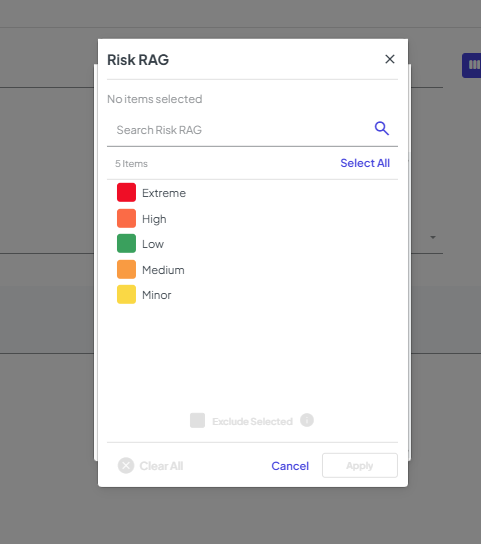
-

Hello. This is a bug, please add to Jira. Thanks!
Please sign in to leave a comment.
Comments
1 comment
Date Votes