Elite - Packages tab - sort order

🐛 Possible Bug - Packages menu/listing of packages not sorted
-
Environment Observed
- EU
- Account Name ACO - 24H du Mans
- Account ID account-114-A
-
Is this a converted account?
- No
-
Issue Scope
- Multiple customers / All users
- Event Name Formation POF / PTE Technique
- Event ID event-15041-A
-
Was the issue reported by the client?
- Yes
- Client Contact Name Paul Tabardel
- Client Contact Email p.tabardel@lemans.org
-
What’s the problem?
- When you want to detail your Event, if you go to the Detailing tab then Packages tab, click + button and select Package, the packages are not listed in the same order as the Inventory. It's all mixed up. Whereas if you add a package from the Functions tab, packages are nicely listed together TBT packages first, then Renaud packages, then Lerouge packages…
-
Is the issue reproducible?
- Yes
-
If reproducible, where?
- Demo
-
Steps to reproduce the issue
- Step 1 Go to Detailing tab
- Step 2 Go to Packages tab
- Step 3 Click +
- Step 4 Select Package menu
-
Expected behavior
- Packages should be listed in the same order as the Inventory
-
Troubleshooting steps already taken
- List everything that has been tried to this point
-
Workaround identified?
- Yes : add Packages from the Functions tab instead of the Packages tab
-
Attachments available?
-
Included video and screenshots
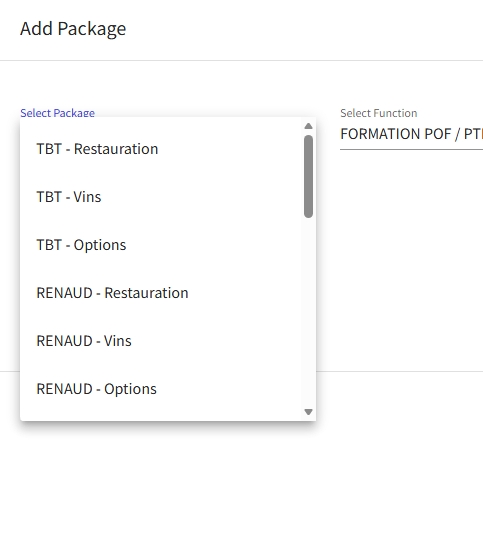
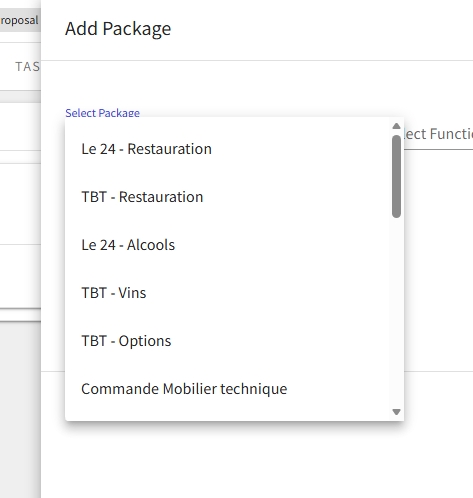
-
- Zendesk ticket link (for Support use)
-
2025-11-18_18h39_22.gif video
-

Could you push an issue into Jira for this? I don't think it currently supports custom sort order but at least it should be consistent in all areas.
-
Thanks Brian
I've just created a ticket as requested.
Yes no custom sort order needed, just consistency with how it's been set up in the Inventory and how it shows on the Functions tab.
Please sign in to leave a comment.
Comments
3 comments
Date Votes