Discrepancy between Old UX and New UX regarding Inserting a Momentus Link

Description of the issue:
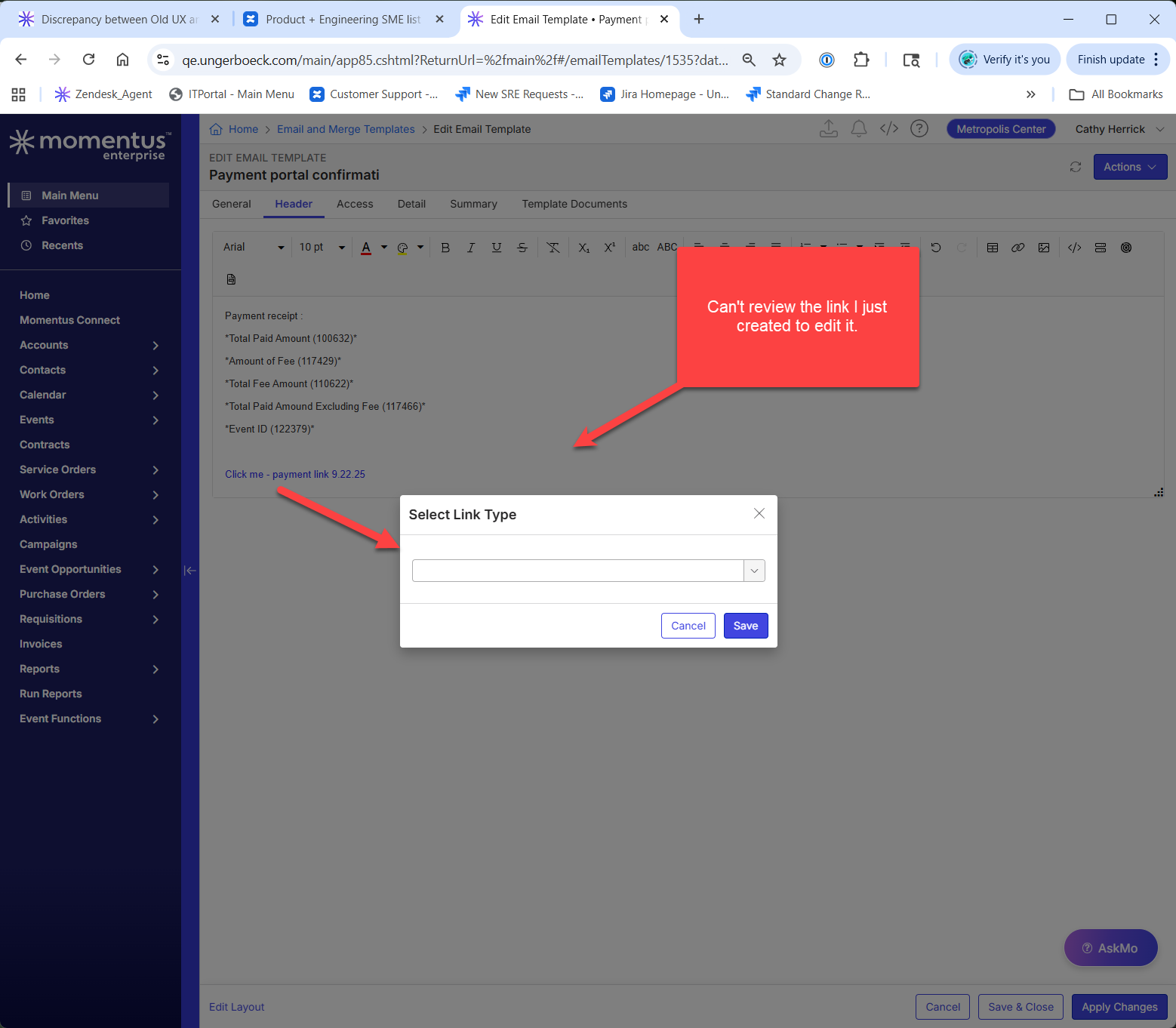
When highlighting a link in an email template, then clicking the "Insert Momentus Link" button, there is a discrepancy in the behavior between 24.4 and 25.1. In 24.4, a window opens with information about the link; link ID, link format, text, type, etc. In 25.1, it opens a window as if you were to create a new link.
Account name:
MTCC_2040376162 (Toronto Convention Centre)
Region:
America
Client version:
25.12025051205
Steps to reproduce:
1) Log into am environment that is on release 25.1 or later.
2) Click on the main menu
3) In the search bar, search for "email and merge templates"
4) Find an appropriate email template to edit
5) Right click on the template, select edit, then edit email template.
6) Select the Header section, but I believe the section should, or can be, arbitrary.
7) Click on the "Insert Momentus Link"
8) In the application configuration sequence, fill in an arbitrary sequence. I used EP Payment Portal (71) to match the customer's example.
9) Link format should be text
10) The text box can be arbitrary text
11) Click save, then click apply changes.
12) Highlight the link, then click the "Insert Momentus Link" button
You can observe the differences between Old UX and New UX in the screenshot I have supplied.

Observed results vs Expected results:
Observed - when highlighting the created link, then clicking the "Insert Momentus Link" button, the window that appears is the link *creation* window
Expected - when highlighting the created link, then clicking the "Insert Momentus Link" button, the window that appears is the link *details* window
What is the job the client is trying to accomplish:
They would like to verify that the link in the email template is correct by highlighting the link
Business impact if not resolved:
In order to verify the link is correct they would have to recreate the link in its entirety
Links to articles where you've looked for solutions and also other steps you've taken to research the issue:
https://supportcenter.ungerboeck.com/hc/en-us/articles/204567988-Email-Templates
Link to Zendesk ticket:
https://ungerboeck.zendesk.com/agent/tickets/367812
Local v30 URL:
https://qe.ungerboeck.com/25_1/app85.cshtml
https://qe.ungerboeck.com/24_4/app85.cshtml
Cathy Herrick for visibility
-

Carissa Harrison and Richard Marmura - I'm not sure if this would be considered a syncfusion library gap or not?
But this is a loss of functionality. I was able to recreate in QE Main (25.3) I created a new payment link, saved it. Then when I highlighted it and clicked Insert Momentus Link it came up with the new link window instead of showing me the details of the existing link. This prevents the ability to edit or review the existing link - it would constantly have to be recreated if any changes were necessary.

-

We have a ticket already https://ungerboeck.atlassian.net/browse/VENOPS-8059. Its blocked due to a bug with the rich text editor. Once Syncfusion updates their code, then we need to update the library.
Please sign in to leave a comment.
Comments
2 comments
Date Votes