Email Template Differences: Classic UX vs. New UX
Refer to Support
- Description of the issue: When we send an email using a template, the output differs between the old UX and the new UX
- Account name: VenuesLiveWA_0486908127
- Region: APAC
- Client version: 25.1
-
Steps to reproduce:
Followed the below procedure in both New UX and old UX: - 1. Login as usiadmin/ITRocks2014 → Go to event #83509
2. From tools menu "Send email", select Event Account
3. Enter your own email address in the To field(Before this, I had changed the customer Jerry’s email address to mine)
4. In Template select the "TEST MASE Client Intro" template
5. Click Send
6. Results are below: -
Observed results vs Expected results:
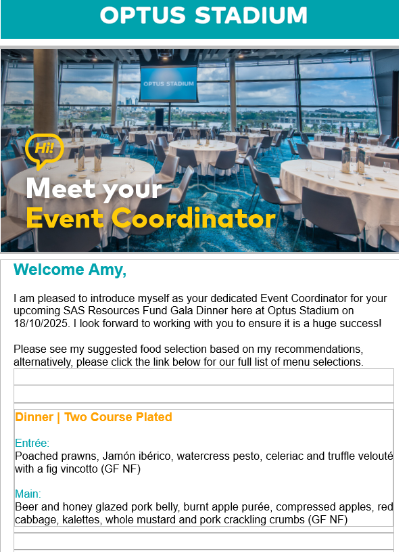
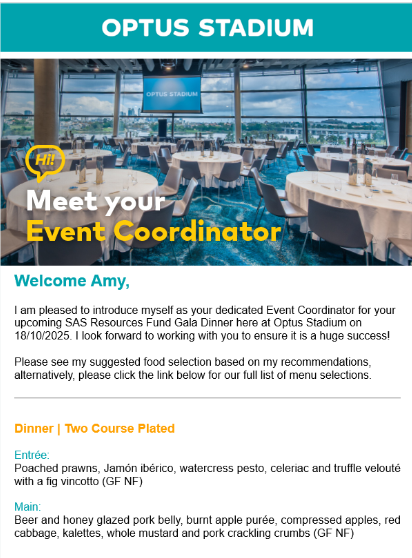
New UX seems to generate an email including all the borders whereas old UX respected the html. As mentioned, this is the exact same process, the exact same event and email template with very different results in the new UX.
New UX(First Screenshot) And Classic UX(2nd screenshot) as below:
-
What is the job the client is trying to accomplish: - Business impact if not resolved: Client experience is impacted as affecting external communication tools such as registration and email templates
- Link to Zendesk ticket: Ticket: HTML code for text not sticking in… – Momentus Support Center – Zendesk
- Local v30 URL: https://supportwebap.ungerboeck.com/VenuesLiveWA_Prod_0486908127_USI_V30
-

There is an existing ticket about this question.
-
Updating - this ticket has a recording on how to fix
https://ungerboeck.atlassian.net/browse/QTE-2063?focusedCommentId=314708
Please sign in to leave a comment.
Comments
2 comments
Date Votes