Linking Journal Entries to Payable Ledger

I have a customer who sometimes sends a bank wire directly through the bank and then creates a journal entry afterward. Is there a way to add the account/contact to that journal entry so that when they pull up the vendor in the Payable Ledger, they can see where the wire was submitted?
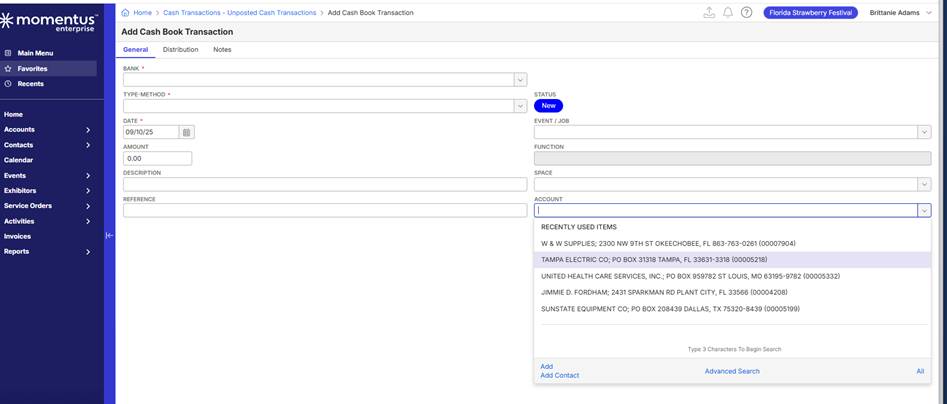
Currently, its looking like the account does not get linked when creating a journal entry under the cash book. There is an “Account” field to enter the vendor/supplier, but if they go into the payables and pull up that vendor, the journal entry doesn’t appear.
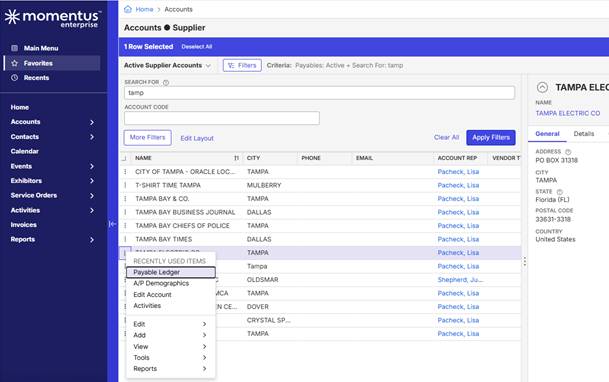
For example, if they go to the Account Supplier window, right-click, and select Payable Ledger, they don’t see any of the journal entries they created for the wire payments, even though they entered the account on the JE.
Has anyone configured this successfully, or is there a best practice for this workflow?
Thanks in advance!
-

Hey Allison Ridings,
They should process these payments as they do with their Check payments, and instead select Wire Transfer when making the Payment Processing Batch. Recording this payment via Journal Entry is not recommended, and will not allow for transactions to be tracked against the account, or when reconciling the payment to the bank.
I'm happy to discuss this with Lisa the next time we connect, let me know if there are any follow-up questions.
-

Agree with Marley
Full activity can always be seen in the GL transaction inquiry when filtering by supplier.
And while I have considered recently whether bringing outbound cash book transactions optionally to the payables ledger makes sense - currently the ledger only displays vouchers and AP Payments.
Please sign in to leave a comment.
Comments
3 comments
Date Votes