Payment Portal Field Display: Payment Amount / Subtotal / Remaining Balance Fields

-
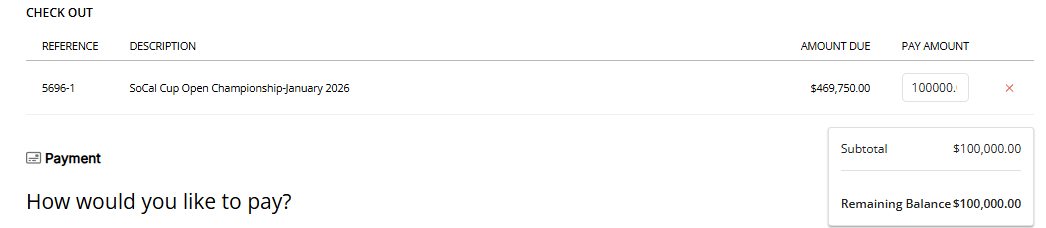
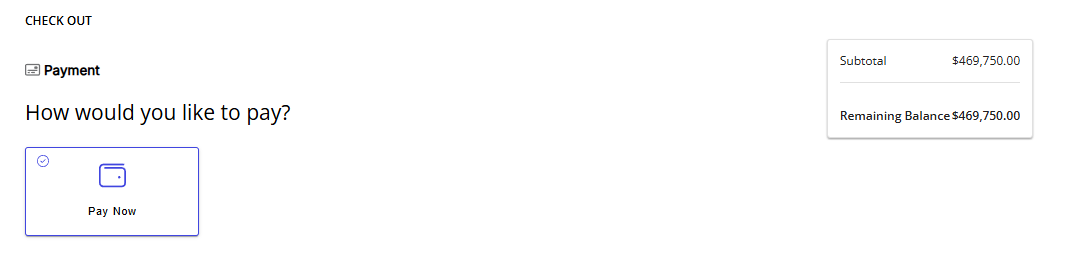
Description: In the V2 Payment Portal configuration, the fields “Pay Amount" "Subtotal" and “Remaining Balance” all display the same number in the Checkout Window. When partial payments are allowed, these fields display the amount selected in “Pay Amount.” When partial payments are disabled, the “Subtotal” and “Remaining Balance” fields display the full payment amount, which is equal to the total Amount Due. These field names as displayed are confusing, as Remaining Balance should likely be: Amount Due - Pay Amount / Subtotal = Remaining Balance.
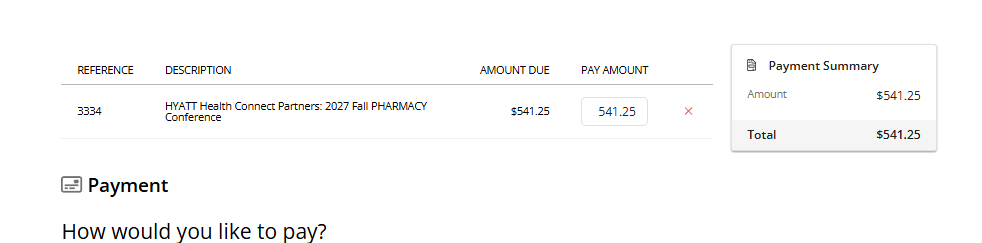
In the E-Payment Checkout Window, these fields mirror each other, but the “Subtotal” field is shown as “Amount” and the “Remaining Balance” field is shown as "Total".
Payment Portal Screenshot - Checkout Window, Partial Payments Enabled:
Payment Portal Screenshot - Checkout Window, Partial Payments Disabled:
E-Payment Screenshot - Checkout Window
- Account name: Salt Palace
- Client version: 25.2
- Local URL (Primary Site): https://saltpalace.ungerboeck.net/test/app85.cshtml#/
-
Local URL (Payment Portal): https://saltpalace.ungerboeck.net/apps/test/paymentportal?pat=434c4f5a306731776545495a68747861336a5053424347646c715a77446f75443473773574775242514f343d
- User Name: luke.ahrens@gomomentus.com
- Password: Test1234!
- Local URL (E-Payment): https://saltpalace.ungerboeck.net/apps/test/pmt/view?aat=636c6232456364317153652b5245384e3473687a756f745059547370746b45776c6a2b61427a4b477250453d
-
Steps to reproduce:
- Login to payment portal, click order that will be paid. View checkout screen.
- Business impact if not resolved: N/A - Impact more related to overall clarity of Payment Portal terminology. Have adjusted the dictionary terms for client (The Mart) to mirror Payment Portal and E-Payment).
-
Links to articles where you've looked for solutions and also other steps you've taken to research the issue:
- https://supportcenter.ungerboeck.com/hc/en-us/articles/236066028-Payment-Applications-and-Configuration
- https://supportcenter.ungerboeck.com/hc/en-us/articles/236066028-Payment-Applications-and-Configuration#h_01FNS5ESD4JEMW064GHEAS7V1Y
- https://supportcenter.ungerboeck.com/hc/en-us/articles/1500009125602-E-Payment-Application-Configuration
- Link to Zendesk ticket: N/A
- Individuals consulted before posting: Marley KezerianJeremy Elmore
-

I think it makes sense to re-review the terminology for these 3 workflows. Go ahead and send a Jira ticket back to review
-

Ryan, is this an enhancement or a bug?
If its an enhancement, i'd prefer that this is submitted as a Pendo enhancement.
CC @...
-
Chai and I will take a look at it. I'm not sure if its an enhancement/could be better or a bug/bad choice of terminology. Need to step through it live and see the different workflows
-
Ryan - To eliminate confusion with the client I was working with, I updated the dictionary terms for the V2 Payment Portal Checkout Page to match the language used in the E-Payment Checkout Page. I included the client info below as a reference point. Thank you for looking into this!
Client: The Mart; Client Site: https://mart.ungerboeck.net/prod/app85.cshtml
Payment Portal Link: https://mart.ungerboeck.net/apps/paymentportal/pp/openItems?pat=33725a337048697449474e5a44632f676d6967482b2f3931734d335a746b53332f4d4c45663156786f596b3d
User: luke.ahrens@gomomentus.com; Pass: Test1234!
E-Payment Link: https://mart.ungerboeck.net/apps/pmt/view?aat=6a6a414a716a6572324c57757762695675714870397753597336556c6a32433654634d587634474b5a31773d
-

This is what we're seeing:

While it may be duplicative, it is displaying the correct numbers. Any requested changes would have to come over as an enhancement request through Pendo.
Please sign in to leave a comment.
Comments
6 comments
Date Votes