Inconsistent and confusing pricing in substitutions in SO
Refer to Product Ideas
-
Description of the issue:
We have found that the pricing displayed in package substitutions is sometimes excluding tax and sometimes including tax.Example - Lens Substitution image
Selected item is the top one and showing excluding GST but the two other options are showing including GST - Account name: ICC Sydney
- Region: APAC
- Client version: 25.1
-
Steps to reproduce:
1. Go to the Events and Search an event - 34575
2. Click on Add Service Order → Go to General tab
3. Select PRICE LIST as "Standard Price List 2025 (2025)"
4. Go to the Items tab and search for "ultra"
5. Change the units of "Ultrawide Screen Projection Package" to 1
6. Click Save -> then Select Substitution screen will be there
7. Add 1 UNITS for "Lens - Barco TLD+ (R9862010) | HD" and "Screen - 30 * 10ft | Stumpfl FP | 9.14m * 3.05m"
8. Click on "Confirm Selection"
9. Now you will observer the new row(SO) has been created -> double click on the row to edit the same.
10. Now please observe the amounts in columns "UNIT CHARGE" "EXTENDED CHARGE" "TAX INCLUSIVE UNIT CHARGE" "TAX INCLUSIVE EXTENDED CHARGE"
11. Right click on "Projector - Barco 31000 LUMEN - UDX-4K32" and click on "Substitute"
12. You can see the amounts for Projector - Barco 31000 LUMEN - UDX-4K32 and SUBSTITUTABLE ITEM "Projector - Barco 27000 LUMEN - UDM-4K30"
13. Check the checkbox of "Projector - Barco 27000 LUMEN - UDM-4K30" and click on "Confirm Selections"
14. Now right click on " Lens - Barco TLD+ (R9862010)" and click "Substitute"
15. Observe the amount 378.18 EA and EXTENDED CHANRGE 756.36 of the first available item(Lens Barco TLD+ (R9862010))
16. Remove the 1 from UNITS section of Lens Barco TLD+ (R9862010) and add 1 UNIT of Lens - Barco TLD+ (R9862020) amount 416.00 EA -> Click on Confirm Selection
17. Now you will see a new row for Lens - Barco TLD+ (R9862020) observe the amounts in columns "UNIT CHARGE" "EXTENDED CHARGE" "TAX INCLUSIVE UNIT CHARGE" "TAX INCLUSIVE EXTENDED CHARGE"
18. Right click on Lens - Barco TLD+ (R9862020) -> Select Substitute and see the amounts for Lens - Barco TLD+ (R9862020) is 378.18 EA and for Lens Barco TLD+ (R9862010) and Lens Barco TLD+ (R9862030) is 416.00 - Observed results vs Expected results: We have found that the pricing displayed in package substitutions is sometimes excluding tax and sometimes including tax.
- Business impact if not resolved: Inconsistent and confusing behaviour with amounts
-
Links to articles where you've looked for solutions and also other steps you've taken to research the issue:Add and Manage Service Orders – Momentus Support Center
- Link to Zendesk ticket: Ticket: 2025.1 New UI - Inconsistent and… – Momentus Support Center – Zendesk
-
Local v30 URL: https://supportwebap.ungerboeck.com/ICCSydney_Test_0472290862_USI_V30
Please see the video - #356280 - 2025.1 New UI - Inconsistent and confusing pricing in substitutions in SOs
-
Seth Halvaksz Please guide us on this.
-

Akash Satalkar documentus posts need to first be reviewed by a senior member of customer support before product will review
-

Hi Seth Halvaksz I had a look at this one with Akash and cannot confirm what the correct behavior is as this feature is one that only exists in the new UX. I agree that it is confusing for users where items that are substituted changes when users go in to substitute the item again.
-
Seth Halvaksz Please guide us on this.
-
I've asked Carissa Harrison to review and comment
-

Akash Satalkar The values next to the item description are the UNIT Charge, the values to the right most column are the EXTENDED Charge. This is consistent with the values that are shown on in the grid. For this price list, they have an extended charge that is different from their unit charge for these items.
Below is the acceptance criteria outlining each field that is displayed per item.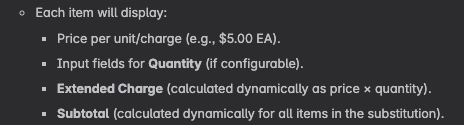
I do see inconsistency on which ext charge we are showing or if its the tax inclusive field. In this substitution we are showing 2 different ext charges but then the unit charge here is the tax inclusive unit charge but on the next substitution after this we are only showing the Unit charge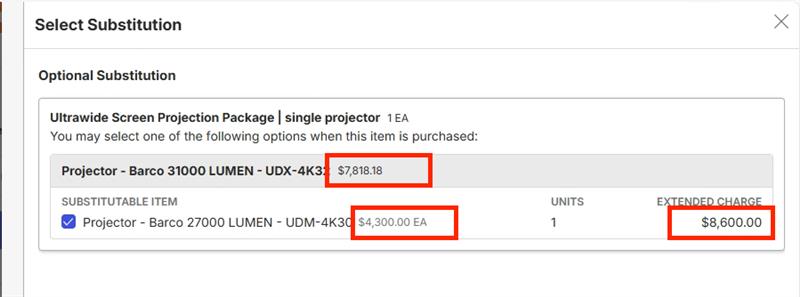

Item Substitution number 2 in the same order we are only showing the non tax exclusive unit charges.
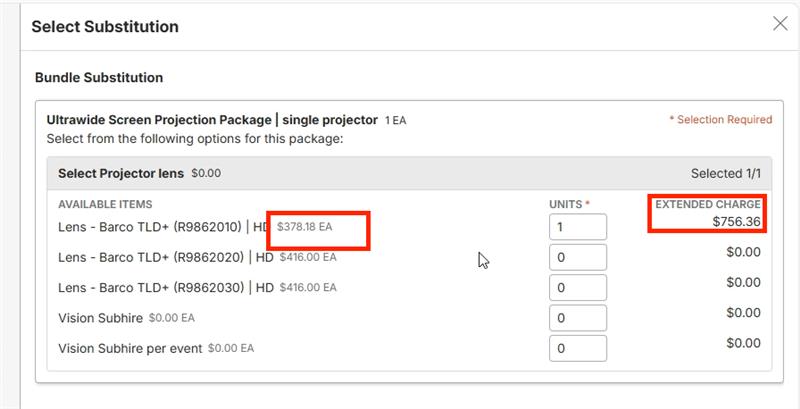

Please include these screenshots in the bug ticket. This is clearer than the video. -
Thanks Carissa.
Akash, please review the comments from Carissa when submitting the jira ticket. Please include a link to the jira ticket here for reference.
-
Hi Seth Halvaksz and Carissa Harrison Thank you so much for guiding us on this.
We have added all the information, along with the screenshots shared by Carissa, in the Jira ticket.
[ME-6327] 2025.1 New UI - Inconsistent and confusing pricing in substitutions in SOs - Momentus Service Connect -
Hi Carissa Harrison
We have informed them that issue has been fixed as per - [APP-5413] 2025.1 New UI - Inconsistent and confusing pricing in substitutions in SOs - Momentus Service Connect
But we have received below response from ICC Sydney:
Half of the ticket is resolved, the other half not so much.Item 1 : Fixed
Example - Lens Substitution image
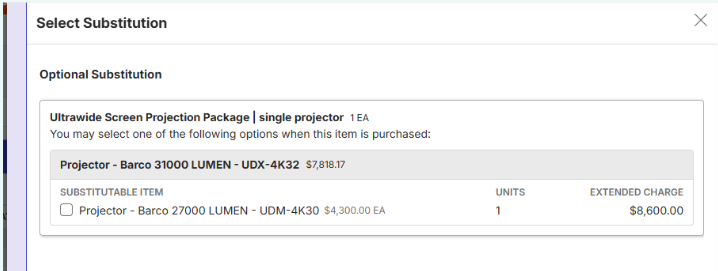
Selected item is the top one and showing excluding GST but the two other options are showing including GSTItem 2: Still occurring
Example - Substitution image (refer to attachment on first ticket for original image, I have also included a new screenshot from test today for the same substitution)
Selected projector (in grey) is excluding GST and total of SO (2 days)
Substitutable Item - Projector is including GST but only for one day but says each (maybe having UT and UM here would help?)It’s challenging have the non-GST amount on the top line (AU obviously quote GST inclusive) and the GST inclusive price on the substitutable line.
Comment about have UT/UM labelled would also help with what the cost is worked out on.
Please let me know if you need more details
-
Akash, what is the issue you're describing in item #2?
As Carissa said in her comment above:
“The values next to the item description are the UNIT Charge, the values to the right most column are the EXTENDED Charge. This is consistent with the values that are shown on in the grid. For this price list, they have an extended charge that is different from their unit charge for these items.”
-
Hi Seth Halvaksz I recreated this in our QE25.2 database to hopefully make it easier to digest and play around with (https://qe.ungerboeck.com/25_2/app85.cshtml#/serviceOrders/291444?data=c7c5632bf5febf41a9fa982f081869876145 login nicole // nicole)
I have created resources, and price list which is tax inclusive - tax rate 20% + service charge. This is what it looks like when I have not made any substitutions. The items that I have added all have the same rate of $100 per day. Regardless of what I am substituting it with, it should be the same amount. I have added the tax inclusive unit and extended charge fields here.
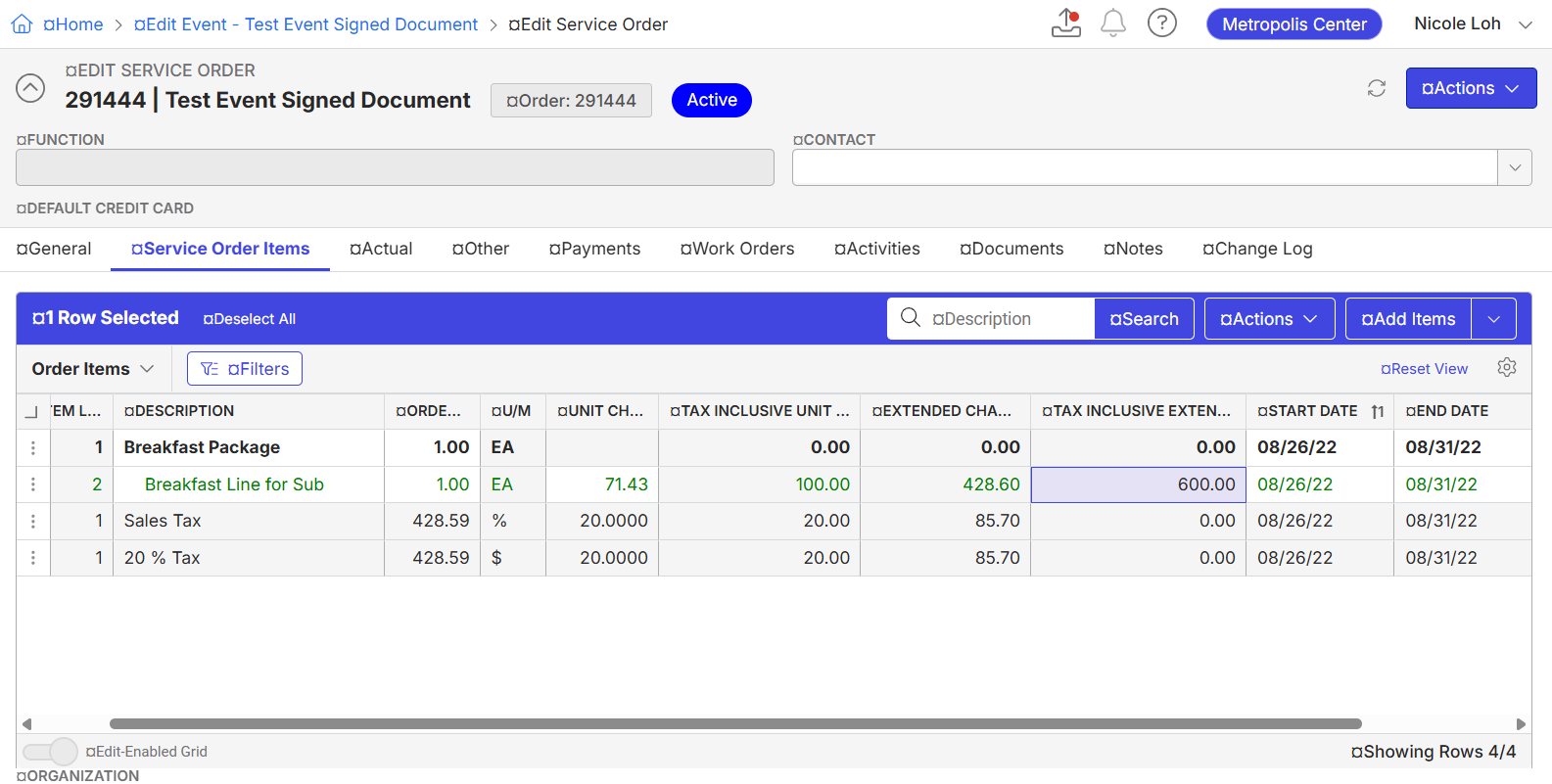
When I right click on the substitution line (green line item) > Substitute.
Notice that the one in the grey line shows the tax exclusive extended charge, while the one drawn in the box is tax inclusive. Users are confused with the 2 different numbers here and are wondering whether this is intended design?
Substitution second take - same issue:
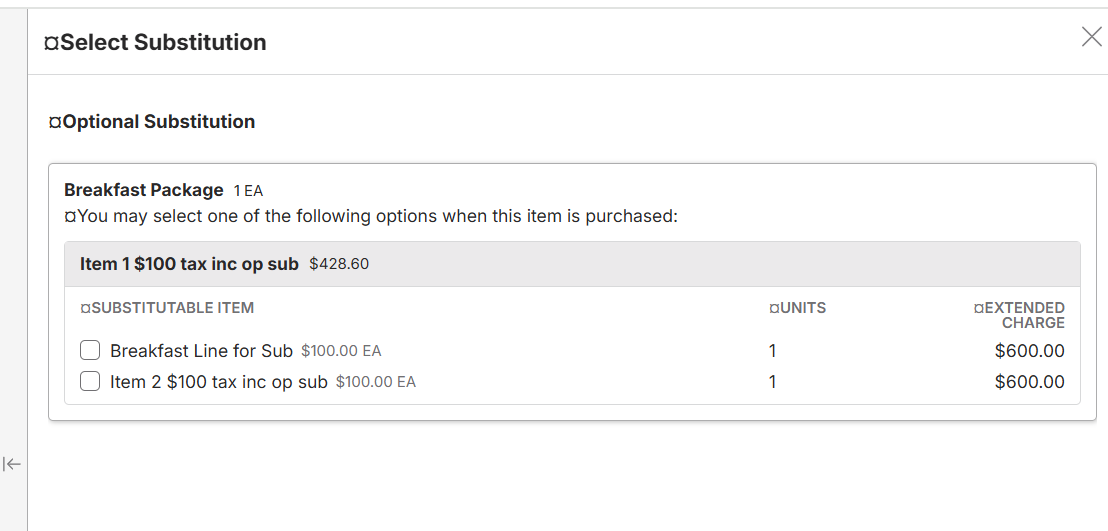
This works fine if there are no taxes, but it can be confusing IF there are tax items involved. Users are used to seeing all tax inclusive items and may get confused if the numbers are not showing correctly.
-
Hi Seth Halvaksz Carissa Harrison Could you please check Nicole's previous comment
-
Hi Carissa Harrison Could you please check Nicole's previous comment
-
Hi Carissa Harrison Customer is asking for an update. Could you please check Nicole's previous comment?
-
Seth Halvaksz Could you please check above comment from Nicole
-
I am reaching out to internal experts to get input on this and will update when i know more. That said, the current behavior is working as designed, so any changes to the behavior will be an enhancement.
-
I asked Samy Kheloufi and here was his suggestion. Does this customer agree with this approach?
"In France and in most of the EU countries, B2B prices are displayed excl. taxes
99% of the customers I have been working with work with prices excluding taxes.
I would advise to display all prices excluding charges, because anyway if any tax should be added on top of it, it will be displayed in the service order as a tax line item"
-
Hi Seth Halvaksz I don't think this will work for APAC. Our region uses tax inclusive pricing predominantly.
Pieter Du Plooy Martin Wooding Would you agree with this that most of our clients uses tax inclusive pricing? A little out of the loop with how our customers uses the system, but I am also taking into consideration my experience in everyday life - groceries, ticketing software, event registrations which all display tax inclusive pricing.
-

Hi Seth Halvaksz I would have to agree with Nicole Loh. In APAC I would struggle to find a customer that isn't tax inclusive. There is essentially a law that says you have to show prices with the tax so there are no surprises.
-
Martin Wooding ok - take a look at Samy's comments. What would you recommend?
-
Seth Halvaksz It probably has to be based on the price list being inclusive or exclusive, or the line item on the price list. I don't disagree with the logic Samy Kheloufi used, but in APAC the customers will.
-
Ok - given the big difference here by region, we'll need to think about the best approach. One option is to display both. We'll need to mock it up and size.
Nicole Loh can you open the enhancement request in Pendo and post the link here for reference.
Please sign in to leave a comment.
Comments
23 comments
Date Votes