User & Dashboard Optimisation - Remove dashboards from retired users
Refer to Product Ideas
- Account name - Tauranga City Council
- Region - APAC
- Client version (Enterprise) - 25.1
- Description of the issue - Unable to retire or delete unused and old dashboards effectively
- What does the client want to do? Why do they want to do this?
- The Customer Success team now routinely examines and provides data to customers on their system use which includes review of dashboards, reports, custom fields, etc. (aka System Health Check)
- During the review, we identified few unused and old dashboards that were linked to retired users.
- We then advised to “clean up” dashboards which are not used and are not required so system is in controlled state and not become a data dump.
- The problem is when a customer tries to remove the dashboard.
- Below is the sequence of events:
- Identify an used dashboard>right click delete>System will prompt you that this is linked to a user. (screenshot below)
- At this stage, System admin have to do a search on “retired users” and it could be many for a large org.
- Review these retired users one by one>remove dashboard before deleting it.
- What does the client want to do? Why do they want to do this?
- What you've already tried or suggested. Why does this not work?
- Review Users one by one and remove dashboard before deleting it>Impractical at times for efficient clean up
- Create a quick actionable checklist when users are retired for better system housekeeping.
- Business impact if not resolved - The above process provides a frustrating experience for system admins to manage users and dashboard effectively and is time consuming with number of clicks this process requires.
- Attach relevant files (such as screenshots)
- Links to articles where you've looked for solutions and also other steps you've taken to research the issue.
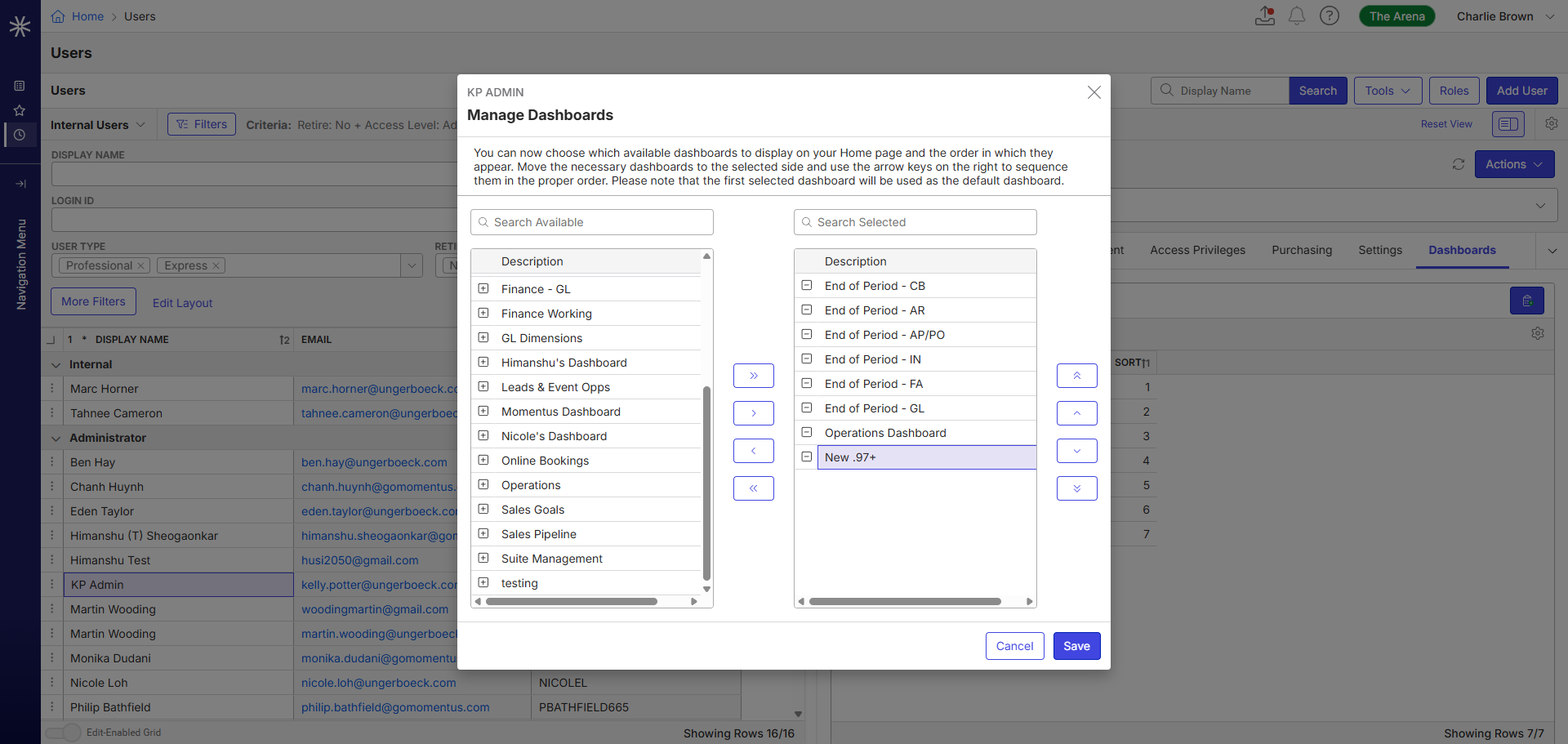
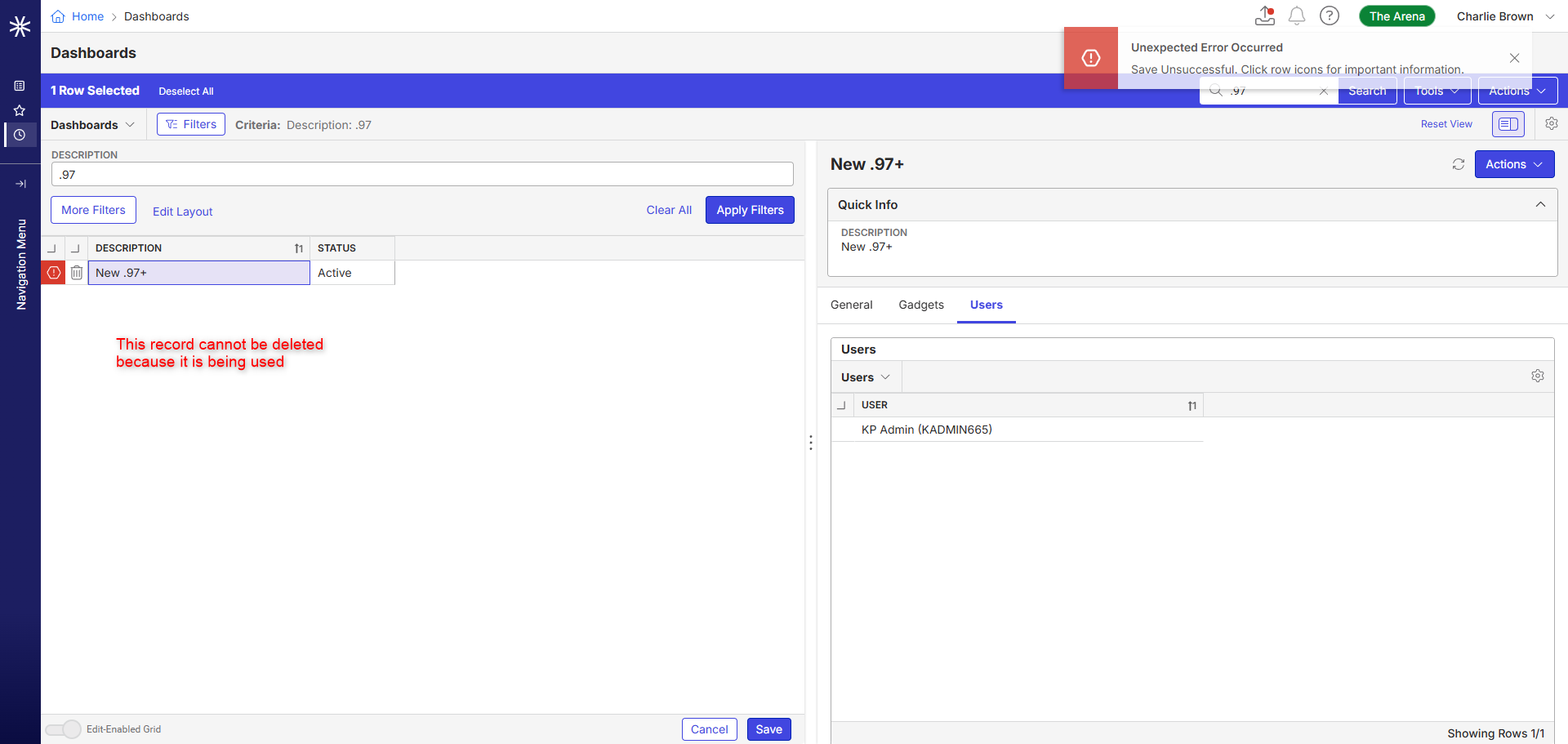
A Pendo enhancement is submitted based on the ask as the customer is seeking some sort of trigger/automation based on the retirement to remove the dashboard from the user profile - Dashboard Management Efficiency for Retired Users
-

Noted that this is an enhancement request. Thanks for adding to Pendo. I'll go ahead and close this post.
Tagging Martin Stephens in case he has anything to add.
-

Thanks, Seth Halvaksz . This description captures the issue well.
It’s definitely frustrating to clean up old connections from retired users. Currently, when users are retired, all roles are removed—but they remain associated with views, dashboards, and likely other records. Another significant annoyance is that we do not remove the assigned license from a retired user - this is also manual.
We should look at improving the user retirement process to automatically disassociate users from these linked elements to reduce manual cleanup and potential confusion.
-

I'd like to improve the User Management article:
- Add a list of items to do before retiring a user, including removing users from shared dashboards and views. Anything else to add to this list?
- Martin Stephens How do you remove the assigned license from a retired user? I can't find that anywhere in the KB. We'll add that instruction as well.
If any consultants lurking out there think it would be helpful, we could create an onboarding/offboarding article similar to the Elite one, just send us the info. 🙂
-
@... To unassign a license, you need to update the “User Type” field (on the user record). Typically this field has 2 options, “Professional” and “Express”. Choosing no option (aka leaving it blank) removes the license. A very small amount of legacy Flex customers have a third option; “Standard”.
Additional fields to ‘clean up’ include:
- Dashboard (user record)
- Theme (user record)
- Startup Favorite (user Record)
-
Martin Stephens Fabulous, thank you! One more question (sorry!) - should they also do this if they are deleting the user?
-
@... To be honest, I am not entirely sure. The only time I delete a user is when they are created in error, before they have accumulated any data.
I do know that when you delete a user, the user ID ‘lives on’ in database records, so it could potentially cause a mess. I am fairly sure I have seen views with such ID's listed on them. The best practice is to retire a user - NEVER delete - at the very least to preserve audit log history to see what users were doing before they left the company.
-
Thank you so much! I've made the following updates based on this post and comments as well as this post also about deleting dashboards:
-
Add and Manage Dashboards (formerly just “Dashboards”):
- Added a note that “users” includes retired users.
- Added a callout about support users blocking deletion.
- Moved the content from “Manage Dashboards” to this article
- Manage Dashboards: Retired this article now that content is in the article above.
-
User Management:
- Updated the Delete section with a new intro highlighting best practices
- Added a checklist to the Inactivate section with the above information.
Any feedback or additional thoughts are welcome. 🙂
-
Add and Manage Dashboards (formerly just “Dashboards”):
Please sign in to leave a comment.
Comments
7 comments
Date Votes