Order Processing does not work in OSB
Refer to Support
Hi team,
I am implementing OSB with Order Processing for one of our customers. I have the application up and running, but the Order Processing Part does not work. When I click on the links, nothing happens. (same with the prompt with the question to order additional items)
I have checked my Order Processing Configurations and I believe I have everything configured correctly. I also changed Web Themes to see if is was related, but same behavior in all Web Themes.
Does anybody recognize this behavior and knows what is going on here?

The customer is in 24.4.
Thanks
Minka
-

Mike Schepker could you review Minka's questions? I expect we'll need more info on her steps to get to this point. Let us know if she should reach out to support to create a case, in order to see if this is an issue or not.
-

I've never set an OSB up from scratch, so I'm not entirely sure. The only thing that jumps to mind is make sure there is a payment config on the order processing configuration.
-
Minka Verkaar could you meet with someone else from services such as Justin Wittrock to review your steps?
-
Hi Seth Halvaksz , I checked with Samy Kheloufi first. I have implemented OSB incl. Order Processing already multiple times so I am pretty familiar with the set up, but even the best can overlook something ;-)
Therefore my post to check to see if anybody knows the behavior to give me a direction what else I can check.
Mike Schepker for OSB itself we need to ‘activate’ something with our internal IT, which they have done. Could it be related to this part? I do have a Payment Configuration configured. (with Pay Later)
-
Minka Verkaar , no, I don't think so. That part was already done, if it wasn't OSB wouldn't load at all. I'm not an expert in OSB so my knowledge is limited. Cathy Herrick would you happen to have any ideas here?
-

Minka Verkaar - Can you turn on Dev tools and see if there are any Console errors when you hit the Order Items button? (see this info if you haven't used Dev Tools before: https://developer.chrome.com/docs/devtools/overview
What errors being written to the apps web log when this happens?
If neither of those things turns up an error giving more details about what is occurring, then I would need to review the set up.
What customer is this for? What environment? What OSB config?
-
Hi Cathy Herrick thanks for jumping in! The link doesn't work, but I think this is what you are looking for:
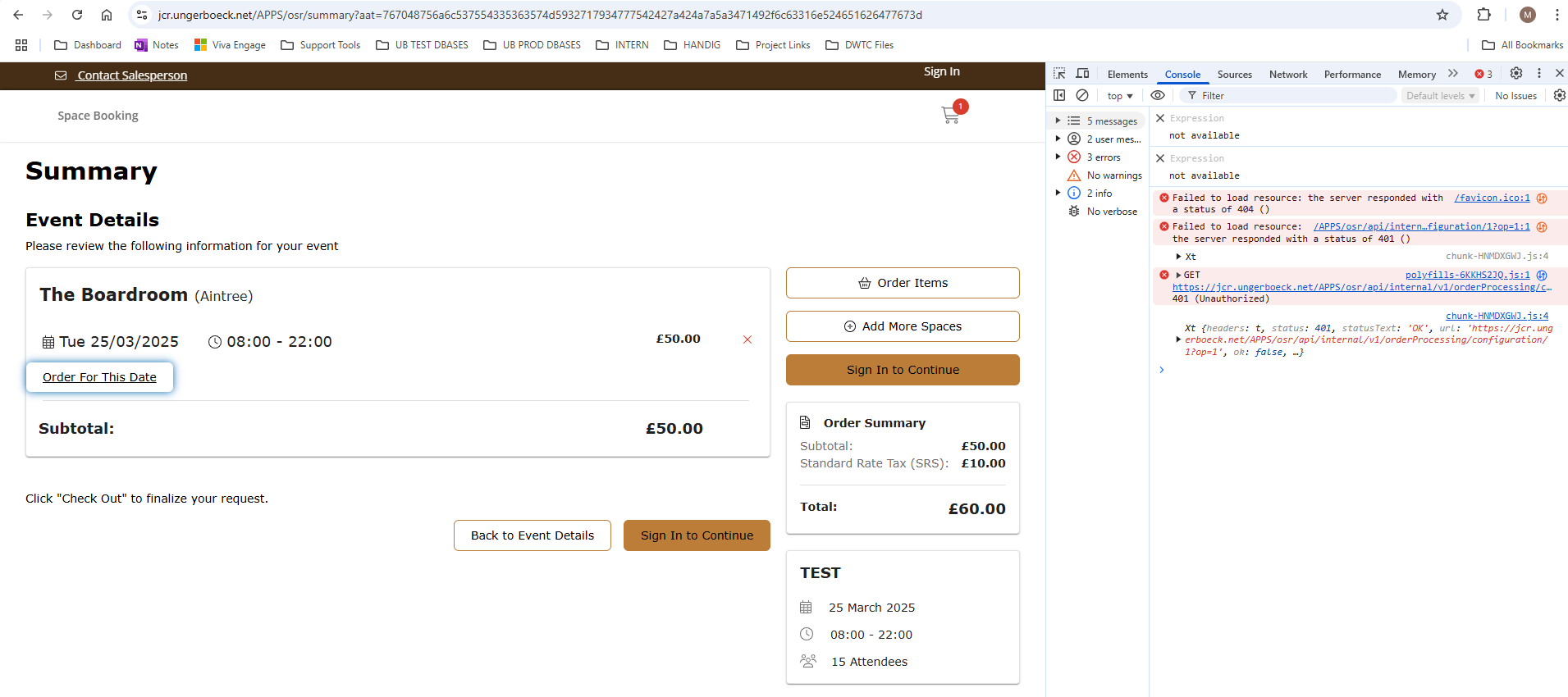
It is for Jockey Club Racecourses (UK) and this is their URL: https://jcr.ungerboeck.net/APPS/osr/?aat=767048756a6c537554335363574d5932717934777542427a424a7a5a3471492f6c63316e524651626477673d)
I have configured this in their PROD database and they have only one OSB Configuration: https://jcr.ungerboeck.net/PROD/app85.cshtml?db7efb85c5f448ecb137477e02394dd4=63c7f1acb8564a8ebd7bdc23dc9435aa
Please let me know if I should create a ticket for this.
Thanks
Minka
-
I have an update on this case: the link works once I am logged in with an Account. So it seems the Sign In Position ‘Before Submission’ prevents users to see the “Order Processing Part” and I think this is not correct. I would have expected that you can also see and select additional items before you enter your credentials.
Let me know if you want me to create a ticket for this :-)
-
Hi all, since I have an upcoming Go Live by the end of this month, I have created a ticket with all necessary information to recreate this: https://ungerboeck.zendesk.com/agent/tickets/348443
-
Thanks. Hoping support will work this with you to see if its a configuration issue.
-
Adding a link to the jira ticket here for reference
-
Adding the comments from engineering on this ticket:
"I looked at this a bit and it looks like their problem is that they want people to be able to add items before signing in. If I’m understanding that correctly it is working correctly they just need to update the configuration. In addition to enabling public access on OSB they need to enable it on order processing as well with the “Allow Guest Access” checkbox. I tried this on the customer site on the ticket and that fixed it.
Note: the guest access values are cached on the server so changing those values may take up to 5min to propagate to the server so if it doesn’t work immediately try again in a few minutes."
-
To be clear for everyone: it is in the Order Processing Component Configurations (and not the Order Processing)

Please sign in to leave a comment.
Comments
13 comments
Date Votes