Calendar cut off time not reflecting on Availability Report
Answered
1. General
Business impact if not resolved: Inaccurate availability reports for events finishing after midnight.
Short Summary of issue: Calendar cut off time not reflecting on Availability Report
Macro Vertical: Arts & Culture
If hotfix is requested, please provide reason/justification:
Is there a workaround? need to manually verify the report but it is not feasible as every Availability report generated cannot be trusted
Note: Momentus has already said that this is working as expected. However, AMG is satisfied with the answer as the Cutt off time is usually after 1 hour, which is not the case. here.
2. Debug Environment:
Customer DB Location: Hosted
Database: AMG_Test_0692727499_USI
Server: Debug-EMEA,1433
Version: 24.4.9152.14935 (20250121)
V30 Link: https://supportwebemea.ungerboeck.com/AMG_Test/app85.cshtml?ReturnUrl=%2fAMG_Test
User Login: usiadmin/ITRocks2014
New UI or Classic UI: both
3. Examples & Links (provide relevant examples & links):
Event ID: 10482,12143, just for viewing purposes, however this can be recreated with below steps
4. Recreation Steps:
Preconditions/assumptions: event running time should be 1900 to 0500 only
- Create an event which runs from time 1900 to 0500 on any future date
- The Calendar Overlap Cutoff Time is configured to 06:00 but events finishing before this time but after midnight are showing up on the availability report for both days.
-
Run the availability report for that specific day date
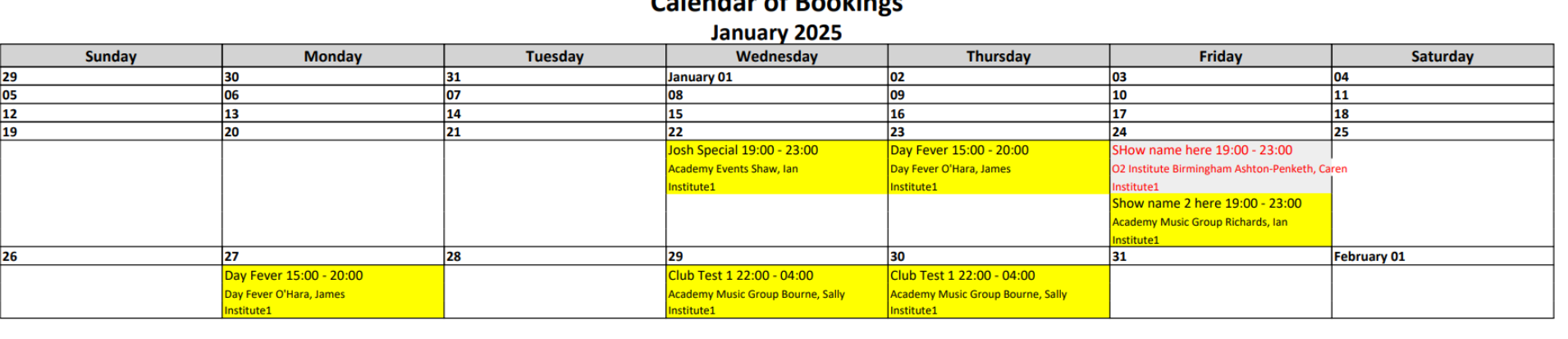
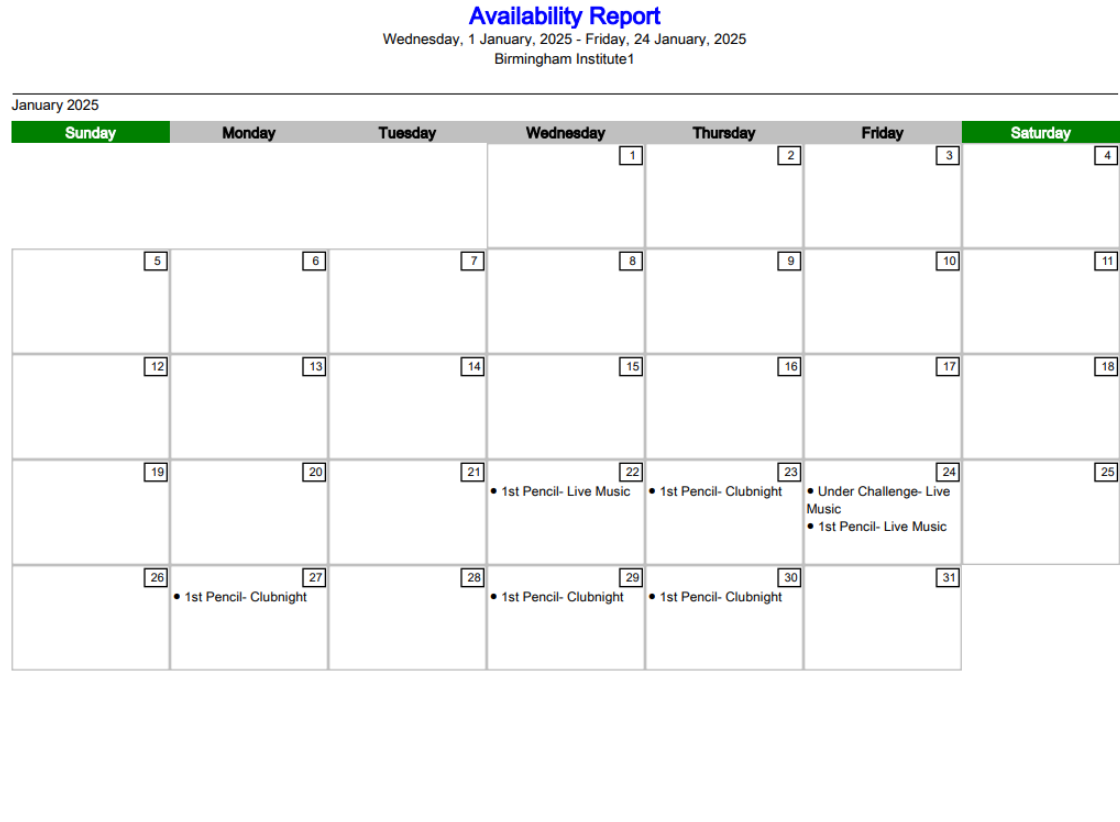
Expected behavior/outcome: Calendar cutt off time should reflect on availability report
5. Attachments:
Attach Screenshots or recording
Recordings from customer: https://share.birdie.so/8WrC5EdD
NOTE: Customer needs a workaround or a fix for this. They have reported this issue several times however we have closed it saying it is working as expected, however this seems to be a issue. Can we fix this for them rather than giving a workaround?
Zendesk: https://ungerboeck.zendesk.com/agent/tickets/341620
-

As discussed in this ticket https://ungerboeck.atlassian.net/browse/ME-4880 it sounds like updating the Availability Report to use “Calendar Overlap Cutoff Time” is an enhancement request. I'd like to use this post to discuss if there's a work around for this customer. Is there another way to view availability?
“A lot of these venues host regular events that run past midnight, so this issue is now becoming critical for the organizations. The availability report shows every day following an event that finishes past midnight as being unavailable."
-
Martin Stephens do you have thoughts on a workaround for this customer?
-
Hello Seth Halvaksz
We have an update from our client regarding this issue. So, AMG is asking if we can confirm the system is designed to show events finishing past midnight on both the day it started and the day it finishes, on both the Calendar of Bookings and the Availability Report?
AMG has confirmed that this is not the experience other organizations have with events finishing past midnight. If it is working as designed, then there is an issue with the configuration by Momentus on setting up our environment.
Also, can we give a deadline for resolving this? They want to escalate this; however they are on hold and should escalate eventually.
-

This is not possible from the Calendar of Bookings (as far as I know). I would recommend building avails from the Booking Calendar instead (you have to love our naming conventions)!
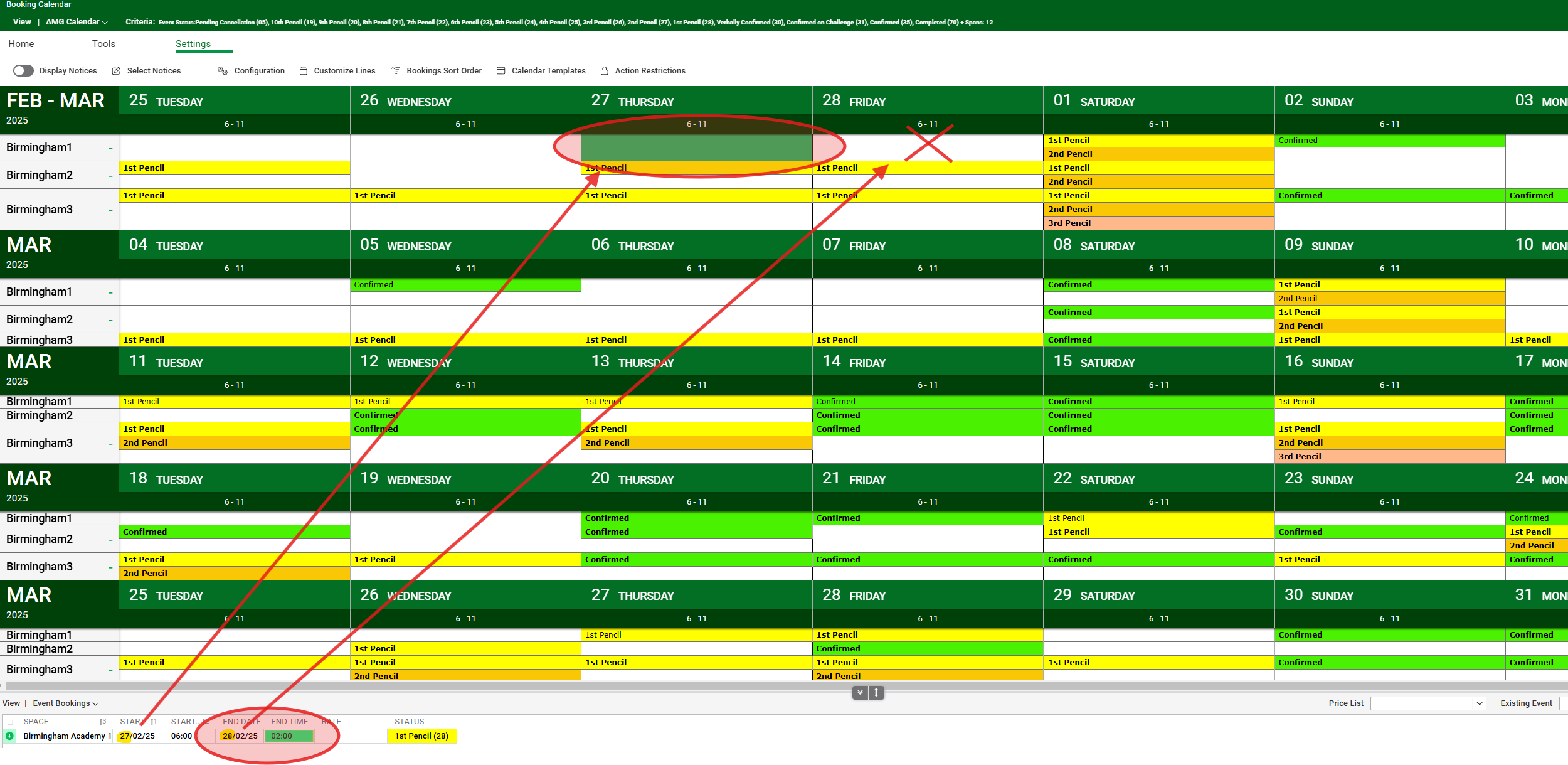
The booking calendar allows you to set Calendar Day Intervals. I setup an interval for the 7-Day span that goes from 6am to midnight. As you can see from the image above, the booking does not roll over onto the next day.
You can also customize the calendar line to show as much/little information as you need. Typically, you just show the status, however you can display the event name if you prefer.
After booking it looks like this:

The PDF output looks a little different from what they have now. It still looks good though:
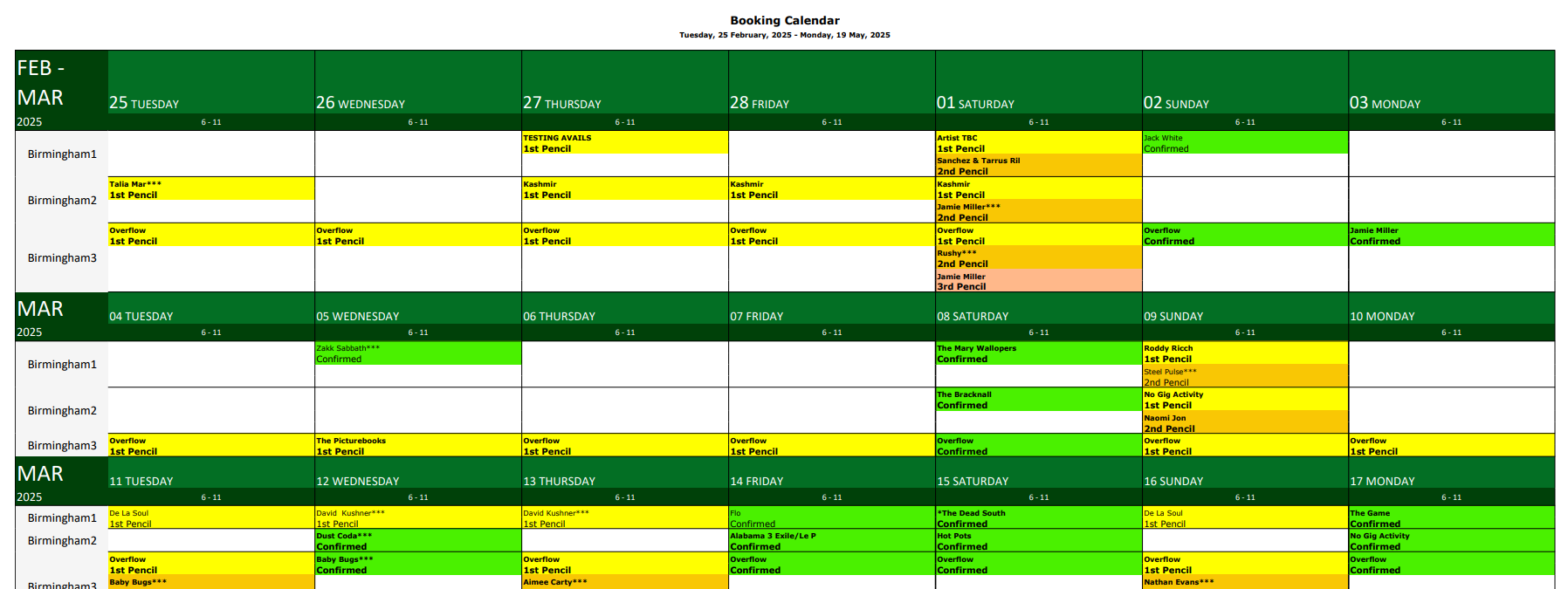
You can also use the Monthly span with Landscape output, rather than weekly. This may be preferable.
-
Hey Martin Stephens thank you for sharing this in detail. I really appreciate it.
However Seth Halvaksz AMG is ok and not satisfied with the workaround provided. However, when can we provide a fix to them? Can we move this enhancement to the nearest or next release? If not, how can we move this to get it fixed? As per the last comment from AMG it’s a crystal report so it should surely be easier to correct whatever is causing the issue in our environment.
So correcting crystal report should fix this issue, or the workflow will fix availability report?
-
Seth Halvaksz They are referring to the standard Crystal Report “Availability Report” (report source in screenshot below).

They want the report to honor the following Org Parameter:

This parameter basically says that if an event runs slightly over midnight, do not show it occurring the next day on the calendar. You get to set ‘how far’ after midnight. The crystal report currently ignores this setting.
Richard Marmura including you FYI.
-
Martin Stephens thanks for the work around. Yes Richard Marmura understands the enhancement request here.
Pushkar Barve have you shared the workaround proposed by Martin? We cannot make any commitments around timeline for enhancements. If their account manager wants to push this, they can escalate.
-
Hey Seth Halvaksz the work around has been shared. I am involving account manager Stefanie Harsce as well to take this ahead.
-
Hey Seth Halvaksz
i had some chat with their Account Manager, however i got an update that this is nothing related to Account Manager. Can you please confirm how we are proceeding with this?
-
Pushkar Barve we should recommend the workaround suggested by Martin, and open an enhancement request for the Availability Report in Pendo.
I see in Salesforce that AMG has a CSM (Ella Fancett). Either she or the AM (Stefanie) should escalate if they feel the customer will escalate.
Please sign in to leave a comment.
Comments
10 comments
Date Votes