Collapsed Payment Plan Steps (Payment Plan Invoices)
Answered
Hi team,
I have a question about the following case: I have added a Payment Plan and the Payment Plan Steps are collapsed because of the due dates, which works fine and as expected:
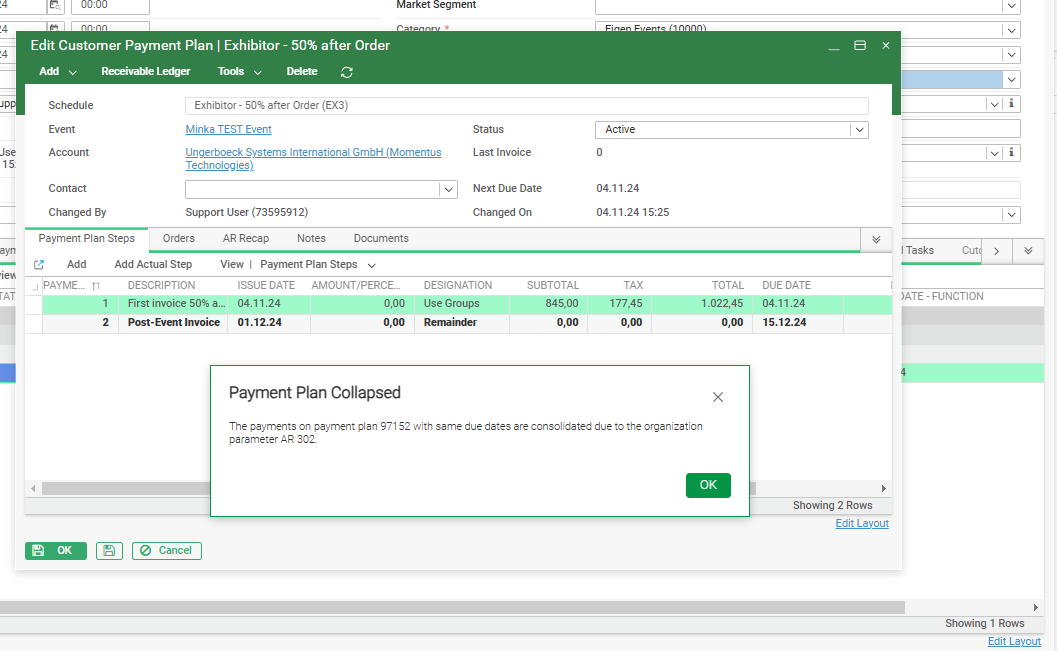
Now I am looking for a reference in the database so I can see that steps have been merged. Business Case: the Invoice Report (=Crystal Report) shows still the Description of the First Payment Plan Step, while this is no longer 50% anymore, but 100% since we have merged the steps.
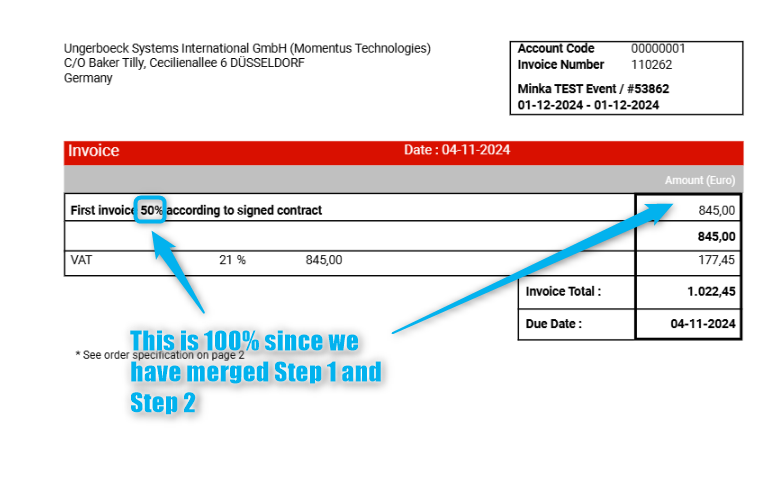
Is there a reference we could use in Crystal so the report shows a fixed text something like ‘Advanced Payment’ without showing the Description of the first Payment Plan Step when we have merged steps?
Thanks
Minka
-
Official comment

My recommendation is to use more generic step descriptions when collapsing is enabled.
There is no precise way to determine that a payment plan step has been collapsed. If you didn't want to take the approach of updating the master payment schedule descriptions - you could try to join out to EV127 on schedule code and payment number and interrogate for a difference in Pct / Amt and Payment Designation which would indicate that there is a difference in the steps on the payment schedule configuration and the created payment plan. -

Couldn't you just change the description on the step that is still there when this happens?
-
That is a possibility, but the Sales Users who are adding the Payment Plans are not allowed to make changes on the Payment Plan. Which means if this happens they need to notify the Finance Department to make a change.
That is the reason why I am looking for an automated solution.
-
I am not aware of a possible automated workaround. Tagging Ryan Ungerboeck in case he has ideas.
-
Just to be clear, I don't need an automated workaround. I would like to know if there is a reference somewhere so that we can add a logic in the Invoice Report, something like; if XXXX, then display ‘Advanced Payment’(=Fixed Text) in stead of the Payment Plan Step Description. Because the Payment Plan Step Description is not correct anymore. (the calculation is)
-

Hey Minka,
What about adding logic using the amount field? You might need to play with this a bit, but I think when the steps get consolidated, this will give you the information about how much will be billed (either XX% or Remainder, depending on how your payment schedules are set up).
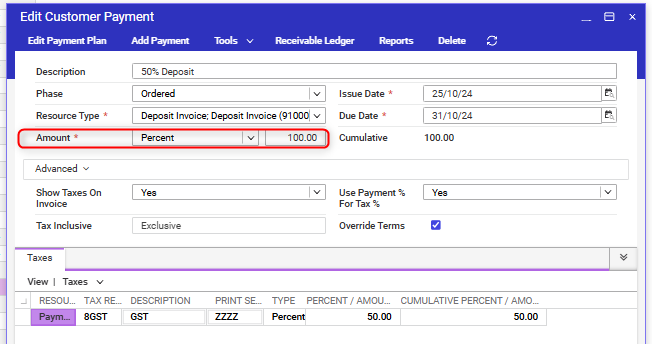
Then you could get the logic to include that info in your description. For example, ‘Advance Payment - xx%’ if the amount field is set to ‘Percent’, or ‘Advance Payment - All Estimated Services’ if the amount field is set to ‘Remainder’.
As far as I know, there is no indicator to show a payment step has been consolidated, so this would need to work for all Payment Plan steps, not just the consolidated ones.
-
Ryan Ungerboeck - Is there anything stored in payment plan step that indicates other steps were rolled into it?
Please sign in to leave a comment.
Comments
7 comments
Date Votes