Event Reporting & Revenue Distribution by GL Space Codes: Update Revenue Distribution by Event Class and changes to historical data
Answered
Account Name: City of Sydney
Region: APAC
Client Version: 2024.1
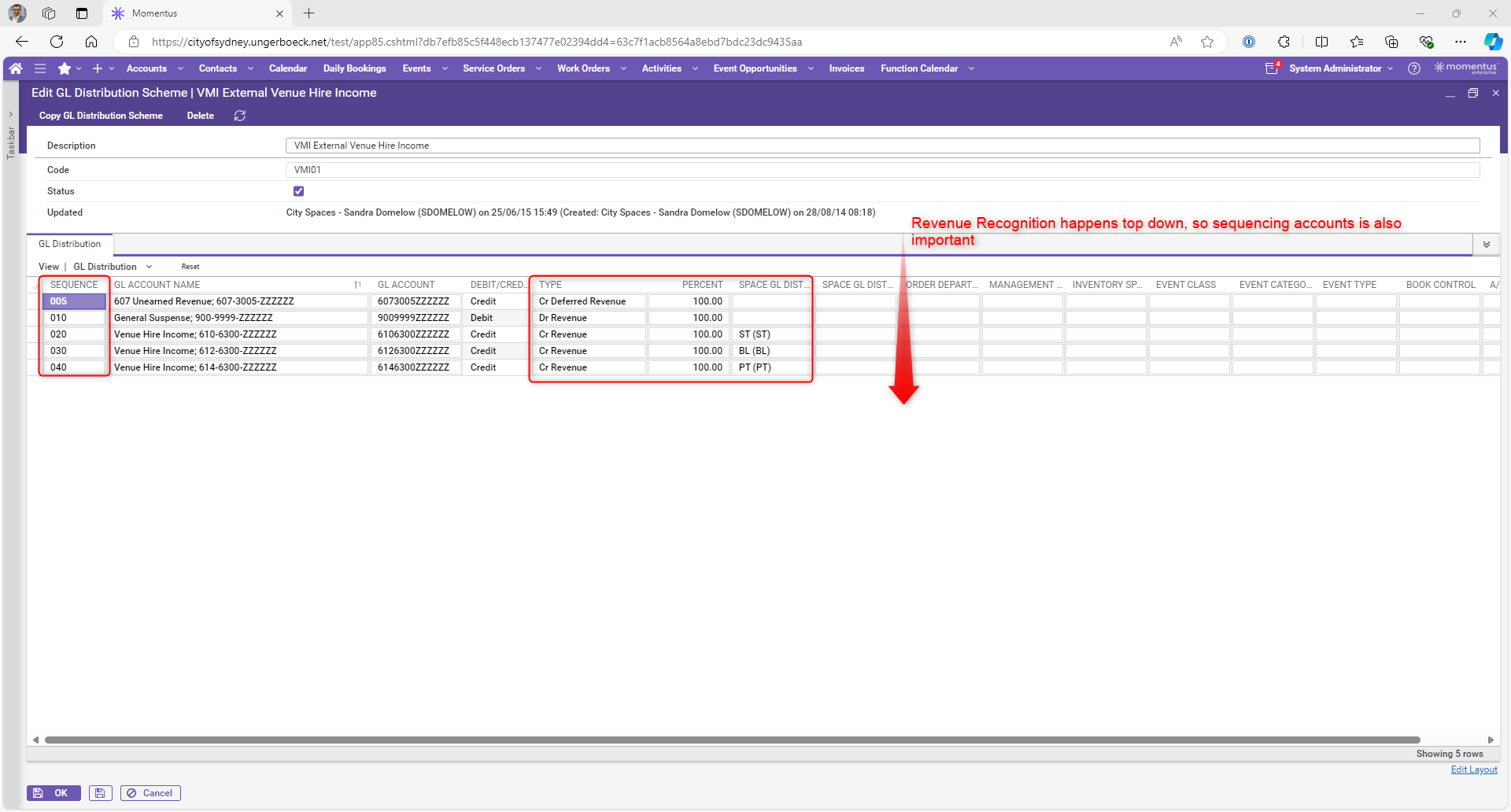
Description of the issue: When our system was first configured the GL distribution schemes were set to use the 'Space GL Distrib 2' to determine at the event level where revenue should land given resource.
This requires that a function space must be assigned to every function line in an event. Without a space assigned the journal will error on the final PP invoice and it requires manual correction. It happens.
I've been thinking about this for a while. I know the system requires that a function space is mandatory but if it is not entered against the booking function it will not populate thereafter. We have also seen some instances where somehow half way through many function lines the space will be missing on one or two lines.
There is a much simpler way to drive this revenue distribution and that would be to use the 'venue cost centre' field. However, this is a UDF.
So my question is. Can the 'Booking Team' field (event class) be swapped over to a UDF and 'Venue Cost Centre' moved to event class. They are basically the wrong way around for the purpose of making the revenue distribution a much simpler task for the user.
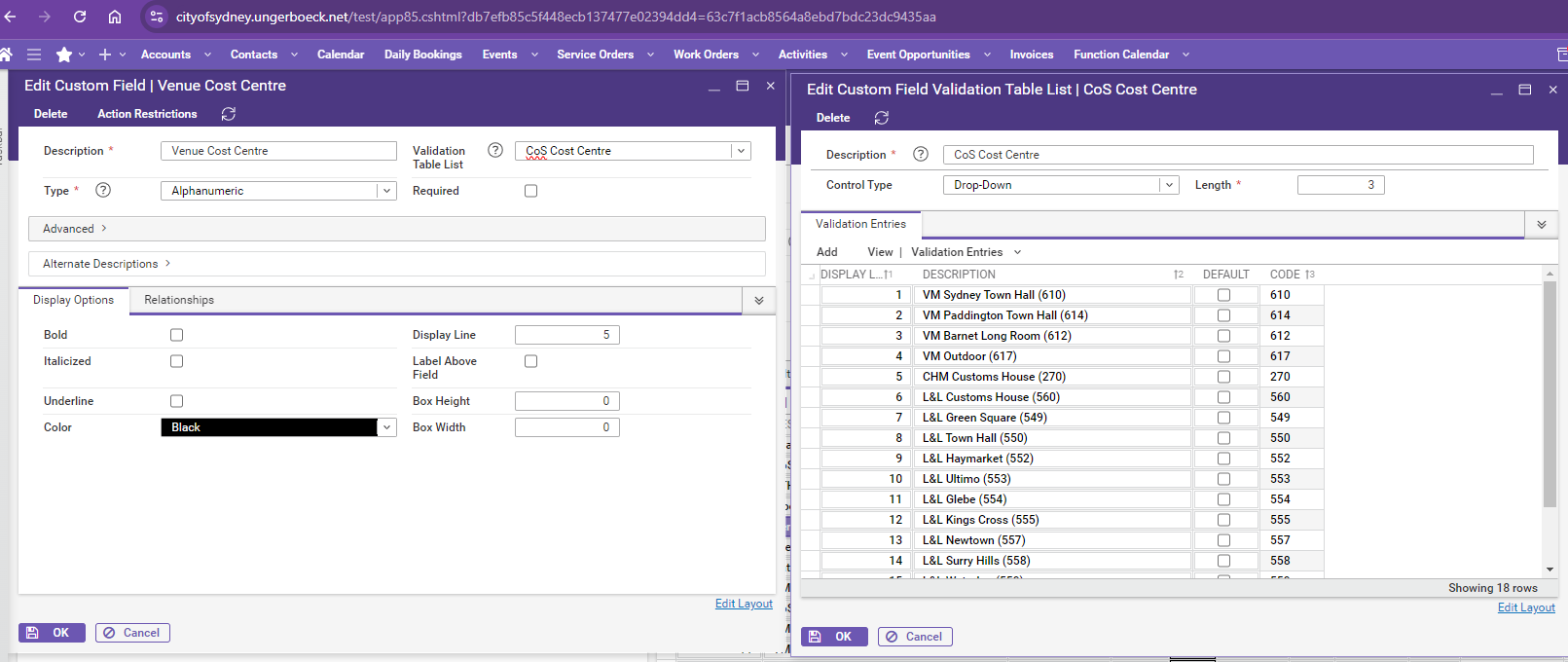
In order to use the event class (currently called Venue Cost Centre) I need to replace the current class categories with the categories sitting under the udf Venue Cost Centre (eg. Sydney Town Hall 610).
My concern/query is how that affects historical records – and how we transition.
Is there a script that could be developed to update past events?
What you've already tried or suggested. Why does this not work?: I've advised the change can happen by utilizing the “Event Class” field on Events with appropriate options and updating the GL Schemes by Event Class, if the distribution has to follow the rule by Event Class. The catch here is if we update the fields, it will impact all the past events where information used for reporting will be lost. What is the best way to clean this up and streamline the revenue distribution process without impacting too much on any historical data. The concern here is the old data might also be impacted if we start making the change on master data (Event Classes)
Attach relevant files (such as screenshots):
GL Distribution Scheme - VMI External Venue Hire Income
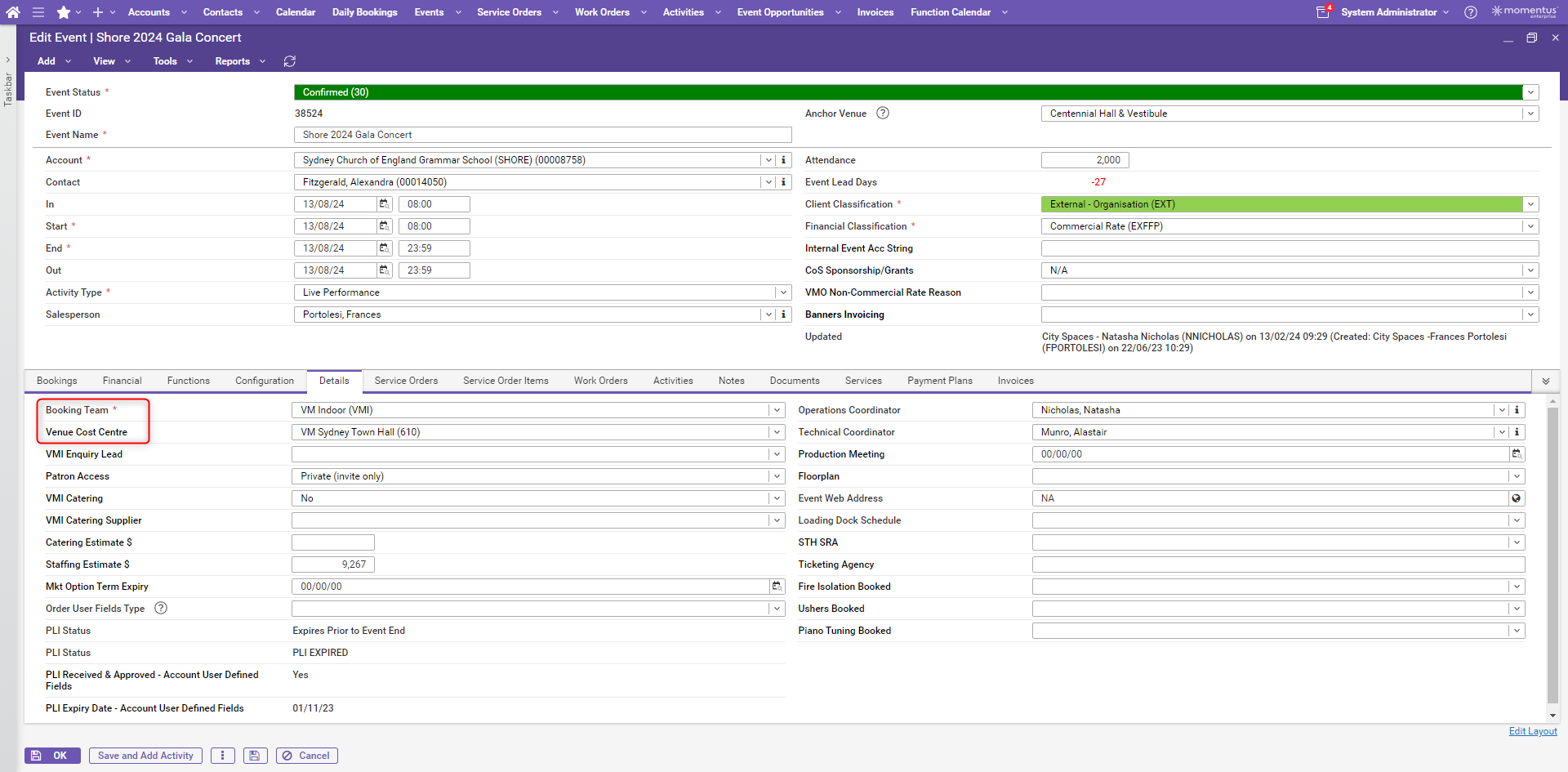
Edit Event Screen:
Booking Team = Event Classes - This field has been rephrased and currently not utilised for Revenue Distribution. Customer would like to switch to this option.
Venue Cost Centre is a custom field on Event level which uses a validation list. Customer would like to use this or perhaps a new field where this legacy data from Booking Team could live.
Links to articles where you've looked for solutions and also other steps you've taken to research the issue.
-

Ryan Ungerboeck - Do you have any input on the GL distribution approach before this customer starts making changes?
-

If I have a customer that wishes to change the GL distribution to rely on a field at the event level (Event Class) - here is what I would do in this example:
Evaluate which reports / portals depend on Event Class:
Spreadsheet (Excel Addin) Reports
Dashboards and Views
Filters/Fields on various portals (calendar of events, etc., Registration configurations)
Filters on Views (Events, Service Orders/Items, Daily Revenue, GL Transaction Inquiry)
Can all of the above reports and views be accomodated by moving the current value to the UDF (likely not IF it is relied upon)
If it can though:
1.) Move Current Event Classes to Event UDF X
2.) Move Current UDF X Values to Event Classes
3.) Update all current and historical events to the new Event Class and UDF values (swapping them)
4.) Clear Space Value 2X on the GL Distribution and Move to Event Class (with mapping if needed -eg. Space 2X 10 = Event Class → Town Hall)
5.) Synchronize this value down to all financial reporting tables via script
Daily Revenue
Journal Entry Details
Recurring JE Details (likely not an issue)
6.) Update any other tables or reports as needed (Meeetings, Registration Configurations, Leads, spreadsheet reports, views)
-
My gut tells me Event Category, Class, or Type is the best answer, but without knowing how the current Event Class value is used and reported on, its tough to say if thats still important enough that it warrants being one of these 3 key fields.
There are probably other things that this customer can consider. If I have a little more visibility to the entire situation (licensing, concerns, etc.) we may be able to look at some other alternatives (GL Core Dimension 01 / 02 or Book Control, depending on the scenario).
These still have some inconsistencies that would be worth addressing from a historical reporting perspective, but may have some benefits in their case. -
Thanks so much Ryan Ungerboeck, that's super helpful.
I'm inclined to suggest an engagement (perhaps a financial consultant) with us in this case, as i believe there would a requirement to get a script developed to update all past event with right values or are you suggesting they can manage this if they follow the steps correctly? (definitely not past journals will be updated if they do it themselves)
They are using AR (Basic & Premium) and Sandra is open to hear what may work best as the current process definitely has its own issues where spaces are not assigned on functions, resulting into journaling errors. Please let me know if you need any other information on licensing or anything else. I think GL Core Dimension 01/02 may work even better if the revenue needs to be targeted through a selection, that way we are still retaining the old information and we phase out the usage of event class if not required.
Please sign in to leave a comment.
Comments
4 comments
Date Votes