Email to Myself - Shared Email Address
Refer to Product Ideas
- Account name: Walt Disney World
- Region: US
- Client version (Enterprise): 26.22026071301
- Description of the issue
- Disney is getting email failures and are unable to modify DNS records to verify SendGrid as an authorized sender
- They are able to control a different domain - events.disneygroups.com - and are trying to find a way to use this domain when sending out emails from Momentus.
- They have created a shared email address - test.email@events.disneygroups.com - that they can then assign users and roles to and this has worked for most of the workflows
- They are seeing an issue when running a report and then choosing the ‘Email to Myself’ option, which fires the email off after selecting.
- This is defaulting and sending to the email of the signed user, which is the correct process
- Inquiry: Is there anyway to alter this email from Email to Myself to use the shared email address instead of the email of the logged in user?
- Zendesk Ticket: 395248
Link to Document showing configuration and results of testing: https://p23.zdusercontent.com/attachment/271647/TGHB3BMnuw4Qv6b0MVfpUnMYv?lotus_request=true&token=eyJhbGciOiJkaXIiLCJlbmMiOiJBMTI4Q0JDLUhTMjU2In0..7jup2_ddrkan7P7z-0j2Yw.X9afqZ1WX3r3WNaI2Zw5wGYpnuVzmySmE_1hBoYZKiIk-qRJ38voomDwwgSUI-DezvTkg27j6wjjVdcTwMntB__4apNNFFGM08daEgnOSfaIb_GClvmCkU2iNhQLVrchAPU8ieHUZ_WEgmbhqrAc1wRz8zxYnoTNNWv3nuaA4HrQLlG1LKNJNI6XxR2zOb2MLhf3hNnC5q63PnqG3S1FriM7Q1cMEexVw9QJdNT1u-9XtNeJaAkmGQh7sVT9e5lISLX1ErD-AM2WdL1RLc6xBH1qnoa-zLf47hxWSEkPgQA.MGWkrJMKXjwh3iIP3957XQ
-

Seth Halvaksz - We need a PM best practice recommendation because I think the ‘send to myself’ report email function is working as intended. In that it sends to the email address on the user.
What is the recommendation to get the behavior Disney wants with the stipulations they have?
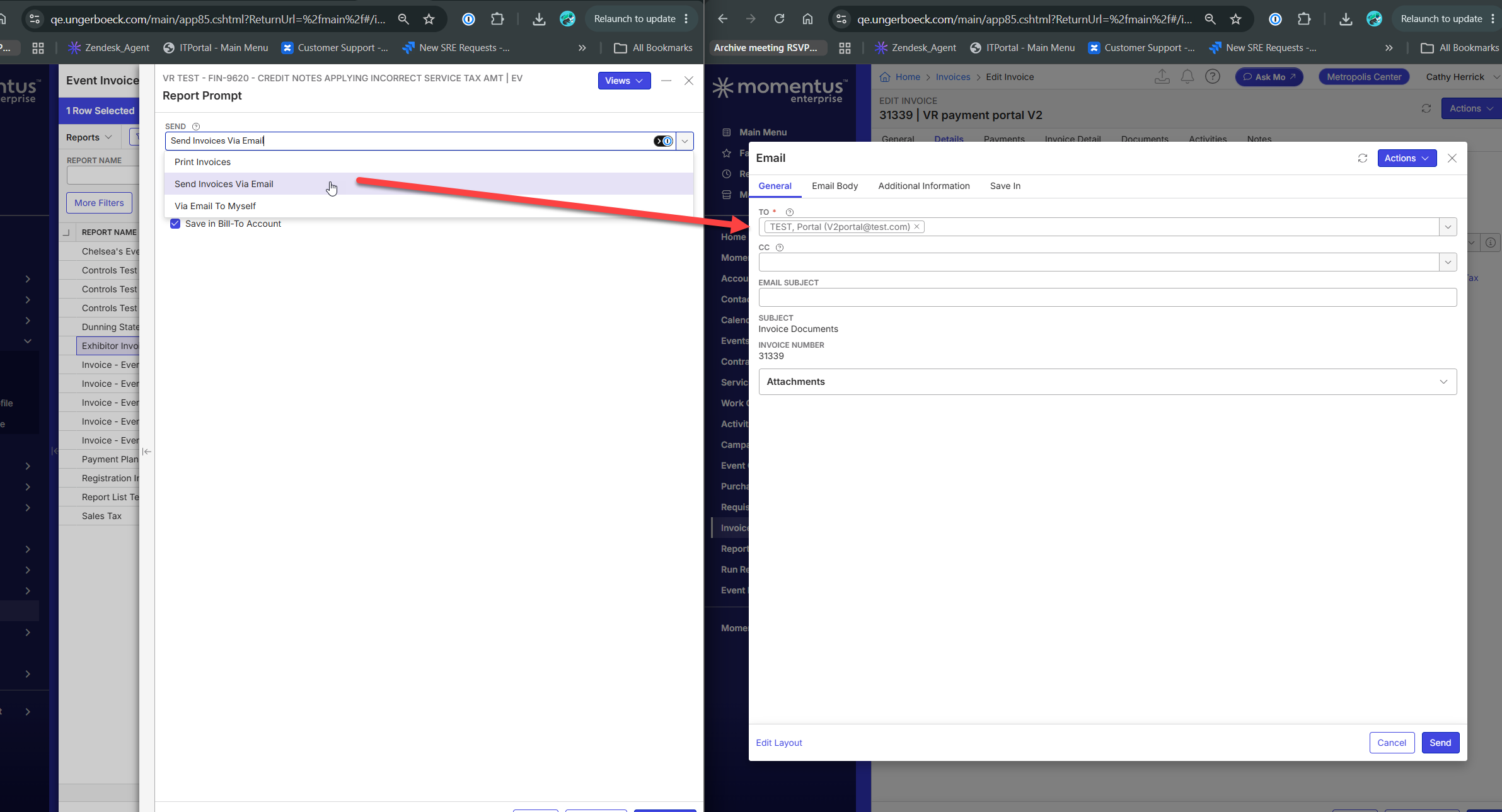
Should they be running the report and then picking the other email option then replacing the email address they want (or picking the email option if its an invoice) and avoid email to myself altogether?
Is there some other, better workflow that works more elegantly for their needs?
-

Cathy, why doesn't ‘send to myself’ work for Disney? I'm not following.
-
Seth Halvaksz - for anything with the @disney domain, it's getting caught as spoof and they cannot update DNS for that domain. They have been using the shared email address with a different domain they can control to get around that for other emailing out of v30, but its not working for the report email to myself functionality
-
So they have shared email address as: test.email@events.disneygroups.com
And when then send to myself, its sending to @disney.com since that's in the user account? And SendGrid doesn't like that domain, correct?
I'll need to ask Dustin for his suggestions. I agree this sounds like an enhancement.
-
Cathy Herrick can you confirm what they are trying to do? Are they literally trying to send the email to “myself” or to a group of users?
-
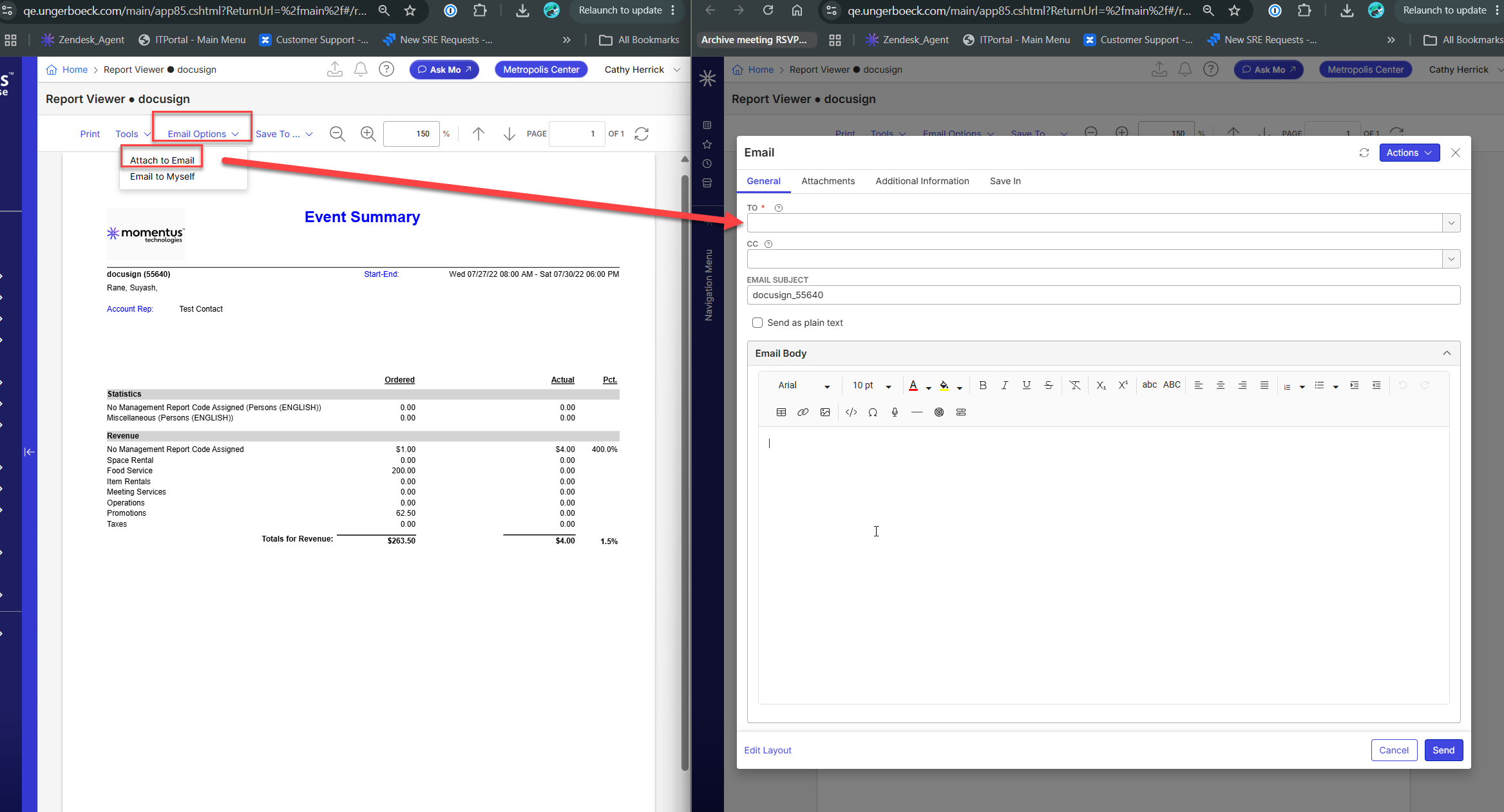
Seth Halvaksz - Their workflow from the Report is to use the ‘Email to Myself’ tool, this emails the report directly to the user without populating an email window.
In my previous comment, the screenshots show the options from the different report types. They are currently choosing email to myself and this causes issues bc their user email isn't where they want to actually receive emails.
-
Cathy, when you say “their user email isn't where they want to actually receive emails” can you give an example? I thought their user account would have the email address that has an inbox. But the shared email address won't, because its a disney subdomain.
-
Seth Halvaksz Going to their user email address is fine - it's the email address it is sent from that is the issue.
On all the other processes, you can select which email address it is sent FROM - this is what is being changed to the events.disneygroups.com in order for their email application to not mark it as spam and not deliver.
But when choosing to Email to Myself on a report, the ability to select the FROM email address is not an option - it just sends the email to the user's email address in their profile as the TO and FROM.
-
Sam, ok got it. Unfortunately this is an enhancement, and a unique scenario because they are using a shared email address. Can you submit a Pendo request and post the link here for reference.
Please sign in to leave a comment.
Comments
10 comments
Date Votes