Delete Service Orders from Contract

Hi team,
I have a customer (CCIB - Barcelona) with the following business case and I am wondering if this is a bug or gap/enhancement request.
→ There is an Exhibition with Service Orders related to Exhibitors (ESC/Webshop) and Service Orders related to Third Parties.
→ The Exhibitor/Webshop Orders are on individual Payment Plans and have already been invoiced, in line with the ESC/Webshop configurations. The Third Party Service Orders are bundled in different Payment Plans, based on the same Bill-To Account/Contact.
So far so good.
→ Now, the team wants to create a Contract for the Third Party Service Orders. In their opinion, the quickest way to link these Service Orders to a Contract is to go to Contracts > Add Contract. However, by default, this adds all Service Orders to the Contract — including the ESC/Webshop Orders. (I am aware there is a workaround to add only the required Service Orders to the Contract via Service Orders > Add > Add to Contract, but even when following this approach, it can still happen that too many Service Orders are accidentally added to the Contract.)
→ What they do next is remove all Webshop Orders from the Contract, since these should not be included. They select the Webshop/ESC Order(s) > Mark for Delete. The next message shows:
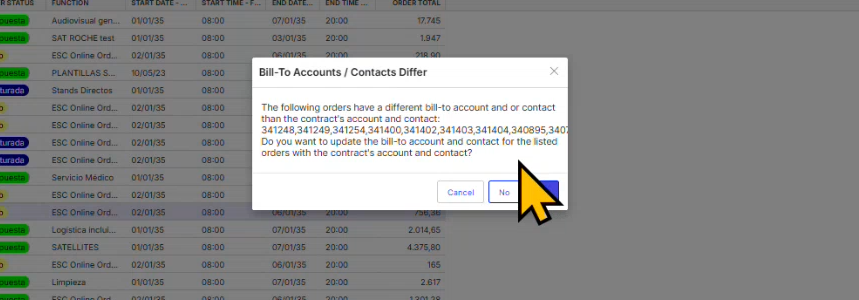
“Do you want to update the Bill to Account and Contact for the listed orders with the Contractors Account and Contact?” > Answer is no, because we just want to remove the Orders from the Contract, nothing else.
→ The following next prompt is asking me “Would you like to remove order 360198 from Payment Plan XXXXXX (12334)?".
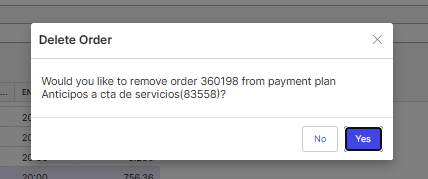
And now we do have a challenge here:
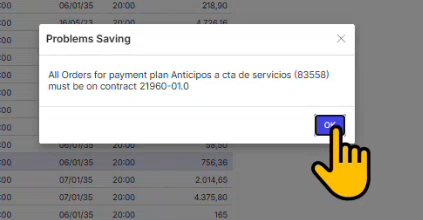
* If they click NO: the system is prompting them again and this time with a Problems Saving saying at all Orders for Payment Plan xxxx must be on the Contract. I can only click OK and that brings me back to the list with the Orders. The Order could not be removed from the Contract.
* If they click YES: (which they actually don't want, but there is no other way to remove the Order(s) from the Contract) They receive the following message:
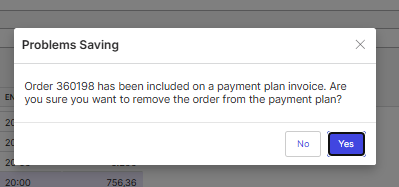
O If they click NO: It will prompt to revise the Contract (and when clicking No) the system returns in the first prompt where it says "Problems Saving saying at all Orders for Payment Plan xxxx must be on the Contract. The Order could not be removed from the Contract.

O If they click YES (again, which they don't want) it removes the Order from the Contract, but it also removes the Order from the Payment Plan, even when it is already invoiced.
Within CCIB, users should not be allowed to remove Service Orders from a Payment Plan at all, which we already have restricted via an Access Exception. However, since this particular way of removing orders from a Payment Plan follows a slightly different route, we have a high-risk issue here, as it is causing significant problems with invoicing and potential loss of revenue.
My goal is to find a way to remove incorrectly added Service Orders (with their own Payment Plan or even already invoiced) from a Contract, without any impact on those Orders in terms of Payment Plans. What would be the Best Practise or have we idenified a gap here?
I have already checked our Access Privileges and the Accounts Receivable Configurations but I could not find any options in the configuration.
Any thoughts Anthony Costantino Martin Wooding or Ryan Ungerboeck?
-

Adding Samy Kheloufi as well. FYI Ryan is out this week, and Tony is out until August 15.
Please sign in to leave a comment.
Comments
1 comment
Date Votes