PriceList Error on ExP

- Description of the issue: Event 5057's exhibitor order price list ("IFL SEPT 2026" / code IFL0926X) exists in Price List, but the EXP shop throws "This order's price list, IFL0926x is no longer available. You must add the price list back to the Price List Master before this order can be changed," blocking Save. No recent changes have been made.
- Account name: WSN DEVELOPPEMENT
- Region: EMEA
- Client version: 26.2
-
Steps to reproduce:
- Log in to the Exhibitor Service Centre for Event 5057 as an exhibitor:
https://supportwebemea.ungerboeck.com/WSNDeveloppement_PROD/app85.cshtml?aat=4d684e4e5837344d30736a386b576938357872775a41466a2f6175426644452b77452b7679516d6d4975633d
(username: test@gomomentus.com pass: 12345)
- Go to Additional Furniture → Table & Chair and add an item (e.g., "White Table - Batik").
- Attempt to save the order.

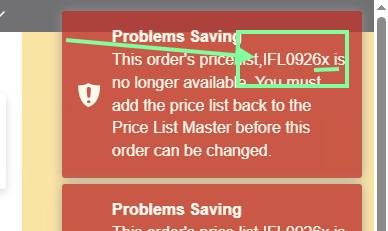
- Observed results vs Expected results: The order should save successfully using the event's assigned exhibitor order price list.
- What is the job the client is trying to accomplish: Complete an order
- Business impact if not resolved: Exhibitors cannot place orders
- Links to articles where you've looked for solutions and also other steps you've taken to research the issue: I tried to use a different price list, but I still get the same error message mentioning the price list IFL0926x
- Link to Zendesk ticket: https://ungerboeck.zendesk.com/agent/tickets/393033
- Local v30 URL: https://supportwebemea.ungerboeck.com/WSNDeveloppement_PROD/app85.cshtml?
-

Even when the price list is retired, and a new replacement is added, the item still points to the above mentioned price list
I have changed all the areas where a price list is added, to the new price list
-

I think it's happening because the price list in this drop down is not correct. That's the code of the price list, not the description appearing in the drop down.
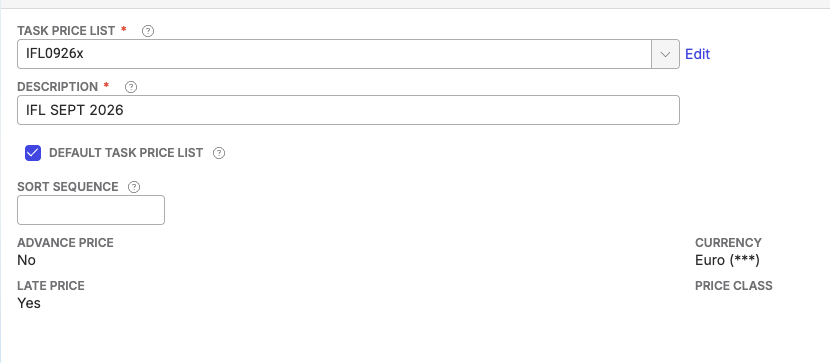
If you open that drop down, this is what you see. It's showing the description of another price list.
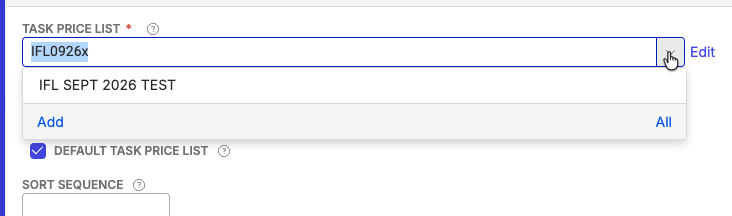
I'm not sure if this bad data or what is going on here. I'll let others weigh in. I've never seen this before.
-
This topic can be closed
The issue was in the price listCopied the price list, replaced it in the EXC and EXP and reprice and recost all the service orders (used the new price list)
this has solved the issue
Please sign in to leave a comment.
Comments
3 comments
Date Votes