Recommended Process for Rental Equipment Purchase Orders

She has been looking at the recommended process for hiring rental equipment to fulfil inventory shortfalls and was hoping Momentus could clarify what it considers best practice.
VCET has reviewed the View Resource Requirements and Inventory Transactions knowledge base articles, however she notes that they explain the individual functions rather than the complete operational workflow.
Specifically, she is looking at the scenario where the Resource Requirements page identifies an inventory deficiency and equipment needs to be hired from an external supplier to fulfil that requirement.
Rather than confirming her understanding, she would be interested in what Momentus defines as the recommended end-to-end process.
For example:
How should rental equipment be managed from the point the deficiency is identified through to its return to the supplier?
Is there functionality during the purchasing process to identify or flag that an item is rented rather than permanently increasing owned inventory?
Given that hired equipment needs to be returned and should not remain as part of the owned inventory balance, how does Momentus recommend ensuring this step is not missed?
Is there functionality or a workflow that helps track the return obligation and automatically prompt or enforce the inventory reduction, or is this typically reliant on users remembering to complete a manual Return inventory transaction?
How are other customers managing this process in practice?
Her main concern is ensuring the inventory balance remains accurate. From what she can see, it would be quite easy for the return transaction to be missed, leaving inventory overstated, so she wants to make sure nothing is being overlooked in terms of functionality or recommended process.
If there are opportunities to improve or automate parts of this process using Workflow Builder, she would also be interested to know.
She notes that the invoice approval example isn't particularly relevant for VCET, as they don't have an external finance system and are using the full financials module.
The automated payment reminder example also feels a little outdated and basic to her, so she would be interested in seeing examples that are more aligned with VCET's current processes and priorities.
She is not necessarily looking for another knowledge base article, more the practical workflow that Momentus recommends customers follow.
-

Hi Phil,As per my current understanding - definitely not claiming full expertise, tagging few experts Pieter Du Plooy Chanh Huynh
Rental Tracking
-
If you’re receipting inventory without a PO, you can flag the item as a rental and set start/end dates. This is pretty straightforward and helps you see at a glance which items are rentals versus permanent additions.
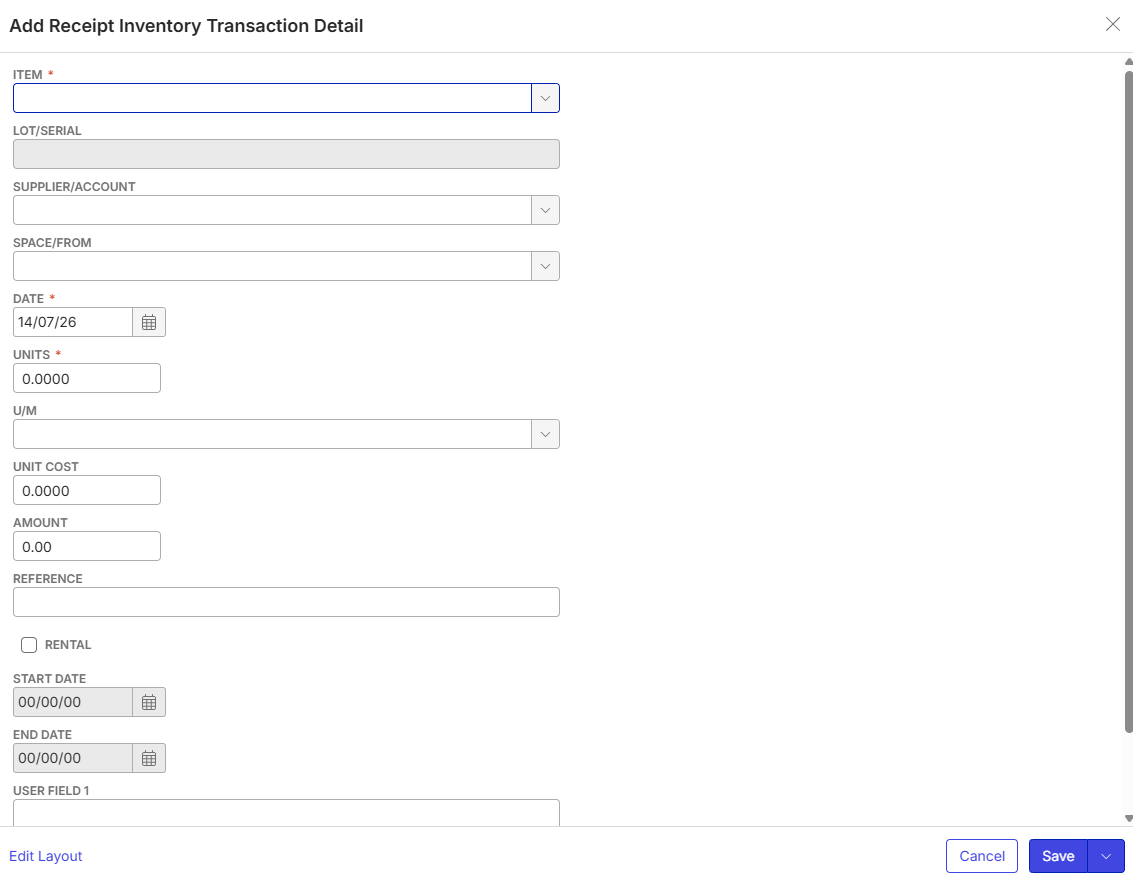
- For items with a PO, the rental flag isn’t always visible or captured in the same way. I was unable to fully confirm this.
Reporting & Views
-
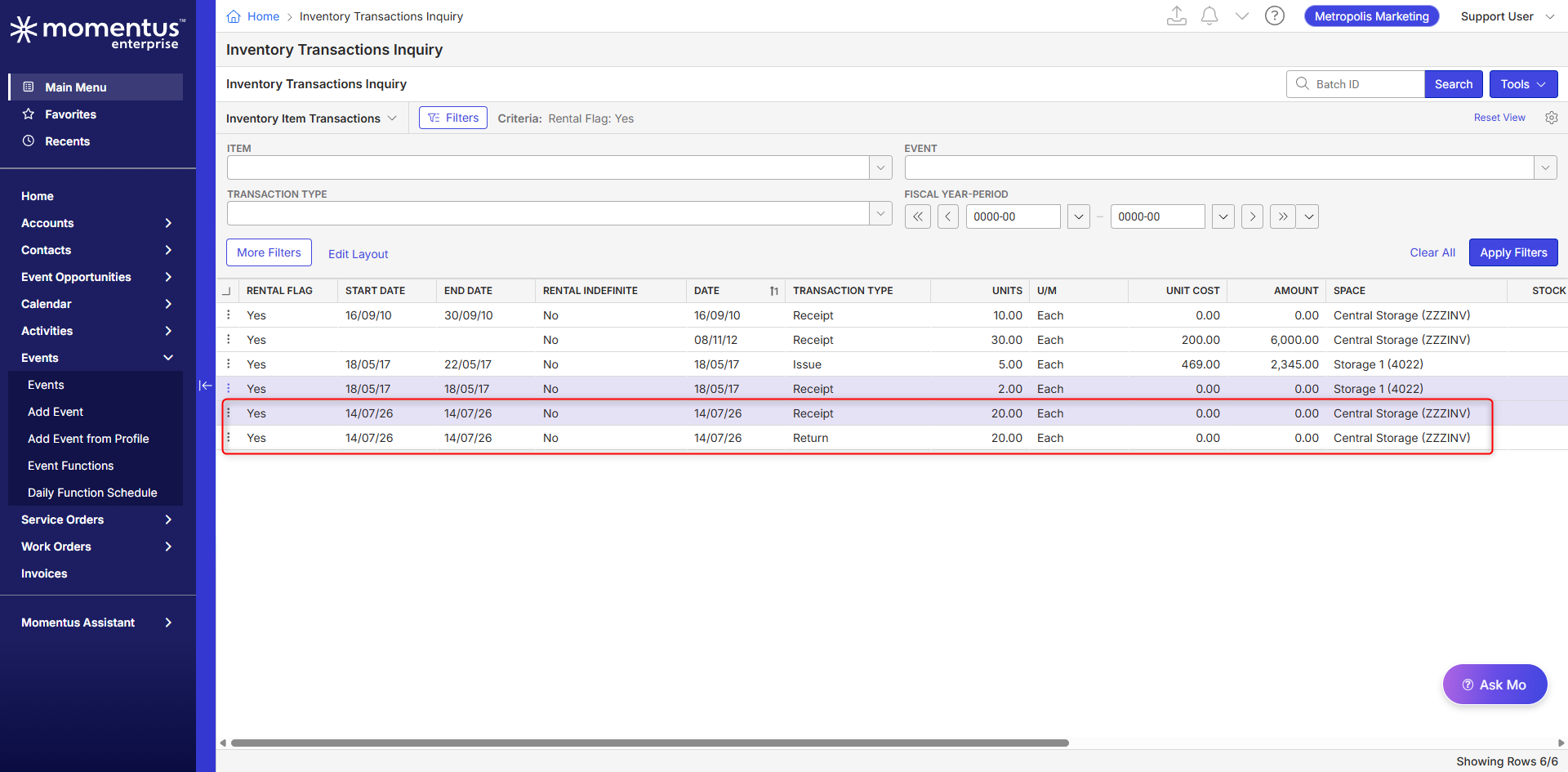
The “Inventory Transaction Items” screen will benefit here. You can filter for rental items (if flagged) and their dates, then save/export the view for regular review. This is how I’ve seen teams keep tabs on what’s still out and what needs to come back.
Reminders & Returns
- Reminders are mostly manual - I'm thinking activities or checklists against the supplier account. There’s no built-in automation (yet) for rental returns, so it’s on the end user to set up a process. Some teams use recurring tasks or calendar reminders to prompt returns.
- To actually return the item, you create a Return transaction in the system. This decreases the item’s stock and keeps your inventory accurate.
Workflow & Automation
- It will be interesting to hear about how Workflow Builder may support scenarios like this.
- Regular audits and dashboard reviews are best practice i believe to keep a track of receipt and returned.
Invoicing & Payments
- I am not sure if i understand your question about invoice approval and payment reminders (i believe you are referring to Dunning statements) which may need to separate it out to understand what's the ask here.
-
-
Thanks Himanshu.
-
Pieter Du Plooy Chanh Huynh it would be great to get your view on the best practices and how are other customers are managing this process in practice?
-

We probably don't have many customers that uses Enterprise fully.
But to add, in the resource requirements window, you can right click one or many items that will be short and create a purchase or requisition order/s. The system will use the preferred supplier linked to the inventory item/s and create the purchase order/s. It will use lead times, min, max and re-order levels of the items to reasonably accurate create the purchase order. It's still someone's job to review before its approved and sent to the supplier.
As for accuracy, the accuracy of any system depends entirely on the quality of the information provided to it. That is why some larger customers have dedicated warehouse staff and or buyers. It's their job to make sure the system balances.
-
Thanks Pieter Du Plooy
-

Hi all,
I analysed the possibility of using the Workflow Builder for this use case and it seems some aspects can be automated. However, I need your help to confirm I’ve understood the use case correctly and it functions as intended.Thanks,
Victor.
WORKFLOW BUILDER ASSESSMENTSUMMARY
Please note this is a high-level assessment based on available API documentation and webhook specifications. A precise implementation answer would require a detailed technical analysis and hands-on validation in your specific environment.
The end-to-end rental process, deficiency identified in Resource Requirements, requisition or PO created, item received, item returned, is only partially automatable today. The front half (requisition/PO creation and receipt) is well supported by the API and has webhook triggers. The back half is where the risk sits: there's no dedicated "is this a rental" flag on the inventory item catalog itself, and nothing pushes a notification when a rental comes due or when a return is posted. The good news is that the Inventory Transaction record does carry native rental fields (a rental flag, start/end dates, and a link back to the originating PO), and the API supports creating and posting that return transaction directly. So the pieces needed to build a monitoring or enforcement layer exist, they just aren't wired together automatically by Enterprise itself.
TECHNICAL ANALYSIS
Deficiency to Requisition/PO: generating a requisition or PO from Resource Requirements is a native Enterprise UI action (right-click short items, system uses preferred supplier, lead time, and reorder levels). The Requisitions API (
GetRequisitionList,GetRequisition) is read-only, no POST/PUT, so this step can be read from but not triggered externally.PurchaseOrders/PurchaseOrderItemssupport full POST/PUT if a PO needs to be created or edited outside the native flow.Rental flag: there is no rental indicator on the master
InventoryItemsrecord, only genericClass/ProductGroupclassification fields. Rental data instead lives on two places:PurchaseOrderItemscarriesDateIn,DateOut, andInOut, and theInventoryTransactionsrecord carries its ownRentalFlag(Y/N),StartDate,EndDate, andRentalIndefinite, plusPONumber/POLineNumberlinking back to the PO andStatus(A=Active, C=Closed) showing whether the obligation is still open.Posting the return:
POST /InventoryTransactionsexists specifically to create and post transactions, andTransactionTypeincludesRET(Return) alongside Receipt, Adjustment, Issue, Count, and Transfer types. This means a return can, in principle, be created and posted through the API rather than only through the native UI.Webhooks:
PurchaseOrderUpdated,PurchaseOrderItemUpdated,POApprovalUpdated,RequisitionUpdated,RequisitionItemUpdated,RequisitionApprovalUpdated, andResourceUpdatedare all available, good entry points for the front half of the process. There is no webhook for Inventory Transactions, Inventory Items, or Inventory Balances, so nothing fires when a rental transaction is created, closed, or overdue. Any monitoring has to be poll-based againstGET /InventoryTransactions.Workflow Builder opportunity: trigger on
PurchaseOrderItemUpdatedwhen a rental PO item is received, then run a scheduled check againstGET /InventoryTransactionsfiltering forRentalFlag=Y,Status=A, andEndDateat or past due. Where a return hasn't been posted, Workflow Builder can notify the buyer or warehouse contact, or, with careful validation, callPOST /InventoryTransactionswithTransactionType=RETto post the return itself, closing the loop that currently depends on someone remembering to do it manually. -
A follow up question raised by VCET: “the key component is the ability to identify rental items on PO's. The process (Resources Requirements > Create PO > PO Receipt = Increase Balance) works for CONSUMABLES, however we are using RTIC for EQUIPMENT, therefore the PO's are created when we need to cross hire AV equipment due to deficiencies and the inventory balance is only temporarily increased”
-
Pieter Du Plooy Victor Nogales Junior Ryan Ungerboeck A follow up question raised by VCET: “the key component is the ability to identify rental items on PO's. The process (Resources Requirements > Create PO > PO Receipt = Increase Balance) works for CONSUMABLES, however we are using RTIC for EQUIPMENT, therefore the PO's are created when we need to cross hire AV equipment due to deficiencies and the inventory balance is only temporarily increased”

Please sign in to leave a comment.
Comments
9 comments
Date Votes