Order and function of buttons inconsistent

Zendesk Ticket: #383442
Account: Cité Nantes
Region: EMEA
General
Business impact if not resolved: No impact, customer just needs to be cautious.
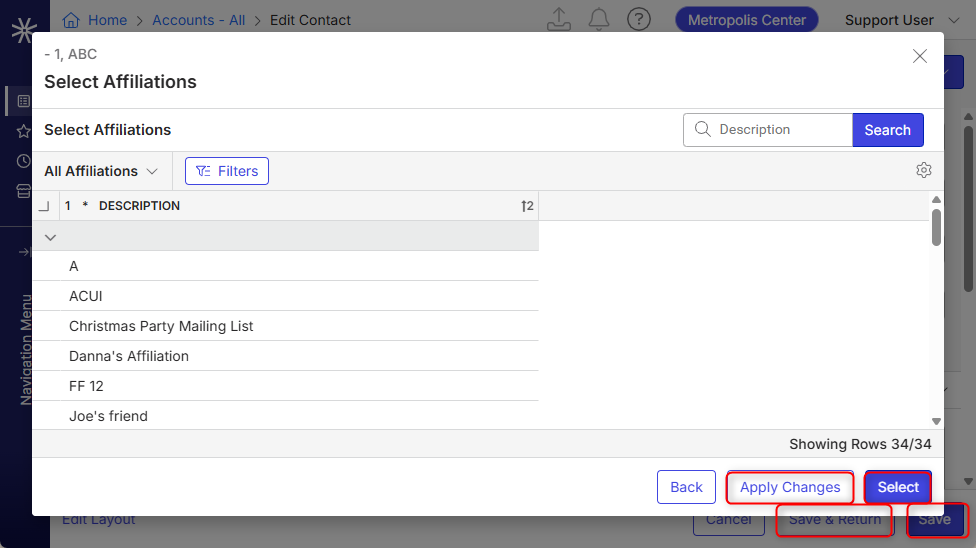
Short Summary of issue (issue description): Since the new UX, users have found the buttons' logic inconsistent; "Save & Return" and "Save" are not always in the same order.
Macro Vertical: Convention Centers
Debug Environment:
Customer DB Location: Hosted
Version: 26.3.9676.32061 (20260629)
V30 Link: https://qe.ungerboeck.com/main
Recreation Steps:
- In the Main Menu, go to Accounts and edit an existing account
- Notice the order and function of the buttons in the bottom-right corner:
1. "Cancel", to close the window without saving, outlined
2. "Save and Return", to save changes and close the window, outlined
3. "Save", to save changes but stay on the window, solid - Open the affiliations tab and click Select
- Have another look at the order and function of the buttons in the bottom-right corner:
1. "Back", to close the window without saving, outlined
2. "Apply Changes", to save changes and stay on the window, outlined
3. "Select", to save changes and close the window, solid
Observed vs. Expected Results: Customer would expect the solid button on the right to consistently save changes and not close the page.
Attachments:
-

This looks like it's working as designed to me. Select is the primary action for this window so it should be the highlighted one.
Please sign in to leave a comment.
Comments
2 comments
Date Votes