Job Cutoffs not preventing actions
Refer to Product Ideas
- Description of the issue: Job cutoffs are not preventing actions
- Account name: Calgary TELUS Convention Centre Authority
- Region: Canada
- Client version:26.1_2026033001
- Steps to reproduce:
- Verify the Job Cutoff is setup by going to Job Cutoffs from the main menu
- See the Adding Service Orders cutoff is set to a job type of CTCC Operating and Cutoff Details has a Status level of 06 and Use Range checked
- Create a new job to ensure the Cutoffs are active on the job < Go to Jobs from main menu < Add Job
- Enter any description, Start/End Date and Account
- Set the Evt Type to CTCC Operating and the Job status to be above 06 < Save
- Go to the Service Orders tab < Click Add Service Order
- Add any item to the order and click Save < the order saves successfully and gets added to the Job
- Observed results vs Expected results: This should not be allowed to get saved to this Job based on the cutoff configuration.
- What is the job the client is trying to accomplish: Can restrict PO's being added for jobs that have been closed.
- Links to articles where you've looked for solutions and also other steps you've taken to research the issue:
- https://supportcenter.ungerboeck.com/hc/en-us/articles/212029647-Configure-Event-Cutoffs
- There are no articles specific to Job Cutoffs
- Link to Zendesk ticket: https://ungerboeck.zendesk.com/agent/tickets/377949
- Local v30 URL: https://supportwebus.ungerboeck.com/CTCC%20Test/app85.cshtml?ReturnUrl=%2fCTCC+Test
-

Seth Halvaksz - which PM is managing Jobs currently?
We don't have anything on the KB about how Jobs cutoffs work, so Sam was troubleshooting according to the Event Cutoffs article. Sharon Whitehall has already confirmed that Event Cutoffs work correctly - so its a question about how Job Cutoffs work and if they are supposed to function like Event or not.
If they are supposed to function like Event Cutoffs then we would enter a Jira for this, if they're not then we would need some guidance and likely and article on KB to be written.
-

A few things.
1: The site does not appear to load correctly. Can't really verify the data right now
2: Did you create the actual cut-off entries on the Job? And is that configured correctly? E.g. the right User/Role assigned, and it isn't set to Inactive?
E.g. on Events there is a Cutoffs tab where you have to add the cutoffs you want from the main cutoff window on to apply there. -

Following
-
Benjamin Schwenke Try this URL instead - https://supportwebus.ungerboeck.com/CTCC_ProdSam/app85.cshtml?ReturnUrl=%2fCTCC_ProdSam
The other local site would not load for me either and I'm not sure why, but this one is working correctly.
It does look like a new DB got brought down however and all the data I tested with is gone, but I have re-added a cutoff.
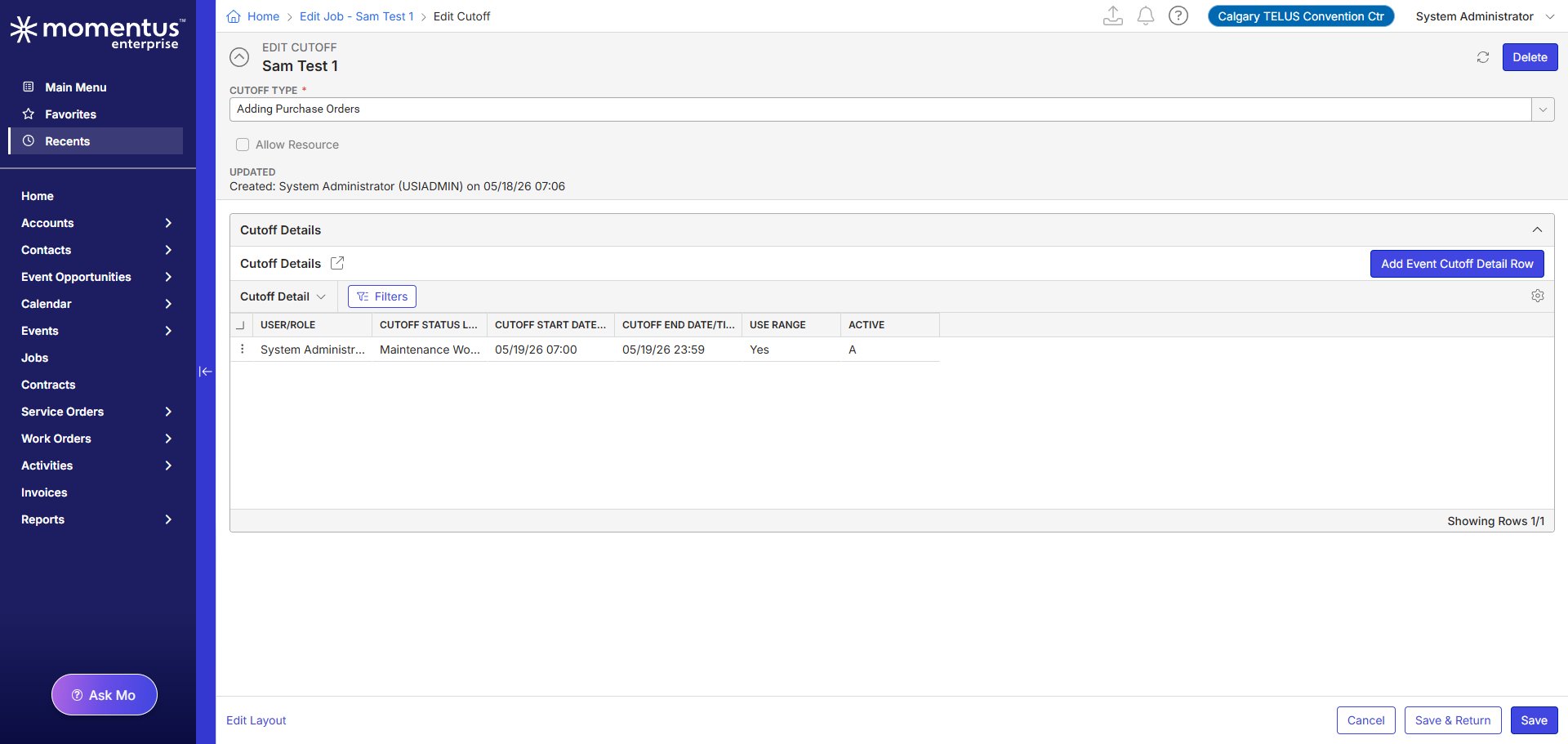
Status Base to prevent purchase orders with a job type of CTCC Capital and a status level cutoff of 6. Based on the article, these cutoffs are setup on event type and status so that the cutoff doesn't have to be added to the specific job.
I add a new job (Sam Test 1) and choose the event type CTCC Capital and set the status to be above 06. The cutoff does show within the event as well, but I am still able to add the purchase order. And yes, the cutoff shows the same - it's set to USIADMIN and is set to active

-
Hi Sam,
When I tested this, I got different results. I had to make a few tweaks though.
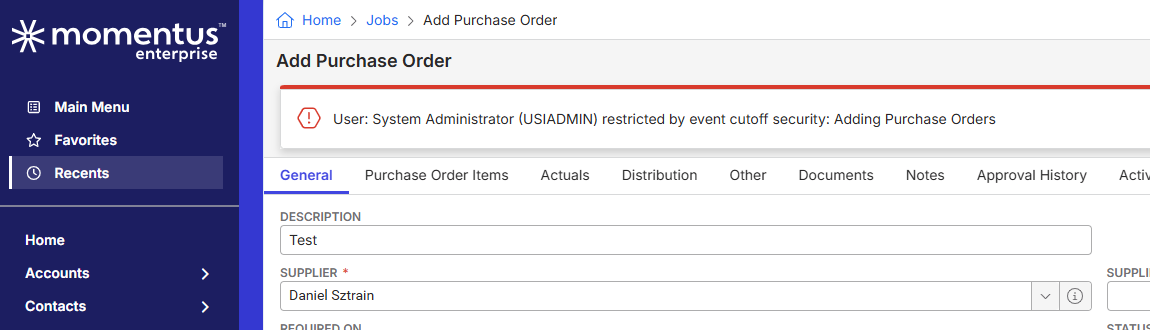
Notably, on Job ID 12130 I had to go to Cutoffs -→ Change the Cutoff start date on the job level cutoff you had. It was set to only enforce on 5/19/26 -→ going forward, but today is the 18th.
I changed the start date to be 5/17/26 and got the above result when I tried to add a purchase order.
I will note that I had to open Add Purchase order and fill out info and click save for the message to appear.
Adding service orders appears to stop the user before the window even opens.
This is likely just a minor UI/Feature gap here but I wouldn't think its a catastrophic issue.
Let me know your thoughts. -
Okay I see what you are saying - it looks like the cutoff start/end dates are defaulting to the job date.
So the Job Cutoffs is a template that then adds the cutoff on the specific Job when that job is created (assuming it matches the requirements of the cutoff like event type). The actual Cutoff on the specific event is what controls whether or not the purchase order can be added.
So this is by design then that the dates would have to be changed on the actual cutoff within the job then correct?
Also to confirm - do Job Cutoffs and Event Cutoffs work exactly the same? I want to make sure so I can provide feedback on the KB article that this also pertains to Jobs and also make sure it's specifies that the start/end dates default to the date of the Job/Event and that the dates of the cutoff record within that job/event would have to be updated.
-
Hi Sam,
Yes, the cutoffs configured from the main menu are templates that can default in based on type.
Critically, you must setup both the Cutoff + Cutoff detail if you want to script the cutoffs by specific date ranges.
** Otherwise, if you only create the cutoff, then the Event/Job will also only inherit the parent cutoff and no details are scripted.
E.g. on the main menu cutoff screen you can select Star/End Days+Hours to a positive or negative number similar to how event profiles work.
When an event or job is created, and the type matches, the system will default those cutoffs into the event/job and script the dates on the cutoff details based on the numbers you entered in the template.
They effectively work the same between the two (Job and Event cutoffs)
The only caveat here might be Unscheduled Jobs, which I have no tested.
But yes, the actual cutoff start/end dates on the cutoff details on the specific Event/Job are what controls the validation aspect.
You shouldn't need to change the dates on the actual cutoff detail if you setup the templates correctly and are happy with the numbers you entered.
Hope this all makes sense. -
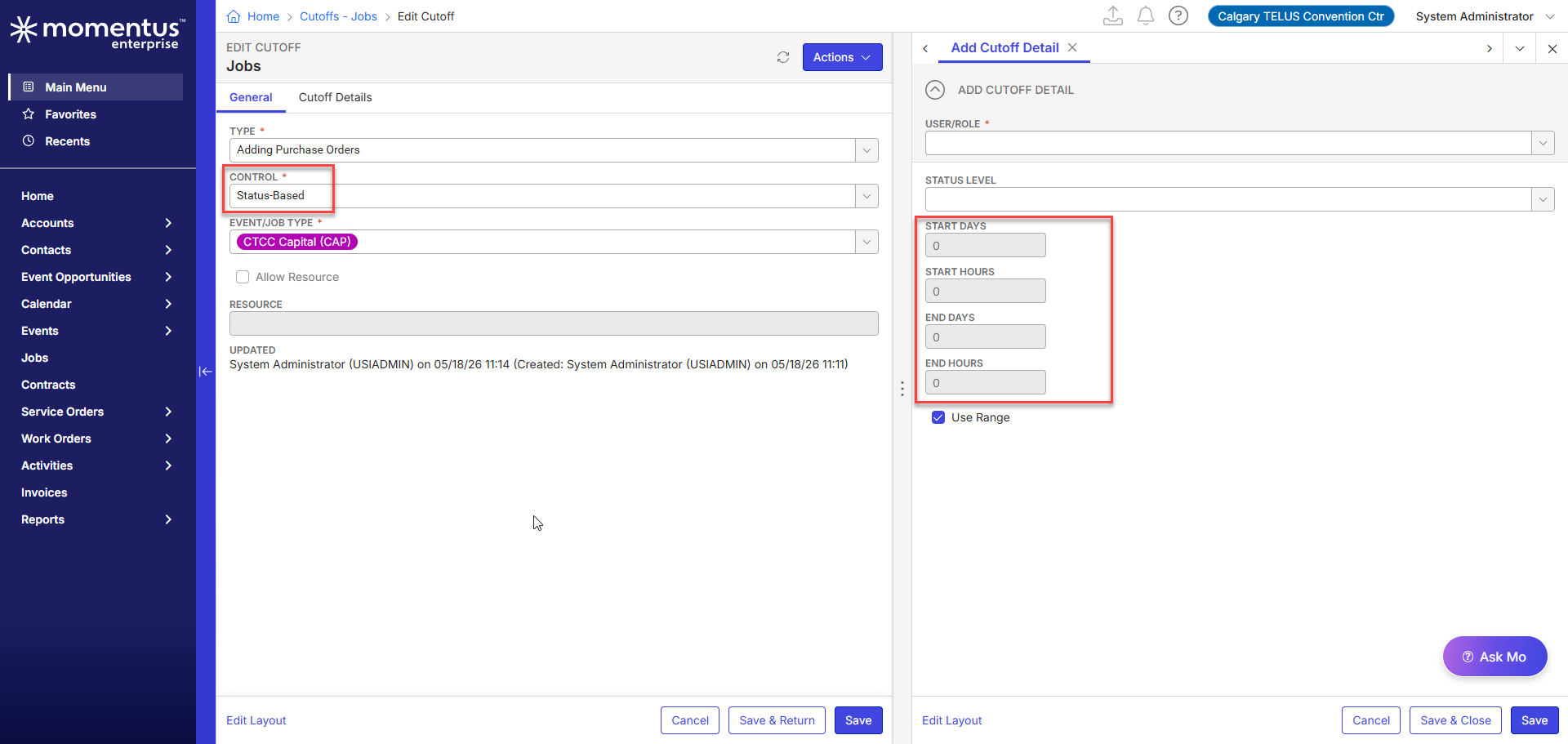
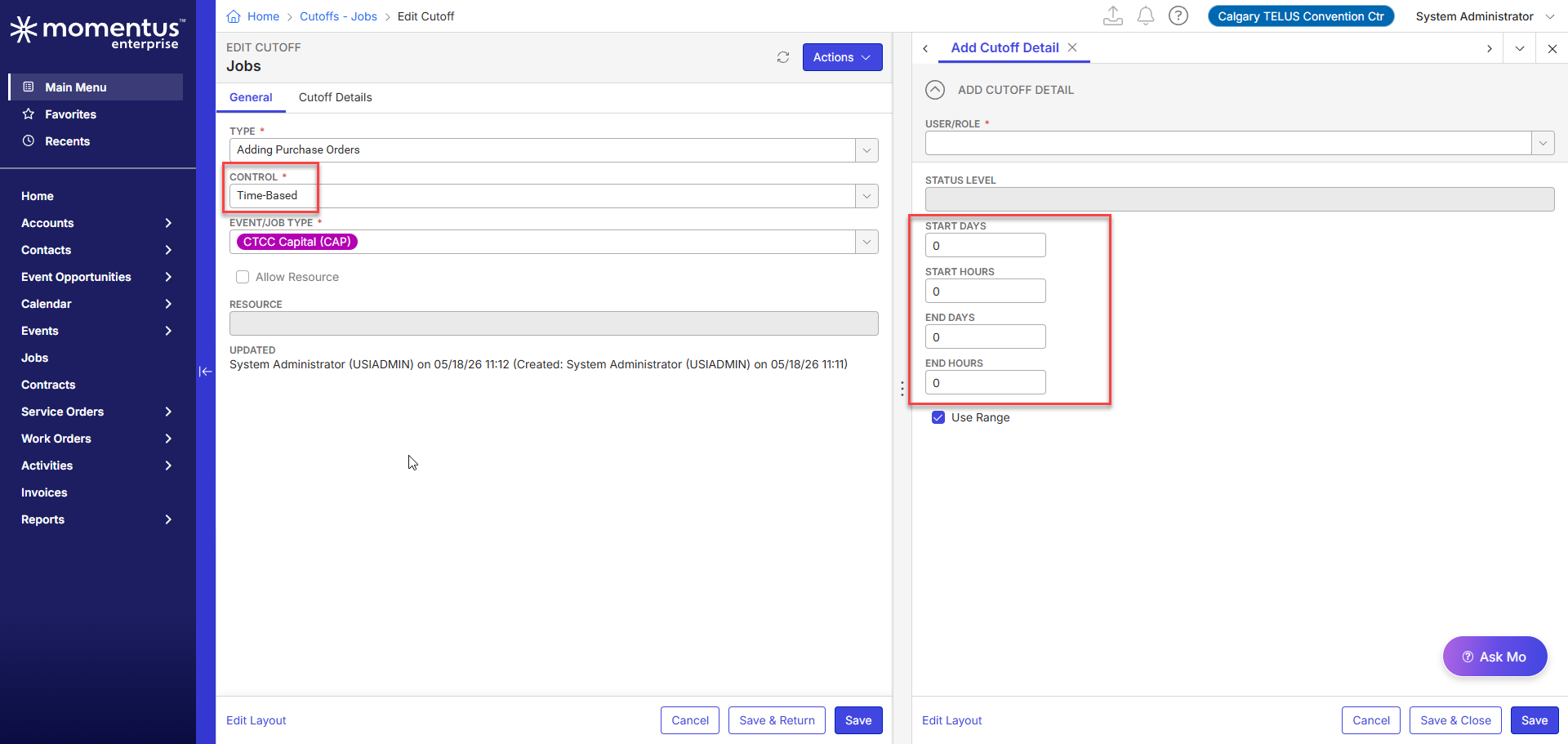
Benjamin Schwenke The start and end days/hours are only available when it's set to a time-based cutoff though and are not editable when it's based on Status.
So if it's a status based cutoff, should the cutoff record on the job be following the start/end date? Shouldn't it only look at the the event type and the status of the job when determining whether an action can be performed and ignore the date and time?
-
Samuel Davidson
So I see what you mean on the cutoff template side.
When you add a new job/event though, the dates do get filled in on the cutoff details based on the event or job start and end dates.
I did a bit more testing and confirmed a few things.
1: When Cutoffs are added/defaulted to an Event/Job, they always seem to pull in the dates based on the Event/Job.
This might be slight issue as I feel like these should not default when “Use Ranged” is unchecked.
2: “Use Range”, when checked on a Status based cutoff, changes the enforcement logic. The statuses must check out and the dates are also validated for that cutoff.
3: When “Use Range” is unchecked on a Status based cutoff, it seems we still validate that the current date is at least ≥ the Event/Job cutoff date.
So there are definitely some quirks here. The logic could likely use some clean up from a feature stand point. But at the very least, if set up correctly, it does still accomplish what a user wants. -
Yeah, I can tell the customer that after adding a job and bringing in a cutoff - they will just need to update the dates on that job. I think that is a normal workaround for the start/end date bringing in the date of the Job itself when it can't be set on the template.
Do you want me to also submit a Jira for this as a bug or are you considering this a gap/enhancement?
-
I would consider this a gap or enhancement. Something for Seth Halvaksz to consider for a future release if he wants. Not a bug really though.
Please sign in to leave a comment.
Comments
12 comments
Date Votes