ESC - Navigation control form (rename header SERVICES from the component)

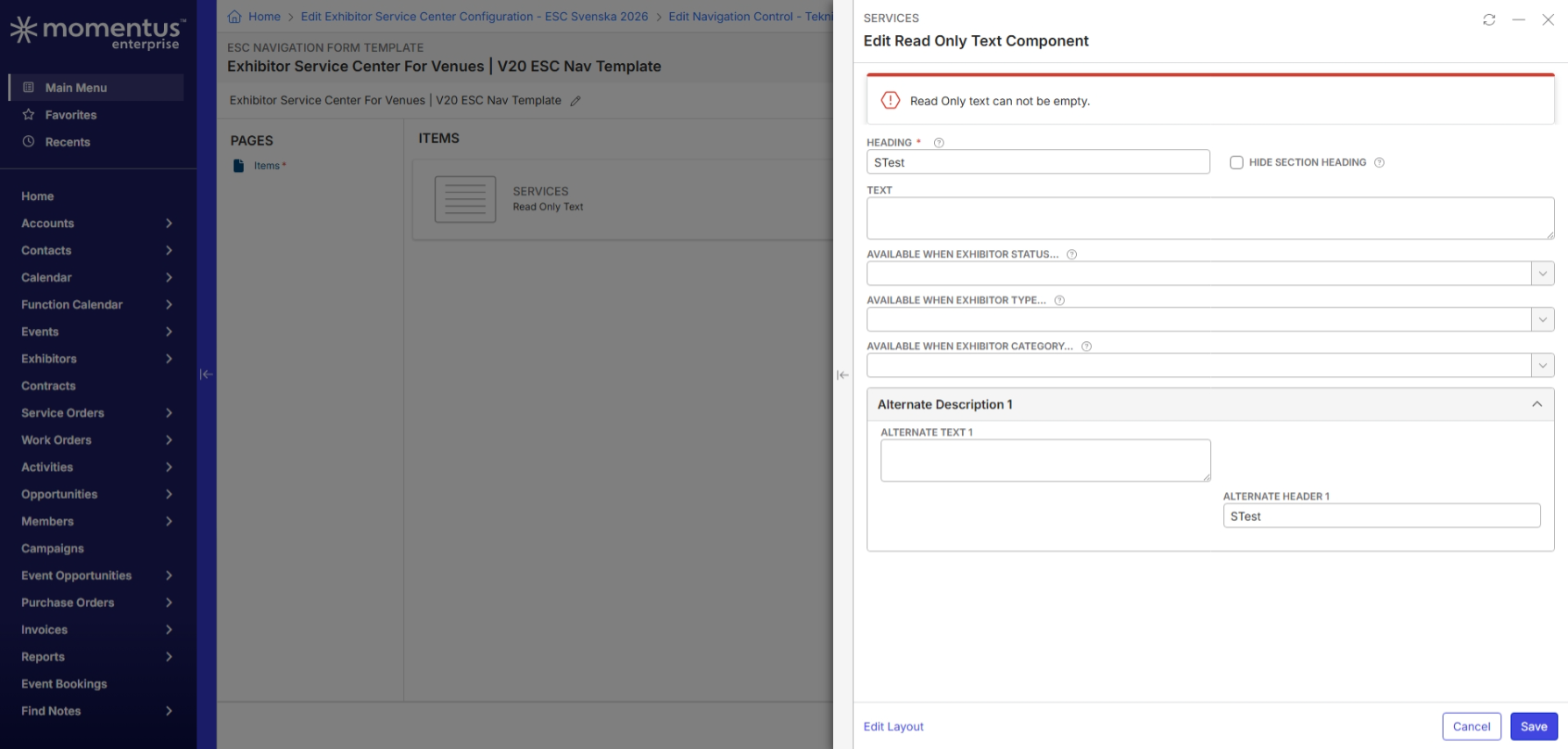
- Description of the issue:I cannot rename the Heading from the text only or html component without text in the text box section. Whereas by default the Heading title is SERVICES and has no text in the text box section.
- Account name: Svenska
- Region: EMEA
- Client version: 25.4
- Steps to reproduce: see Scribe
Go to Exhibitor Service Center Configuration (ESC 2026 configuration)
Go to tab Navigation
Double click a Navigation link/control
Click Edit on the Form field
Click Edit Component
Rename the Heading from Services to Technology or any other word
Save…
- Observed results
You get an error message "read only text can not be empty"
- vs Expected results:
You should be able to rename the heading
Link to the Prod environment : ESC Navigation Form Template • Exhibitor Service Center For Venues | V20 ESC Nav Template • Momentus
Link to my Scribe : https://scribehow.com/viewer/How_To_Edit_Exhibitor_Service_Center_Components__5X4gk1k_SbG855JDra7Wmg
-

Celine Puech could you provide a link to the articles you researched in trying to find an answer to this question?
One of our objectives of documentus is to make sure that documentation is updated, where there are gaps.
-
ESC - User Documentation - 2023R1 : ESC - User Documentation - 2023R1.docx
-
The text box “Instructions or Custom HTML” does not have an asterix to show it's mandatory and it's not mentioned on the ESC User documentation guide.
-
I've also looked here on Confluence and could not find anything ESC Configuration Guide - Professional Services - Confluence
-
@... tagging you in case you are interested also
-
Thanks @... that is no longer a supported guide, so we may need to create a new knowledge base article. Will ask @... to review after we get your question answered.
Tagging Tragen Herrick to assist in answering your question.
-

I reached out to the dev team on this and this is what they are saying right now.
I don't understand the issue here - she needs to actually enter text in the Text field otherwise there is no "read only text" to display......? She wants to just display a header?
(referring to her screenshot) These sections do not display in that middle area until they've actually been saved so that means that someone at some point entered the header of SERVICES with actual text and she is now trying to change the section heading and remove the required text?
Once she enters the text in the Text field, it will save and display the new header text on the component view.
And for Instructional Text, there needs to be a value in the "¤Instructions or Custom HTML" field.
-
https://scribehow.com/viewer/How_to_Configure_Custom_ESC_Navigation_Links__LSsFxxuNQI6lBdM_FKG0Xg
The Read Only Text Component is created by default and as you can see there is no Text in the Text box. I have not deleted the text. It comes empty by default.

Please sign in to leave a comment.
Comments
8 comments
Date Votes