Popup "Unsaved Changes" - Save & Return Button
Refer to Support
Description of the Issue:
1.login to qe 25.4 with provided credentials
2.open any event with work order items in it
3.now make changes in work order items by adding quantities

4. Now click on save and return button. The popup appears to save the changes. As per button save & return data should saved immediately without any extra popups in the system

Clicking save & return button data should be saved directly without any extra popups for saving it, or?
Client:
RedBull but tested on QE
Version:
25.4.9511.35231 (20260115)
V30 Link:https://qe.ungerboeck.com/25_4/app85.cshtml#/about?
zendesk:
#378315
-

I think this is working as designed, as it's just asking if you're sure you want to save & return… however, maybe an enhancement case, if the customer feels that it's 1 pop-up too many..
-

Following
-

I think I disagree with Pieter Fourie on this one. Clicking Save and Return is the act of saving. That warning should only come up if you're navigating away from the page without saving, which is not what you're doing. We don't display this warning on other windows where you make a change and hit Save and Return.
-
I would agree, and suggest to submit a bug for this. Please add the jira to this post for reference.
If you're clicking “Save and return” then it should save automatically.
-
Noting for this post that this was fixed in 26.1. So customer should see this after 26.1 is released and they upgrade.
-
Seth Halvaksz it seems that this issue produces another one.
See my comment in the Jira.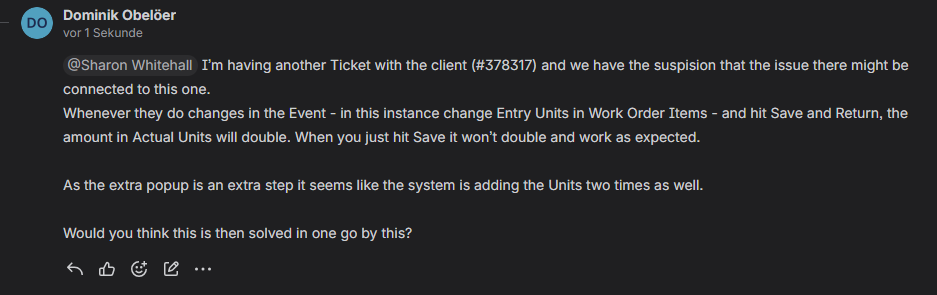
-
For now just going with the “Save” Button is a workaround but it would be good to determine if the new/maybe connected issue needs extra attention or not.
-
Did you test in 26.1? You cannot because it is not released yet. Once released you can test the fix is there.
-
Seth Halvaksz this was now tested in 26.1 and the issue is still there. Also it is not only the extra pop up window. The quantitiy of the change will get doubled. So it seems that per extra pop up window the system is adding the quantity/changes two time.
Please see this recording:
https://app.birdie.so/library/719ce90f-8b72-4236-a38f-ae8fd3329065 -
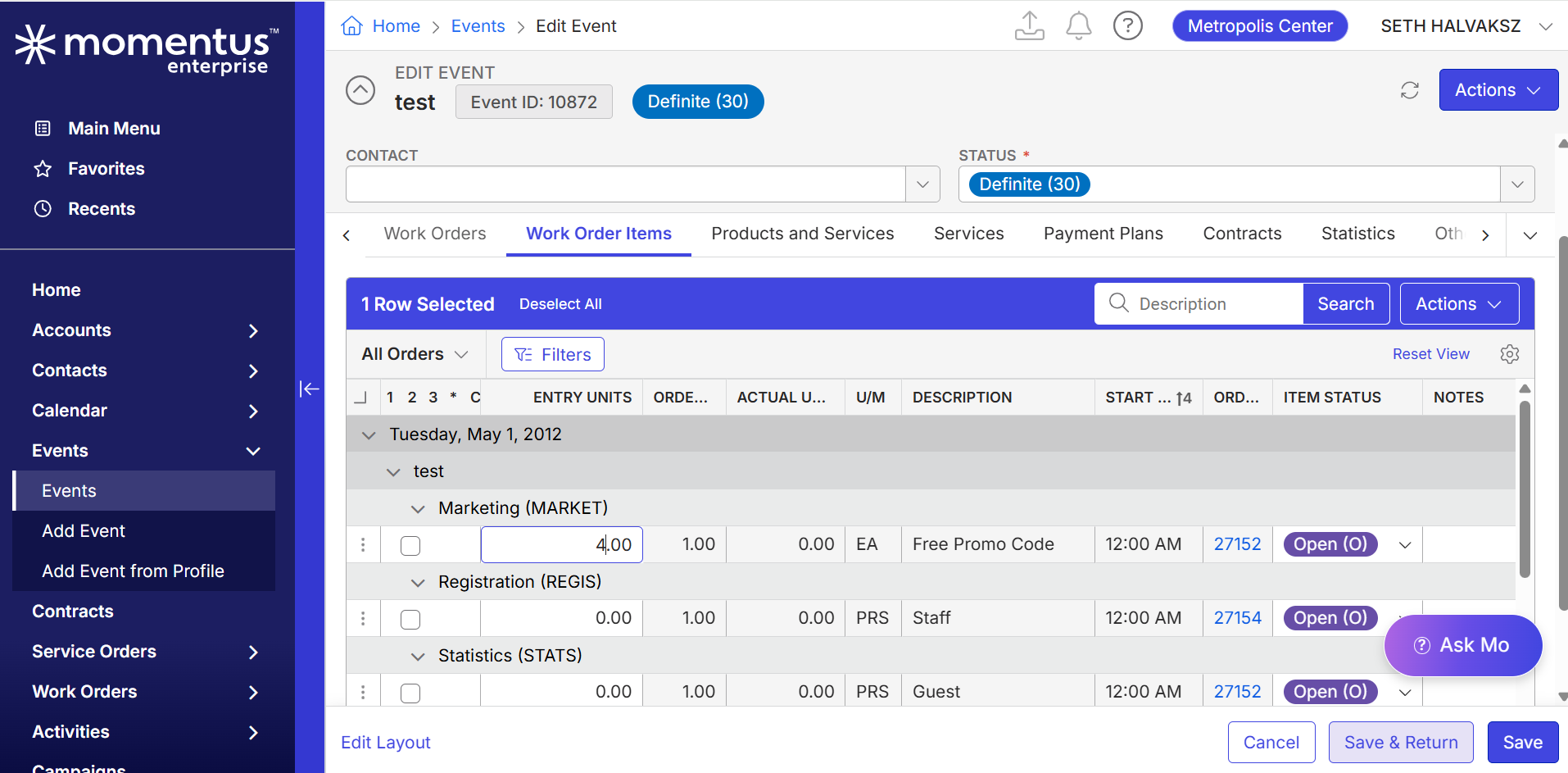
Dominik Obelöer What is the name of column you are editing? I am unable to see in the recording.
Can you replicate this issue in an internal test environment (not the customer environment)? I am trying to determine if this is a unique issue for just this customer.

-
Dominik Obelöer Actually i see above the column is “Entry Units”
I just tried on 26.1 and i'm not able to replicate. Are you able to replicate in an internal test environment?
-
Seth Halvaksz I tested this again on the latest 26.1 on a copy of Red Bull Prod on Debug. The issue is still there and as adviced by Josiane Mikhael I have created https://ungerboeck.atlassian.net/browse/ME-8335
-
Dominik Obelöer Josiane Mikhael
Are you able to replicate in an internal test environment?
Not a copy of the customers environment. An internal testing environment.
Please sign in to leave a comment.
Comments
15 comments
Date Votes