Summary Fields in Related Contacts Subject
Refer to Support
Hi team,
I am looking for some background information about the following case; I have a customer in the database, with multiple contacts linked, so far so good:
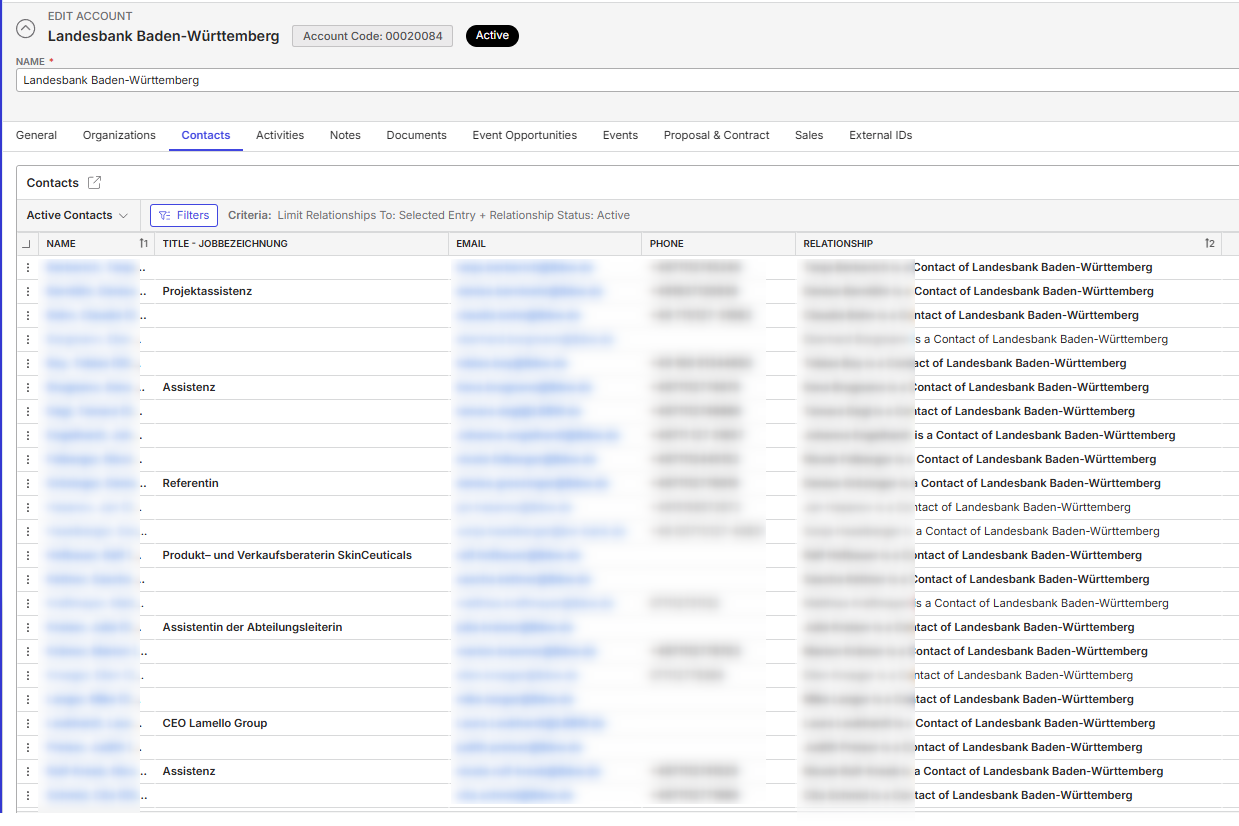
In the above example I have about 25 Contacts linked to this Account. Now, I would like to see how much Events they have booked and the amount of revenue they are responsible for. This gives us valuable data to see who the key bookers are within an account.
This is possible in Menu - Contacts, where I have created two Summary Fields which gives me exactly this information.
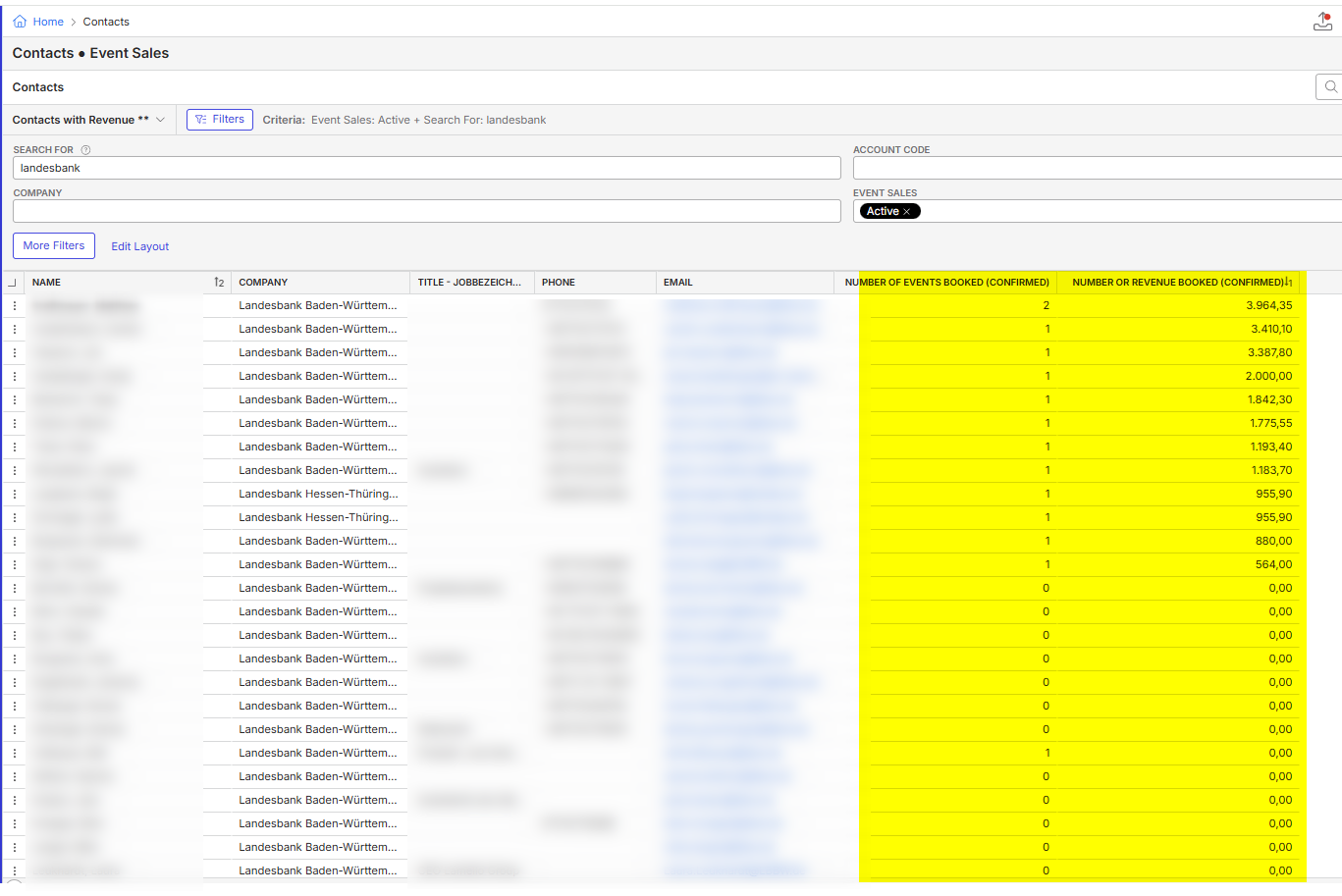
Example how I have set up the Number of Events:

However, in the Account itself, in the tab Contacts, the values are not shown, while I used exactly the same configuration:
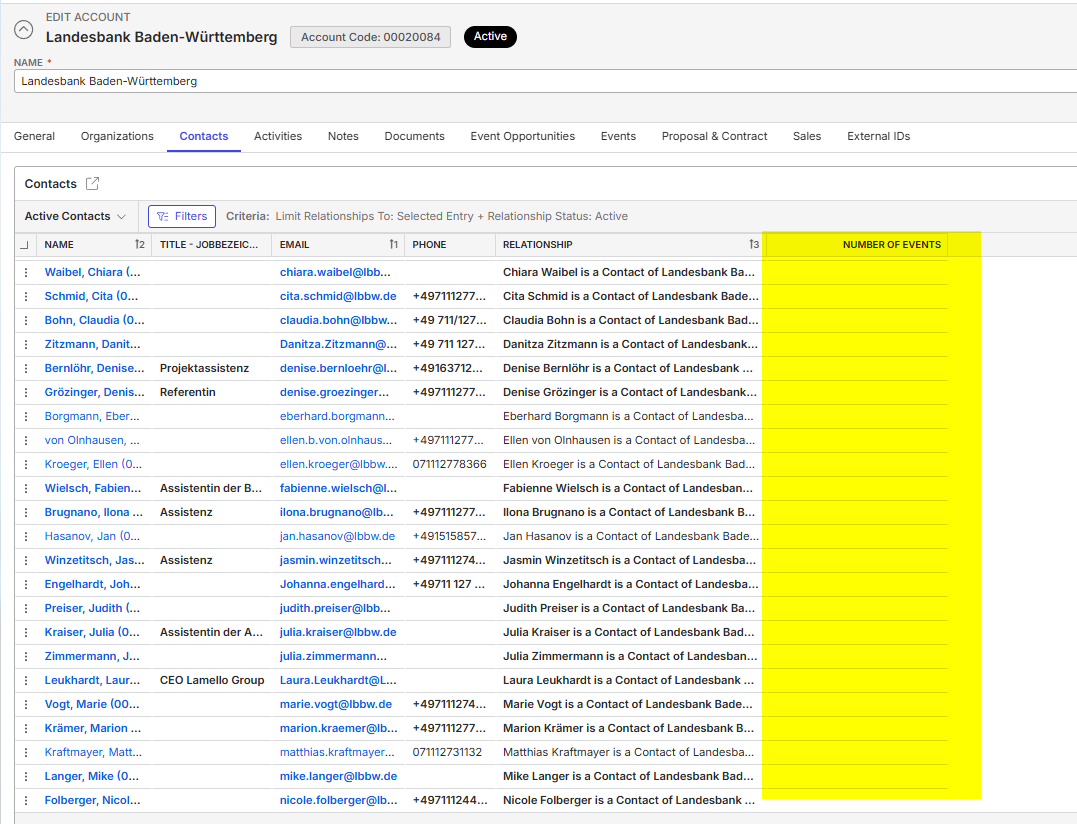
The difference is the Subject: in this tab we are using the Subject “Related Contacts” in stead of All Individual Accounts. I know I have to set up the same Summary Field twice, but I would have expected the same outcome:
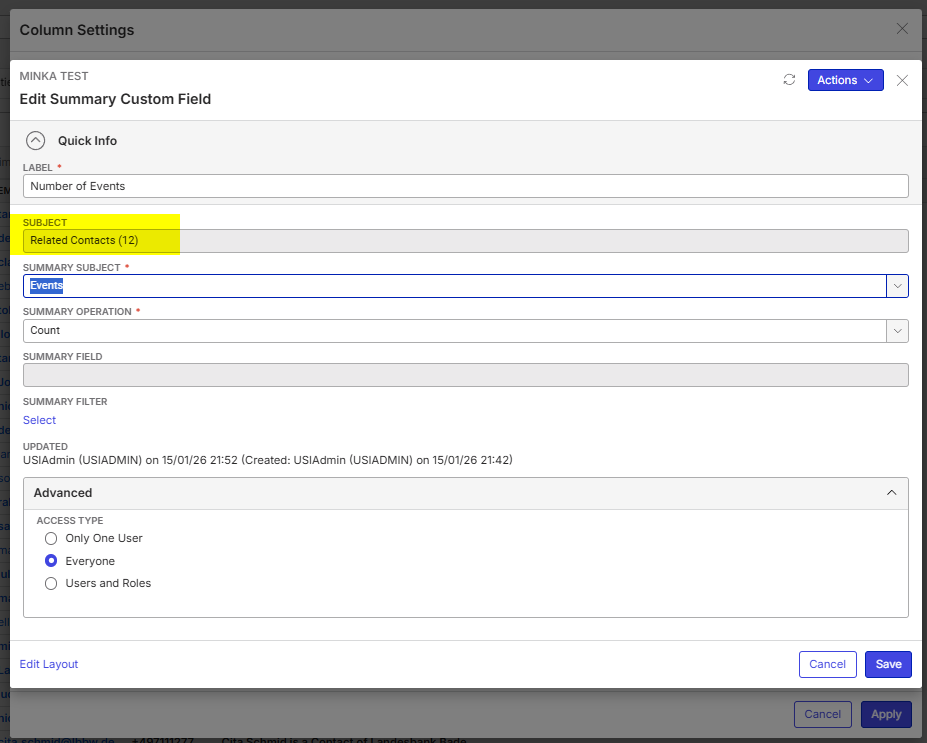
Is this a bug or a gap in the functionality?
Thanks
Minka
-

Hi Minka, you said your goal is:
“I would like to see how much Events they have booked and the amount of revenue they are responsible for.”
Why not use a report or view for this, instead of trying to make this work within Accounts?
-
Hi Seth Halvaksz the report would be so big, since there is no filter to select only the first 50 or 100 (biggest) Accounts or Contacts (which is a pending enhancement request for this customer). Which means, the report will always load the full list of Accounts and that is too heavy.
The view will work as workaround, but it means additional clicks when you are reviewing your Account. Workflow; I am an Account Manager I would like to analyze the numbers one of my Key Accounts. I go to Menu > Accounts and search for my Account and Edit. In the Sales Tab I can find a lot of information about this customer: (note; these are all custom Summary and Formula Fields)
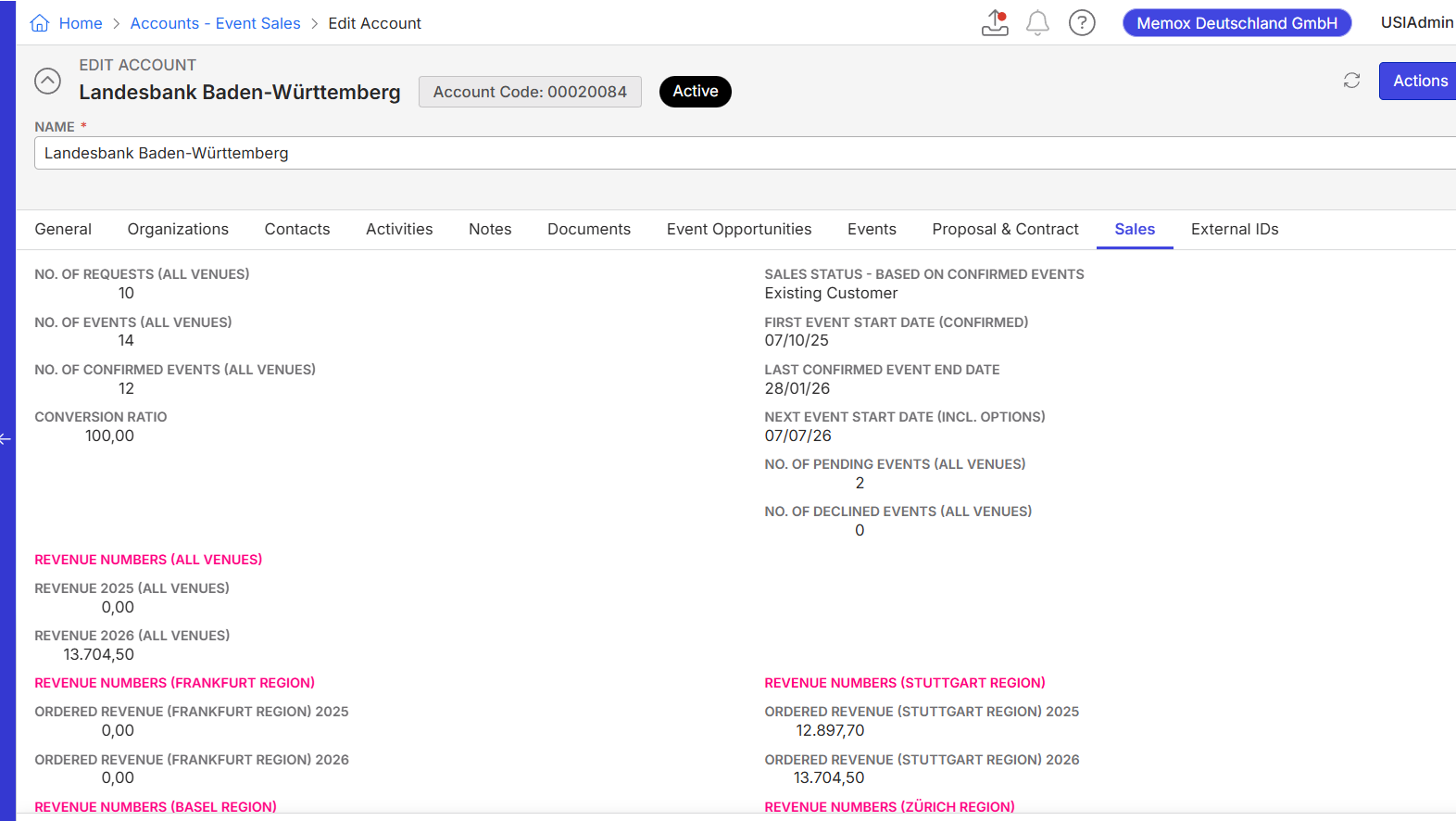
Now I would like to see who are the Key Bookers of this Account and the quickest way is going to Contacts now. The workaround you suggested, means I have to leave this window, go to Menu > Contacts > search again for the same Account and look in another place for this info. Possible yes, but with additional clicks.
-
Thanks for the context Minka.
I'd like to ask Martin Stephens for his input on whether this is the best way to try and get this information.
-

Minka has touched on a few gaps with accounts/contacts.
We cannot filter for “Top X” records
Clients have been asking for this functionality for years! It is particularly relevant for Accounts and Sales Reporting. For example, “Show me my top 10 revenue generating accounts”.
Note: this issue is compounded because we do not have good indexes for the CRM tables. Large datasets with calculated fields can take a very long tome to load - at least triple the load times of the event tables.
Account UDF fields do not apply across sections
If you create a summary field for “Accounts All”, the summary field is not available in individual sections. It is also not available in the other CRM sections, such as Event Sales. You have to create a new summary field for each section.
Note: the Events section does NOT behave like this. Summary fields created on the grid are also available on individual records. Accounts should work like this too.
Related Contacts Summary Fields not returning values
Summary fields for related contacts are not calculating properly. For example, the image below is trying to calculate the number of events for each record. We can clearly see that the first record has 1 event, however the summary field returns blank. I would consider this to be a bug.

The workaround you suggested would work, however as Minka identified, it would add significantly more clicks/complexity to the workflow.
-
Thanks for your assessment here Martin Stephens
Is there another approach to get the same information besides using the Accounts and Contacts? A View or a Crystal Report, for example?
-
A Crystal Report could work if the client is willing to invest in it. It would be an improvement over the workaround suggested above, however still not as effective as inline results in the grid. Ideally, the preferred outcome would be to resolve this through fixing the existing Summary fields - if this is not possible then Crystal Reports would be the best next option.
-
I agree with Martin Stephens. A Crystal Report for only these figures is, on the one hand, an investment the customer has to make, and on the other hand it is not very user-friendly to work with when you look at my described workflow. In addition, when you compare this workaround with a modern and dynamic dashboard (not only our own dashboards, but also Power BI, which many customers already use), a Crystal Report with static information is really a step backwards.
For completeness, please find below/attached the Pendo request regarding the filter on the Top 10/20/50 customers: https://app.pendo.io/s/6229449325477888/listen/feedback/views/ZWNAnL_3nsJ6p5EtfWhAOeEO8vg/items?openItem=qGw7O2a20484kuAcT8USaGkaAVs
Seth Halvaksz looking to this info, would my initial question be a bug in the Summary Fields or an enhancement request?
-
Martin, thanks for your assessment.
Minka, I'll confirm with engineering this week if this is a bug or working as designed.
-
I spoke with engineering and this is a bug. Please ask support to open a jira ticket, and include the link on this post.
Comments:
“I would say this is a bug - the summary field is working on the Accounts object but not the Related Contacts object. The fact you can pick Related Contacts as a subject and configure it to count events and for some reason it's not, is a bug.”
-
Thanks Seth. Ticket created: https://ungerboeck.zendesk.com/agent/tickets/379088
-
Thanks. Once i get the jira ticket i'll add here for reference.
From a prioritization perspective, i'm thinking this will be a medium priority, unless its blocking a critical business process or a go-live.
-
Medium is okay. We have a workaround.

Please sign in to leave a comment.
Comments
13 comments
Date Votes