Numbers Formatting on Dashboard
Answered
Customer: Farnborough (FIL)
Feedback : Their finance director is not happy with the formatting of numbers on the contract dashboard (No separators, making large numbers difficult to read in some parts of the gadget).They expect the numbers to have a consistent display across the dashboard.
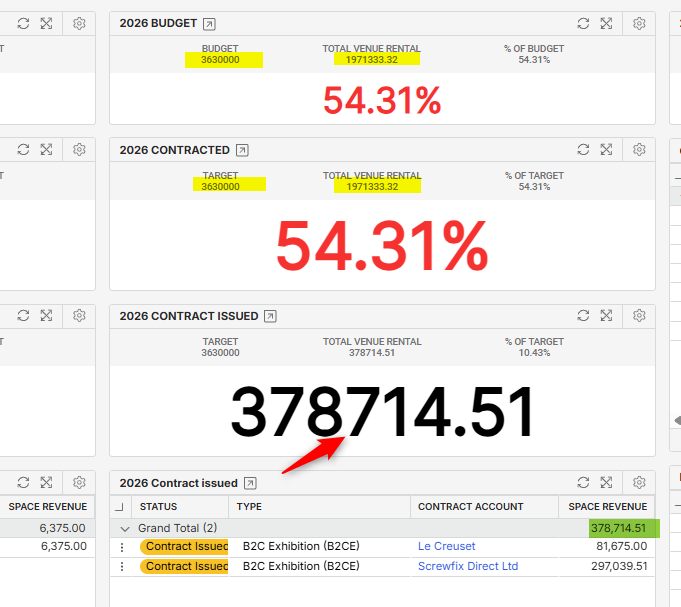
Suggested format:
- Current: 378714.51 → Expected: 378,514.51
- Current: 3600000 → Expected : 3,630,000
FIL finds this unprofessional and currently makes it difficult to read .
Could you confirm if this can be updated in the system or can this be considered for enhancement?
Many thanks!
-

Mike Schepker or Pieter Fourie can you help with this question
-
Hi Seth Halvaksz Mike Schepker Can you please review this ?
Many thanks!
-
Also tagging Martin Stephens or Anthony Costantino in case they can help with this question
-

Seth Halvaksz No workaround for this unfortunately, at least that I am aware of. This is one of several little format enhancements that are required for report builder. I have a list of items - happy to review details with you and Rich. This is low hanging fruit - should be easy fixes that will improve the dashboard UX.
-
Thanks for confirming Martin.
Mariam Abid if you can submit Pendo feedback for this, and include the link here for reference so we have it documented.
-
Thanks Martin Stephens
Seth Halvaksz Done : here is the link to the Pendo feedback : https://app.pendo.io/s/6229449325477888/listen/feedback?openItem=B56PVZPFsHIs-nP-KWVJJZnhO14
Many thanks!
-
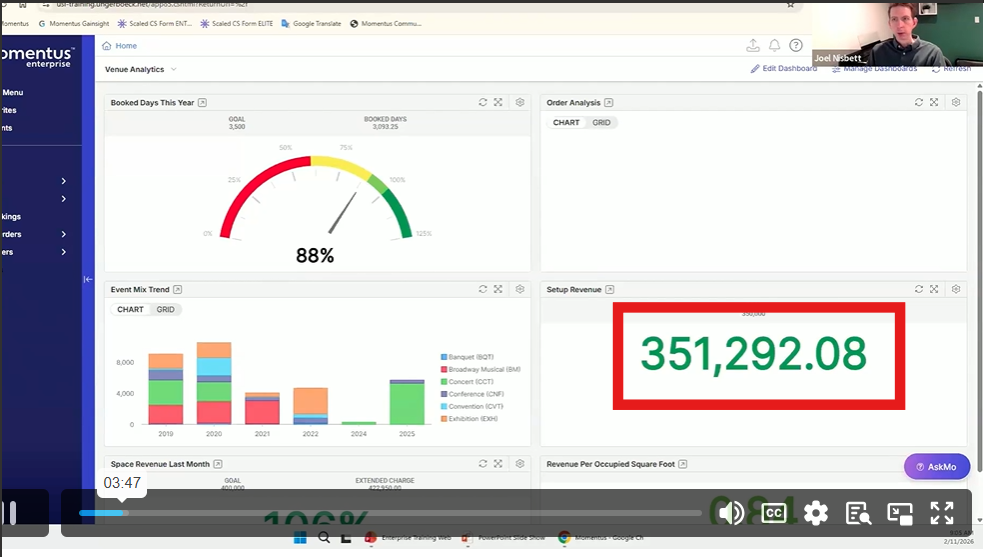
Hi, was this addressed in 25.4? The customer noticed that it was showing properly with thousands decimal in the Move faster Webinar presented by Joel.
Joel Nisbett Is there a specific setting that you have on that dashboard ?
-

I'm not aware that anything changed in 25.4. This customer's TEST database is on 25.4 but still refuses to show the thousands separator, so there must be something different about how this customer is configured.
-
Figured it out! It's based on the Locales config. Main Menu > Locales > Edit > Grouping dropdown. This customer had the grouping value set to “Nothing (15000”. I tested changing it to Comma (15,000) and it worked. I'll reply on ticket 377775. Mariam Abid Dominik Obelöer
-
Martin Stephens Your previous comment sounds like you had tried to solve this before, unsuccessfully. Can you double check that the Locales > Grouping setting works the way you would expect?
-
Joel Nisbett thank you, I had completely forgotten about Locales! You are a genius.
Please sign in to leave a comment.
Comments
12 comments
Date Votes