Difference in allowed file size for Document upload vs Document check in
Answered
- Description of the issue: Is there a difference in file size allowed for Document upload vs Document check in
- Account name: MCEC - Melbourne Convention and Exhibition Centre
- Region: APAC
- Client version: 25.2
-
Steps to reproduce:
1. Log in to https://qe.ungerboeck.com/25_2/app85.cshtml with nicole // nicole (Please ensure that your diagnostics for web add-in is turned on)
2. On the side navigation bar, click on Events. Search for event ID 67687.
3. Edit the event and go to the documents tab for this event. Notice that there is a document with description Proposal - Australian College of Mental Health Nurses 2026.
4. Please right click and undo checkout if it is currently in a checked out status. Document needs to be back in the Checked In status.
5. Double click on the Document to Check out, and you should see this in the USLP900 folder soon. Make any changes to the document and close it. You will need to “Save” a copy of this to the USLP900 folder.
6. Go back to the documents tab for the event > Right click on the document that is checked out > Click on Check in. (The system will try to check the document in).
7. However after a while, the diagnostics will tell you that the check in document failed because the Entity is too large.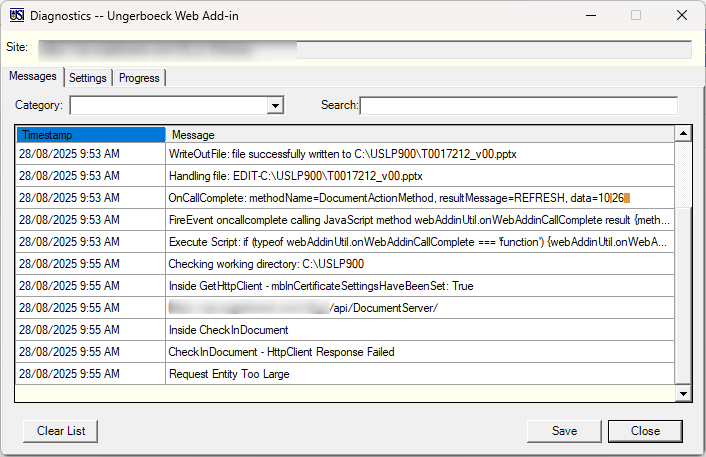
8. It doesn't quite make sense why the system allows the upload of document, but when checking in, it is “too large”?
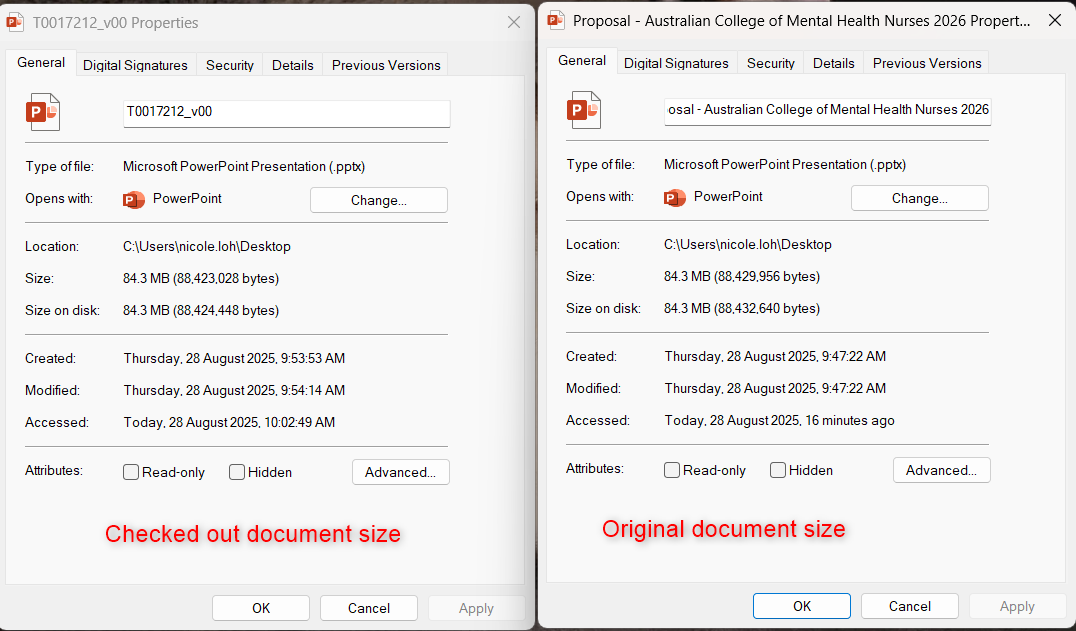
- Observed results vs Expected results: Unable to check in checked out document because file is too large, but system allows us to upload it in the first place?
- What is the job the client is trying to accomplish: Client is trying to check PowerPoint document back in to the system.
- Business impact if not resolved: Additional steps to upload multiple versions of files instead of system retaining the history of the file on one single document line.
-
Links to articles where you've looked for solutions and also other steps you've taken to research the issue: I've searched for Zendesk tickets and the KB (https://supportcenter.ungerboeck.com/hc/en-us/community/posts/19563069944599-document-PDFs-whats-the-maximum-size-allowed-for-an-upload-and-API-document-limits-is-it-the-same) and it seems like the max size allowed for upload is 100MB on a single file which the document that I have satisfy, but no where does it tell me whether checked in document follows the same rule. I am unsure whether this is a bug or whether there is a difference in checked in document size limit?
There's also another Documentus post, but it's a different issue from this one:
https://documentus.zendesk.com/hc/en-us/community/posts/33017007542423-Document-Upload-Size-limitations?input_string=Difference%20in%20allowed%20file%20size%20for%20Document%20upload%20vs%20Document%20check%20in - Link to Zendesk ticket: https://ungerboeck.zendesk.com/agent/tickets/334587
- Local v30 URL: https://qe.ungerboeck.com/25_2/app85.cshtml
-
Seth Halvaksz I feel like we might need dev's input here. There's no information regarding size limits of documents being checked in in any support cases nor on the knowledge base. Should it be the same as when the file was uploaded? Should it be consistent with uploads of single file up to 100MB?
-

I asked engineering and here's what i received. I'm geting more infomation:
“if multiple files are picked, none can be larger then 20MB, else if 1 is picked, it can be no larger then 100MB”
-
Hi Seth Halvaksz what you've mentioned is documented somewhere I'm sure. It was a rule that was introduced a few years ago. With this particular post, I am wanting to know whether there is a limitation when “checking in” documents that have been checked out without the add-ins - things like PDF, powerpoint.
During my testing, my laptop is telling me that the one file that I checked out of the system is around 80MB, but when I try to check it back in, it's saying it's too big. BUT, it allows me to drag and drop the document into the system as a new import. I feel like there is a limitation to it that we aren't aware of, and I don't have the exact number to be able to go back to the customer about it.
-
Nicole, this is the response from Dustin:
“There is no additional limitation that I am aware of. The logs provided in the screenshot tell me that the server is the one saying that its too large, not a business validation of any kind. I am wondering if it is being overriden in a different place. If they can check in an 5-10 mb document, then we need to look for where its being overridden in the config at. If they cannot but they can with less then 4mb, that means its definitely being ignored for a default value somewhere else. ”
Please sign in to leave a comment.
Comments
4 comments
Date Votes